


Contributor I
October 21, 2024
Solved

Conditinal split VALUE TOO LARGE issue

  • October 21, 2024
  • 3 replies
  • 79 views

I have created segments based on the age of the child. 

I chose Properties about someone → Childs_Age→ between 0 and 365 days ago. That would include all children under the age of one. And then I have segments for different ages up until age 9.

I then created different email flows that use different segments as triggers and also conditinal spliting. So the first year is split into 6 emails based on how many months the child is old. 

This works fine until age of 5 then I get the error Value too large
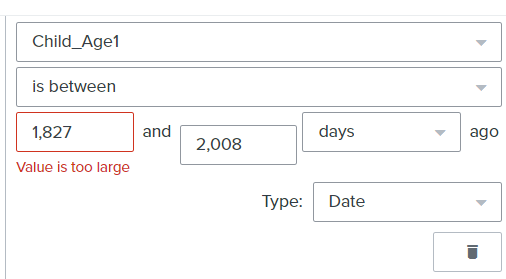
 

I need to be able to use the values up to age of 9 like i did in the segments. Can I change or remove this limit somewhere?

This topic has been closed for replies.
Best answer by Maxbuzz

Hello @toysharing  Apologies for the confusion, I just tested using the conditional split and found it's not working as expected. Here's an alternative approach: We could create separate segments for each age group, then set the exact age (like 9) as a profile property. This would allow us to use conditions like "age is between 7-10".

3 replies

Partner
October 22, 2024

Hello @toysharing  I just tried the same condition and don’t see any issue. It could be a temporary glitch. Did you refresh the page and try creating it again?

https://theforms.pro
Contributor I
October 22, 2024

@Maxbuzz thank you for your reply. I did try refreshing and many other things. It is always there. When it worked for you, did it work in the conditional split of the email flow?

MaxbuzzAnswer
Partner
October 22, 2024

Hello @toysharing  Apologies for the confusion, I just tested using the conditional split and found it's not working as expected. Here's an alternative approach: We could create separate segments for each age group, then set the exact age (like 9) as a profile property. This would allow us to use conditions like "age is between 7-10".

https://theforms.pro