


Contributor I
June 1, 2021
Solved

Conditional Split Specific Email Open

  • June 1, 2021
  • 11 replies
  • 1804 views

I'm looking to add a conditional split to one of my flows.


Essentially, we are sending 4 emails over 1 month. After 30 days they hit the conditional split. I'm looking to have anyone who has opened one of those 4 emails continue on the flow and anyone who has NOT opened one of those 4 emails to be split onto a separate branch.


However, when I go to make the trigger, it is just a generic "Opened Email at least once in the last 30 days". 


There is a filter option, but when I select it and go to choose my property it says there are no items on this list.


I found this article on segments where it's mentioned that you can build segments off who opened a specific email. However, I don't know how to do this.


https://help.klaviyo.com/hc/en-us/articles/115005061447-Introduction-to-Segments-in-Klaviyo#what-is-a-segment-1


Can you help?
This topic has been closed for replies.
Best answer by elisegaines

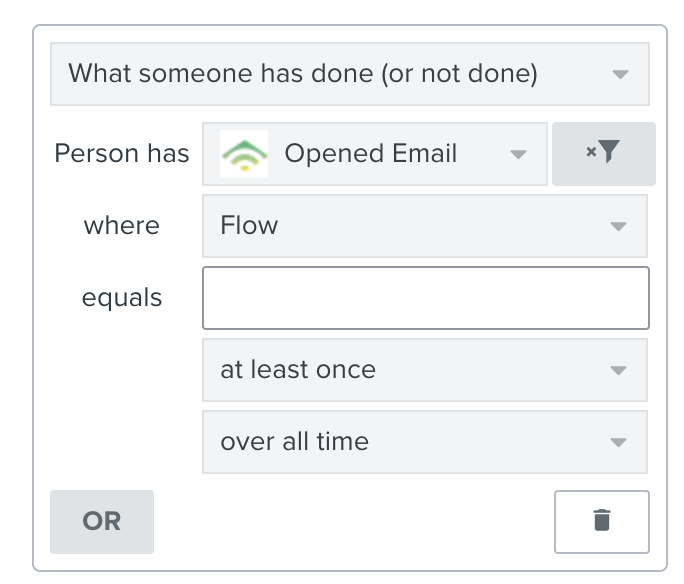
Hey @Peyton! It sounds like you’re on the right track -- using that additional filters option is the best way to specify which emails the split should look at. Your conditional split rule should look like this, but with the name of your flow in the blank: 

That said, you won’t be able to select the name of your flow in that field until at least one person has received and opened a message from that flow. This is because the options populate based on past activity. So, as soon as someone opens a message from that flow, you’ll be able to build the split you’re envisioning! 

11 replies

David To
Klaviyo Employee
Klaviyo Employee
September 22, 2023

Hey @lisa11203915,

I don’t see why you wouldn’t be able to. Klaviyo’s template editor supports writing logic statements for a wide variety of use cases such as showing or hiding certain blocks, elements, etc. 

If you haven’t already, I would recommend checking out our many Help Center articles on using our template editor from our Templates article directory

Webhooks allow you to send information from Klaviyo to your third-party tool or application. You can learn more about this feature from our Understanding webhooks in flows Help Center article. 

David
