Contributor II
October 6, 2023
Solved

Conditional split $value question

  • October 6, 2023
  • 8 replies
  • 416 views

Help, I am having a problem adding a $value condition to our email sign up. I know how to do it with a trigger split, but we only have the conditional split option on the email signup flow.

So basically what we want to do is send the person that signed up free content emails and then if they haven’t placed an order to send them a discount offer BUT the discount offer should only apply to people that haven’t placed an order over $500 

In other words we want the discount to apply to only our big ticket items and not minor purchases.

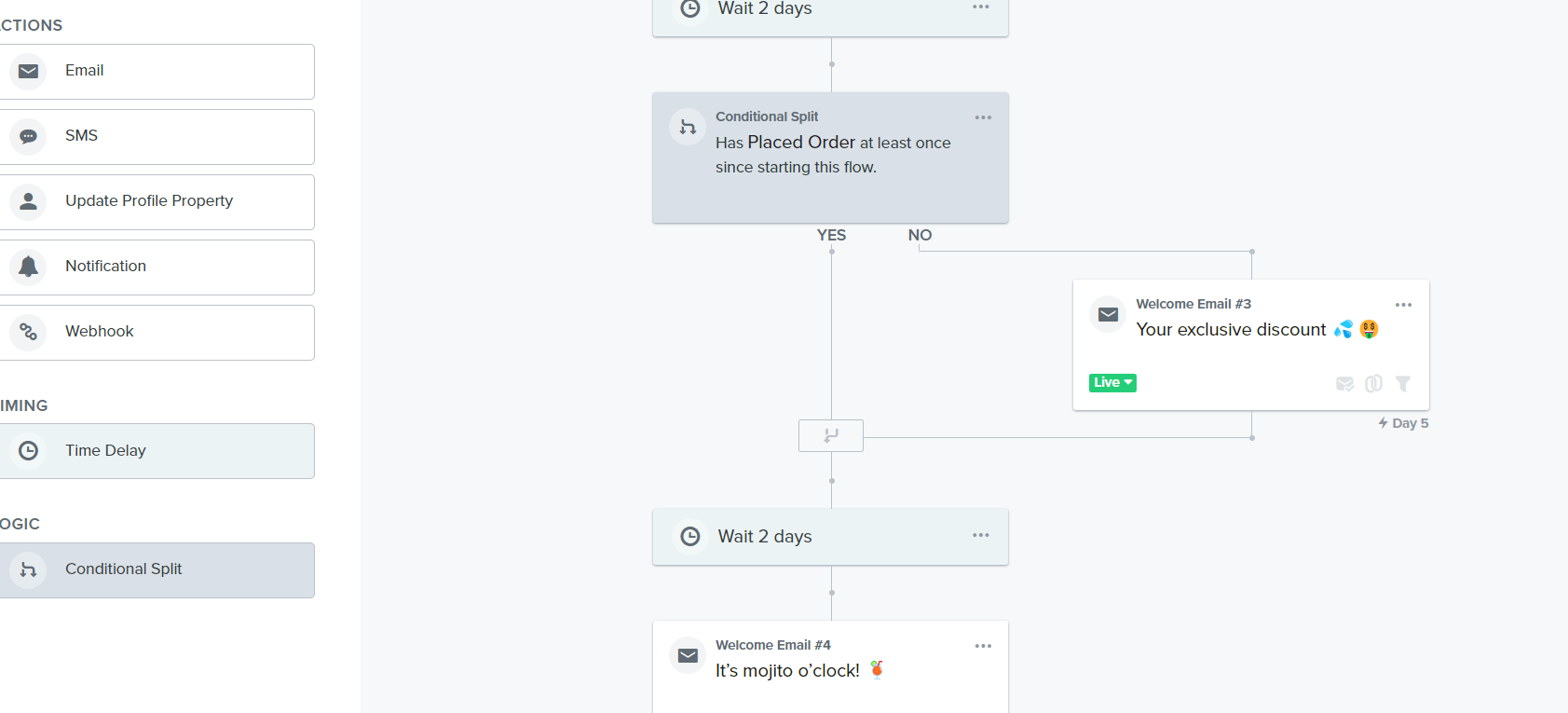
Here’s the flow we have,  how do I change the conditional split to have a $ value?
 

    This topic has been closed for replies.
    Best answer by bluesnapper

    Hi @DanWA 

    Thanks. Got it now!

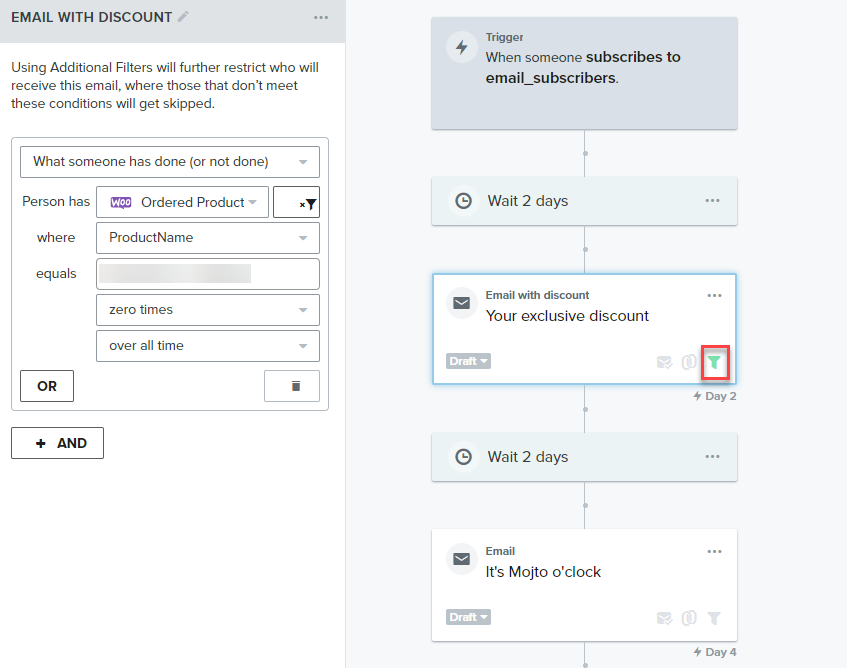
    Here's what I suggest below. It's using WooC metrics. 

    As you had the recipients who received the discount code rejoining the flow and also receiving the "It's Mojito o'clock' email, I've used an email filter on the discount email rather than a conditional split. However, you could use a conditional split if you wanted to send the discount group additional discount reminders. That conditional filter would be the same.

    Only contacts who have never purchased your high-ticket product will receive that discount email. Those who have purchased that product historically would fail the filter and be skipped.

    I recommended initially setting the emails in the flow to manual so you can check the wait list before they receive them; check that everything is OK before setting to live.

    Let me know if my solution matches your requirements.

    Andy


    8 replies

    gmartu
    Partner - Silver
    Partner - Silver
    October 6, 2023

    Hello @DanWA,

    Have you tried using the "Ordered Product Value" parameter?
    For example, on a shop with Shopify you can split like this.

    I don't know what platform you are using for your e-commerce, but I think there is this metric anyway if you used an integration.

    I hope I have helped you,
    Regards

    Gabriele M. | Marketing Automation Specialist @ drop.it
    bluesnapper
    Partner
    Champion & Partner
    October 6, 2023

    Welcome to the community @DanWA 

    Just to add to the response by  @gmartu

    If you want the discount to be offered to contacts who have previously ordered a product of less than $500 i.e to encourage them to buy the big-ticket items, then the condition should be 'ordered product value is less than $500 over all time' with the YES branch having your discount email. That will lookup all their previous orders, including ones placed prior to subscribing to your list.

    Let us know if that's not what you want.

    I also suggest that you keep your welcome flow (trigger on purchase or fulfilment metric) and email sign-up flow separate if you've not already done that. 

    Regards

    Andy

    https://bluesnapper.com - Klaviyo Champion '24 & Partner
    DanWAAuthor
    Contributor II
    October 6, 2023

    Hey guys thanks, your responses helped point me in the right direction but I’m still a bit stuck on the implementation. With the screenshot below, you can see with Woocommerce there is no “order value” but there is a “started checkout value” which I find a bit confusing. 


    I know there is probably some way of adding the order value greater than.. in these sections but I just can’t seem to get it right! 

    I did do this as below, but I’m not sure if that will work?


    bluesnapper
    Partner
    Champion & Partner
    October 6, 2023

    Hi @DanWA 

    Sorry, but I’m unclear what is your use case.

    Can you describe who qualifies to receive the discount and at which stage(s) of the customer journey you want them to receive it?

    Thanks,

    Andy

    https://bluesnapper.com - Klaviyo Champion '24 & Partner
    DanWAAuthor
    Contributor II
    October 7, 2023

    Thanks Andy,

    So the idea is that people will sign up for free content through a flyout.

    After giving them some content we offer them a discount on our main, high ticket product, but we only want the discount to go to people that haven’t already purchased that product as obviously a discount after they’ve bought it would be annoying for them, at the same time we don’t want to exit them as they may like to still receive the free content in the rest of the flow. I hope that makes sense. So basically, we only want to offer the discount email to people in the flow that haven’t purchased our high ticket product. Thanks for your help. 

    bluesnapper
    Partner
    Champion & Partner
    October 7, 2023

    Hi @DanWA 

    Thanks. Got it now!

    Here's what I suggest below. It's using WooC metrics. 

    As you had the recipients who received the discount code rejoining the flow and also receiving the "It's Mojito o'clock' email, I've used an email filter on the discount email rather than a conditional split. However, you could use a conditional split if you wanted to send the discount group additional discount reminders. That conditional filter would be the same.

    Only contacts who have never purchased your high-ticket product will receive that discount email. Those who have purchased that product historically would fail the filter and be skipped.

    I recommended initially setting the emails in the flow to manual so you can check the wait list before they receive them; check that everything is OK before setting to live.

    Let me know if my solution matches your requirements.

    Andy


    https://bluesnapper.com - Klaviyo Champion '24 & Partner
    DanWAAuthor
    Contributor II
    October 9, 2023

    Brilliant, thanks for your help

    bluesnapper
    Partner
    Champion & Partner
    October 9, 2023

    No problem @DanWA 

    Regards

    Andy

    https://bluesnapper.com - Klaviyo Champion '24 & Partner