Yes, it is possible to clone an existing flow to another account. You need to have access to both accounts to be able to clone the existing flow in one account to the other.
In the flows section, scroll to the left of the flow you want to clone to find the three dots vertically stacked.
In the menu that appears and select Clone.
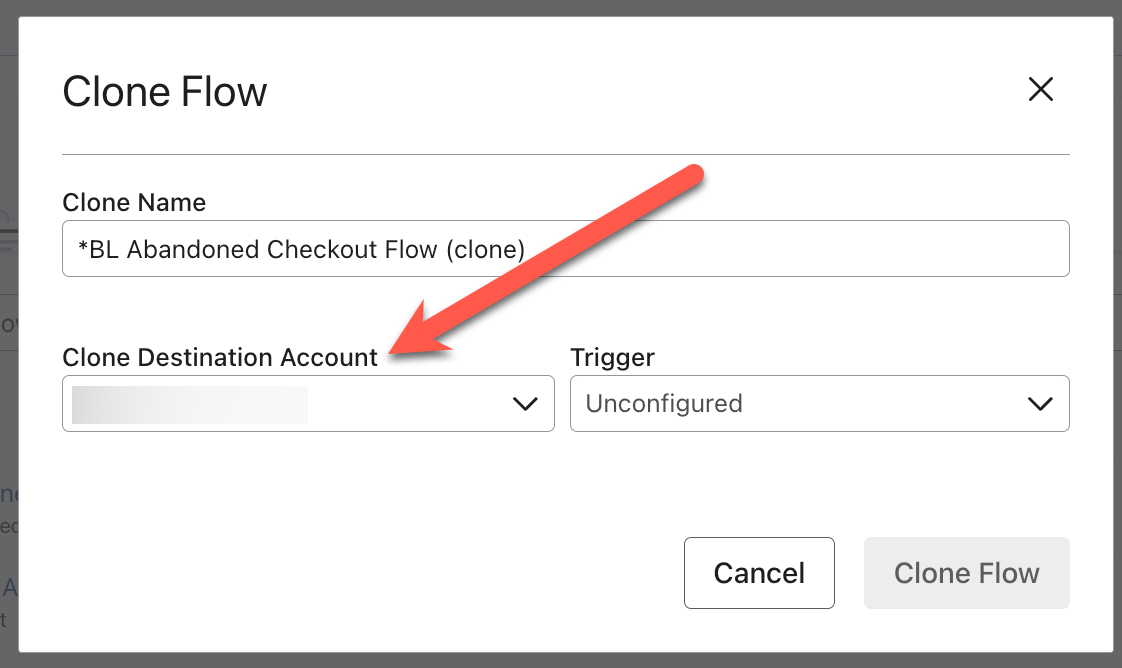
In the next screen, you’ll have the option to designate which account you want to clone the flow to. Again, you will only see options for the accounts you have access to:
I hope that helps!
@In the Inbox
Bryan Richey // Klaviyo Champion & Email Strategist at In the Inbox // https://intheinbox.co/
Yes, it is possible to clone an existing flow to another account. You need to have access to both accounts to be able to clone the existing flow in one account to the other.
In the flows section, scroll to the left of the flow you want to clone to find the three dots vertically stacked.
In the menu that appears and select Clone.
In the next screen, you’ll have the option to designate which account you want to clone the flow to. Again, you will only see options for the accounts you have access to:
I hope that helps!
@In the Inbox
Bryan Richey // Klaviyo Champion & Email Strategist at In the Inbox // https://intheinbox.co/
The clone to another account option is not showing for me. I’ve invited my user from my 2nd account to my 1st and have accepted the invite. On both sides when I hit the clone button the Clone Destination account doesn’t show