


Contributor I
May 23, 2024
Solved

Create a trigger url link to display a flyout

  • May 23, 2024
  • 1 reply
  • 149 views

Hello everybody,


I'm setting up a form for new subscribers in my footer. I use Shopify CMS. 

My problem is the following:

I'd like when someone clicks on the highlighted link below it to open a flyout. I know this is possible with a button like the following tutorial: https://help.klaviyo.com/hc/en-us/articles/4418052317339 but I'd like my trigger to activate only when the URL link is clicked.
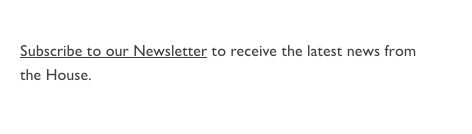
Can you please help me?

Thank you in advance,

Pierre

 

    This topic has been closed for replies.
    Best answer by Taylor Tarpley

    Hi there @Aken75


    Welcome to the Community! Happy to help, great investigation so far!


    If you want to do this with a link instead of a button, you will want to work with your developer in order to custom-code a trigger for your sign-up form as Klaviyo can’t assist in custom coding. We have great developer docs on the subject to help them accomplish this


    If you don’t have access to a developer, I’d recommend reaching out to one of our Klaviyo partners, or better yet a Community Champion, to set this up to you!


    -Taylor

    1 reply

    Taylor Tarpley
    Community Manager
    Community Manager
    May 24, 2024

    Hi there @Aken75


    Welcome to the Community! Happy to help, great investigation so far!


    If you want to do this with a link instead of a button, you will want to work with your developer in order to custom-code a trigger for your sign-up form as Klaviyo can’t assist in custom coding. We have great developer docs on the subject to help them accomplish this


    If you don’t have access to a developer, I’d recommend reaching out to one of our Klaviyo partners, or better yet a Community Champion, to set this up to you!


    -Taylor
