


Problem Solver I
February 20, 2024
Solved

Does anyone know how to distinguish preview emails after they are sent?

  • February 20, 2024
  • 4 replies
  • 394 views

We have some links that send events back to Klaviyo that trigger new emails to be sent. When we send a preview email through klaviyo, the placeholders and filled in and the links are technically live meaning if someone accidentally clicked a link in a preview email, it would have consequences for the real person who’s test event was used to send the preview. 

Is there a way to distinguish whether an email was sent as a preview or to a real person as part of a flow/campaign so that we can disable the links for the previews but have them live in the real emails? Any placeholders that are replaced differently etc?
    This topic has been closed for replies.
    Best answer by KatherineB

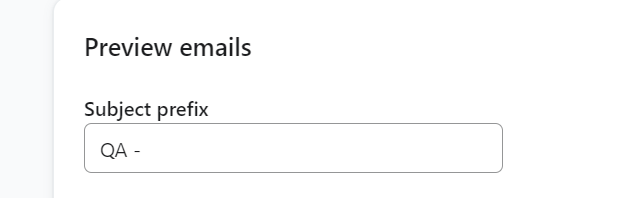
    HI @dkjonzy,  in your Klaviyo settings you can set preview emails to come with a specific subject line (aka Preview: your subject) and this would enable you to know which emails are coming through as previews. 


    Go to settings → Email → Sender preferences and under Preview Emails Subject Prefix you can put whatever you’d like to differentiate your preview emails. Hope this helps,


    4 replies

    KatherineB
    Partner - Platinum
    Champion & Partner
    February 20, 2024

    HI @dkjonzy,  in your Klaviyo settings you can set preview emails to come with a specific subject line (aka Preview: your subject) and this would enable you to know which emails are coming through as previews. 


    Go to settings → Email → Sender preferences and under Preview Emails Subject Prefix you can put whatever you’d like to differentiate your preview emails. Hope this helps,


    Katherine - &BAM | 2023 Klaviyo Champion and Elite Partner
    dkjonzyAuthor
    Problem Solver I
    February 21, 2024

    @KatherineB That is helpful. Unfortunately I don’t think I can access subject text inside the email so I can’t disable the links. Is there anything in the email body (some dynamic field or something) that we can use.

    Something like {% if is_preview %} or {% if email.recipient = person.email %} ??

    KatherineB
    Partner - Platinum
    Champion & Partner
    February 22, 2024

    I’m going to ask some of the other Champions here for input as I’m not sure of the answer. @In the Inbox @chelsgrove @retention @Bobi N. @Gabriel L. @Omar 

    Katherine - &BAM | 2023 Klaviyo Champion and Elite Partner
    dkjonzyAuthor
    Problem Solver I
    March 15, 2024

    I was thinking about this again today. The places something like this happens right now are tags like {% unsubscribe %}, {% web_preview %} or {% coupon_code %} where the replaced value is different in a preview than in a real email. Which is necessary because you don’t want someone unsubscribing a customer accidentally when previewing an email.


    We basically would like to use the same functionality for some links that we embed in emails. Is there a way to expose that logic? If not I might try to hack something together using coupon_codes (maybe using the fact that preview codes have “PREVIEW” in them)
