Contributor II
November 10, 2024
Solved

Edited Teaser text won't appear on my Mobile

  • November 10, 2024
  • 9 replies
  • 149 views

Hello,

I edited the teaser texts from the app settings (from SAVE 30% to SAVE 35%) but it keeps appearing on my mobile (even with incognito) the old discount 25%). Can anyone help?



    This topic has been closed for replies.
    Best answer by bluesnapper

    Hi ​@putonlovemarket 

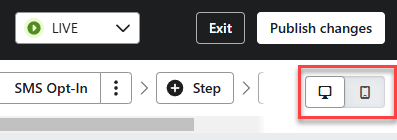
    Just another thought: have you checked the visibility of your % off text block? I’ve seen cases where a block is set to desktop with one message and another block with a different message is set to mobile. You can toggle between the two while in the form editor (see below).

    Regards

    Andy


    9 replies

    ArpitBanjara
    Principal User II
    Principal User II
    November 10, 2024

    Hey @putonlovemarket 

    Can you check it on a completely different browser on your phone?

    Arpit Banjara - Lead Email Marketing Specialist at Flowium
    Contributor II
    November 10, 2024

    I did.. even w/ incognito mode.. still says “30%” instead of modified “25%”… Help!

    ali786
    Expert Problem Solver I
    Expert Problem Solver I
    November 11, 2024

    Made sure you publishing with updates otherwise That sucks, have you discussed this issue with support?

    ali raza -🔎www.aliXemail.com
    Contributor II
    November 13, 2024

    No.. I have the free version and no access to free email support. 

    bluesnapper
    Partner
    Champion & Partner
    November 14, 2024

    Hi @putonlovemarket 

    Your current teaser is showing ‘Save 30%’ and you say it should be 25%. A few things to check:

    1. Are you editing the correct form (it happens!). Your teaser is being triggered from the form with an ID of Ucv6YH. Edit your form and check that the form’s url you see has the correct ID in it: /forms/Ucv6YH/reports/overview. If not, you have another form (Ucv6YH) that’s live and is taking precedence.
    2. If 1 checks out, is the form‘s status ‘Live” or ‘Editing’? It needs to be live for your recent changes to display. At the top of the form you should see the status as below. If it says ‘Editing’, select ‘Publish’

    Let me know how you get on

    Regards

    Andy 


    https://bluesnapper.com - Klaviyo Champion '24 & Partner
    bluesnapper
    Partner
    Champion & Partner
    November 14, 2024

    Hi ​@putonlovemarket 

    Just another thought: have you checked the visibility of your % off text block? I’ve seen cases where a block is set to desktop with one message and another block with a different message is set to mobile. You can toggle between the two while in the form editor (see below).

    Regards

    Andy


    https://bluesnapper.com - Klaviyo Champion '24 & Partner
    Contributor II
    November 14, 2024

    Thank you so much for your advice!  I only have one form so it’s the correct one I’m editing… and I tried deleting the teaser altogether using both blocks but still that 30% teaser shows up. I can’t seem to get rid of it! Do you think it’s a common problem with Klaviyo? 

    Contributor II
    November 14, 2024

    Resolved the issue! I was finally able to reach them through Shopify support. I had to make changes to the teaser for each variation of the A/B testing. Thanks for your help!

    bluesnapper
    Partner
    Champion & Partner
    November 14, 2024

    Thanks for the update ​@putonlovemarket Glad it’s resolved!

    Regards

    Andy

    https://bluesnapper.com - Klaviyo Champion '24 & Partner