

Contributor I
Jun 15, 2023 4:15 AM UTC
Solved

Editing Not Accepeting

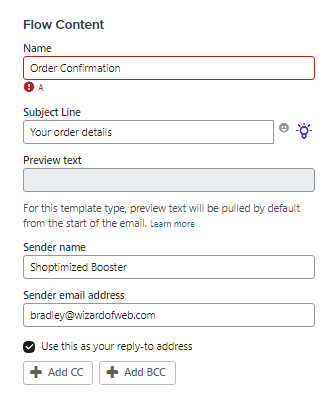
Hello, I have created some flow with HTML Email tamplate. I made some mistakes. I want to edit. But no edit accepting. 

No error is showing but not accepting. Just Showing a “A”
here is an Screenshot: 
 

This topic has been closed for replies.
Omar
OmarAnswer
2025 Champion
Jun 17, 2023 9:30 AM UTC

Adding to this I'd also check if you're still logged in. Probably not the cause but I've seen issues when your session times out.


Regards,

Omar Lovert // Polaris Growth // Klaviyo Master Platinum Partner

We help with e-commerce growth through CRO, Klaviyo and CVO

Helping E-commerce brands maximize Lifetime Value & Profits with Klaviyo, CRO & CVO - Get your free Audit - https://link.polarisgrowth.com/free-audit

4 replies

chloe.strange
Community Manager
Community Manager
Jun 15, 2023 5:00 PM UTC

Hi @shakib6472, 


Thanks for being a part of our community and I apologize for this inconvenience! If you are receiving an error message we recommend cloning the template and adding it again to the flow with the cloned version. I did want to mention, in order to use this template in drag/drop form, it would need to be recreated in the drag/drop editor. To do this you would need to select 'create new' under email templates > selecting a 'basic' or a 'themed' template > and deleting/adding blocks to get the layout you would like. 
More information on creating drag/drop templates can be found here.


I hope this helps!


~Chloe

Contributor I
Jun 16, 2023 6:58 AM UTC

Hi @shakib6472, 


Thanks for being a part of our community and I apologize for this inconvenience! If you are receiving an error message we recommend cloning the template and adding it again to the flow with the cloned version. I did want to mention, in order to use this template in drag/drop form, it would need to be recreated in the drag/drop editor. To do this you would need to select 'create new' under email templates > selecting a 'basic' or a 'themed' template > and deleting/adding blocks to get the layout you would like. 
More information on creating drag/drop templates can be found here.


I hope this helps!


~Chloe

Well, But right now they are not allowing me to create new one not even duplicate. Even I cant create a new flow. Its showing a network error. 

What is going on? 


David To
Klaviyo Employee
Klaviyo Employee
Jun 16, 2023 7:21 PM UTC

Hey @shakib6472,

Seems like that original error in your flow may be stemming from that network error you’re noticing.  would suggest taking a look at some past Community posts which discuss this subject such as the ones I’ve shared below:

In my experience, network errors are isolated to your own network and connection - which you may want to double check on. Additionally, it wouldn’t hurt to also see if clearing the cache and cookies could help as well!

David

Omar
Partner - Platinum
OmarAnswer
2025 Champion
Jun 17, 2023 9:30 AM UTC

Adding to this I'd also check if you're still logged in. Probably not the cause but I've seen issues when your session times out.


Regards,

Omar Lovert // Polaris Growth // Klaviyo Master Platinum Partner

We help with e-commerce growth through CRO, Klaviyo and CVO

Helping E-commerce brands maximize Lifetime Value & Profits with Klaviyo, CRO & CVO - Get your free Audit - https://link.polarisgrowth.com/free-audit