Contributor I
April 1, 2024
Solved

Email field in signup form will not accept any addresses

  • April 1, 2024
  • 4 replies
  • 126 views

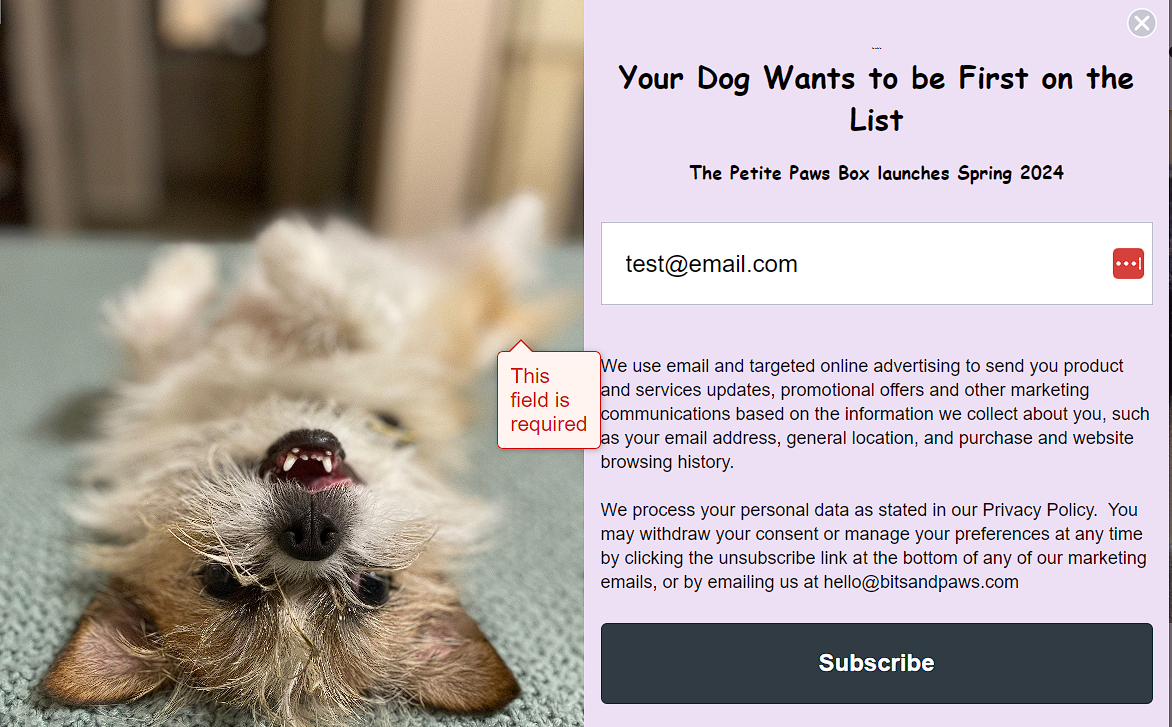
The email field in my popup signup form will not accept any input. No matter what email address I enter, I get “This field is required.”

    This topic has been closed for replies.
    Best answer by Omar

    Hi @SBrentnall

    I went to your site and I think I found the issue.

    The big block of text below your signup form is actually a check box people need to tick. Somehow it's moved behind the image on the left. 

    Most of the times this is caused by CSS on your site overruling the Klaviyo popup styling.

    Maybe test with the image to the right or on top or without an image?
    or if all else fails - just create a new popup and test it - something must have gotten mixed up.
    I've not seen this behavior before.


    Omar Lovert // Polaris Growth // Klaviyo Master Platinum Partner

    We help with e-commerce growth through CRO, Klaviyo and CVO

    4 replies

    AlexandraPalau
    Partner - Silver
    2025 Champion
    April 2, 2024

    Hello @SBrentnall!

    Welcome to the Klaviyo Community :)

    I will try my best to assist. 

    Can you provide a screenshot of the form setup? I’m interested in knowing what type of field was added. 

    Looking forward to your response!

    Thanks,

    Alexandra :)

    - Alexandra Palau, Klaviyo Partner & Community Champion. Website: allaboutemailmarketing.com
    Contributor I
    April 2, 2024

    Thanks, Alexandra!

    It’s set up as an email input.


    Omar
    Partner - Platinum
    OmarAnswer
    2025 Champion
    April 2, 2024

    Hi @SBrentnall

    I went to your site and I think I found the issue.

    The big block of text below your signup form is actually a check box people need to tick. Somehow it's moved behind the image on the left. 

    Most of the times this is caused by CSS on your site overruling the Klaviyo popup styling.

    Maybe test with the image to the right or on top or without an image?
    or if all else fails - just create a new popup and test it - something must have gotten mixed up.
    I've not seen this behavior before.


    Omar Lovert // Polaris Growth // Klaviyo Master Platinum Partner

    We help with e-commerce growth through CRO, Klaviyo and CVO

    Helping E-commerce brands maximize Lifetime Value & Profits with Klaviyo, CRO & CVO - Get your free Audit - https://link.polarisgrowth.com/free-audit
    Contributor I
    April 2, 2024

    Omar, thank you! It looks like there’s actually another field above the disclaimer text that’s supposed to be a consent box, but the box isn’t displaying. I’ve removed it, and everything seems to be working now.