I manage three separate Klaviyo accounts for brands I work on and every single one has seen a massive spike in bounce rates basically overnight on January 22-23, from 0.3% to over 5%. The weird thing to me is they’re all @me.com, @icloud.com, and @mac.com email addresses, all of which we were receiving emails just fine before January 22nd.
My temporary solution is to just not send emails to anyone who has bounced, but Apple users make up a good chunk of our lists, so I don’t want to do this forever. Has this ever happened to anyone else? Are there any solutions for sending emails to these accounts? I am totally baffled.
HI @maddiebarbera, first, welcome to the community!
So, a few things you might want to check to troubleshoot - it does seem strange that it’s isolated to a particular inbox provider (Apple), and across all three different accounts, but this might give you some clues on what’s going on.
Check your Deliverability Bounce Detail Reporting
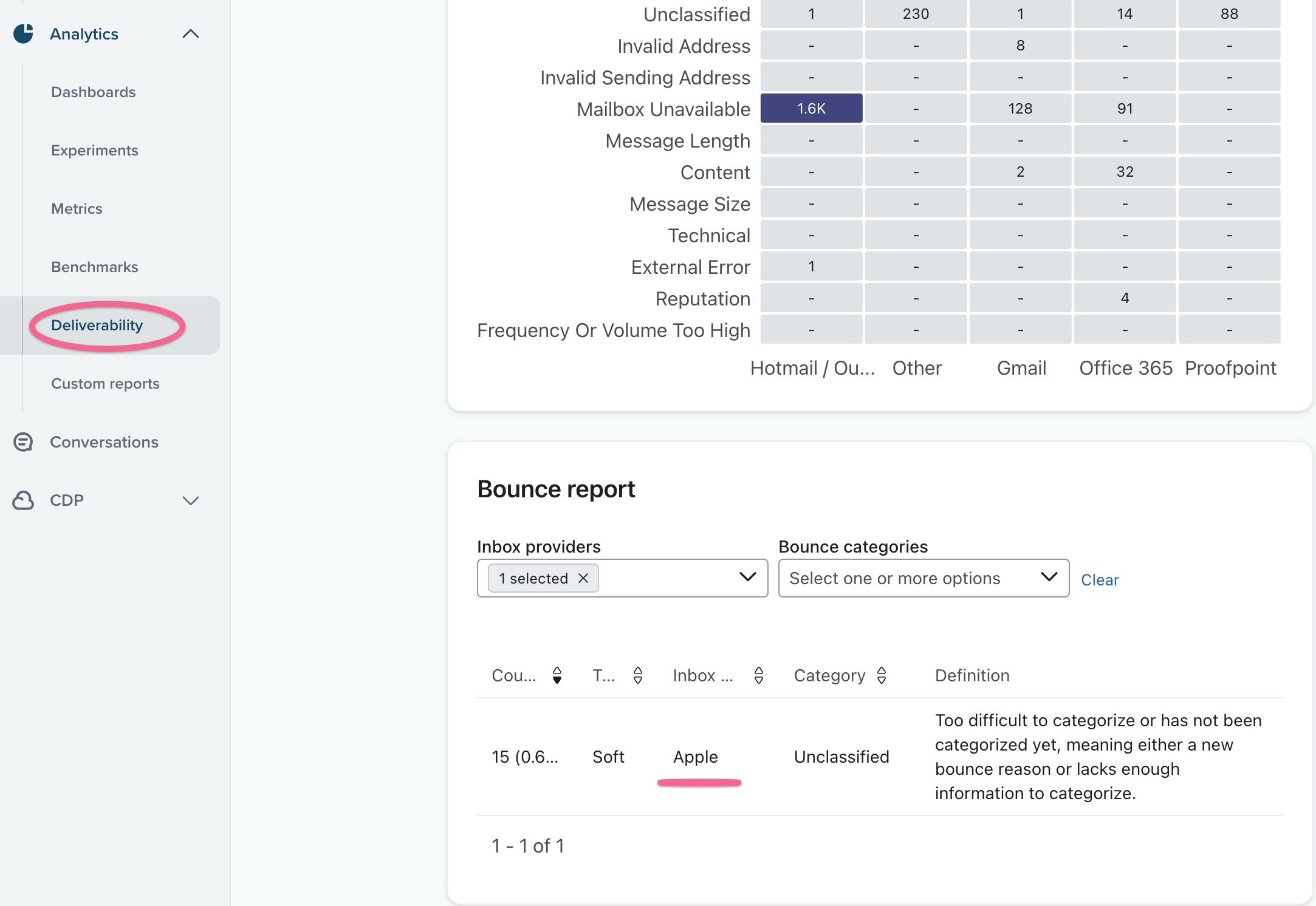
You can look at the accounts’ overall deliverability in the Sidebar → Analytics → Deliverability, then go to “Bounce details” in the secondary sidebar. In the “Bounce report” section, select Apple as your “Inbox Providers” and see what type of bounce reasons that Klaviyo is finding.
It might look something like this:
If you don’t see any reports, make sure you have a wide enough time period
In my example, there’s not enough incidents to find a conclusive reasons for those bounces, but yours may differ and you may be able to address them.
Other suggestions to consider:
Are all your brands on a branded sending domain yet?
Or, did you recently switch to one to be compliant with Google/Yahoo Bulk Sending? Perhaps you’re getting caught into something algorithmic in a sudden change, and with high volume or frequency shortly after a change.
Is all the configurations (e.g. SPF/DKIM/DMARC) correct? Some inbox provider may be more sensitive to updates or misconfigured settings. I realize it’s unlikely all three accounts have these issues, but just verify.
Apple doesn’t have a feedback loop for Postmasters for the general public, but they do have some specific guidlines here. You may want to take a look here: Postmaster information for iCloud Mail
Hope this helps! Perhaps others can chime in with other suggestions or ideas.
Joseph Hsieh // retentioncommerce.com // X: @retention
There is a Shopify Bot that is attacking via webhook -- adding thousands of profiles every day to some Klaviyo accounts.
Make this segment… 1.DO NOT SEND_1.klaviyo bots_not suppressed
DO NOT SEND_1.klaviyo bots_not suppressed
This segment will look for checkout started events that have ZERO events at Shopify. These are bots. Note, the “accepts marketing” is a Shopify event, vs “If some can or cannot receive marketing” is a Klaviyo suppression.
This segment will tell you if you have an infestation from the well known Shopify webhook bot.
ADDITIONALLY, you can also try to identify bots that touch Shopify… using this segment:
2. DO NOT SEND_Subscribed to Email Marketing via Shopify Customer Webhook
DO NOT SEND_Subscribed to Email Marketing via Shopify Customer Webhook
BUT -- this segment can also trap visitors who go directly to a product, ATC, then checkout started, and add an email, before any other indentity graph tracking. So be careful with this one…
IF you have hundreds or thousands of profiles in these segments, you may be a victim of the Shopify bot attack. Please message me privately and I will share your details with Shopify and let you know who to reach out to at Klaviyo.
@AliciaM - try sending your emails to icloudadmin@apple.com from an icloud email like the one for your Apple account. They finally responded and resolved my blocking issue, but only after I started emailing them from an icloud.com email address. If you are forwarding an email with the blocked message, they will block it regardless of which email domain you send from, so just take a screenshot of the message or copy just the message and paste into a new email, preferably from an icloud account.
Create a segment named DO NOT SEND_1.klaviyo bots_not suppressed.
Set conditions to filter profiles with “Checkout Started” events but zero Shopify events. These profiles are likely bots.
Segment 2:
Create DO NOT SEND_Subscribed to Email Marketing via Shopify Customer Webhook.
Use this cautiously, as it may include legitimate users who interact directly with products before identity tracking.
If these segments reveal hundreds or thousands of profiles, it confirms bot activity. Let me know, and I’ll guide you on reporting this to Shopify and Klaviyo contacts for further resolution.
Please let me know if you need help setting up these segments.
> Let me know, and I’ll guide you on reporting this to Shopify and Klaviyo contacts for further resolution.
@MANSIR2094 already reported to Klaviyo Engineering And they are in contact with Shopify. This bot can DESTROY a sender’s reputation and kick your deliverability into the toilet. I was fortunate to reach someone in Klaviyo engineering support. They helped me build a “bot killer” flow. But this is real. And it’s happening to many accounts.
I understand the severity of this issue and the potential impact on sender reputation and deliverability. Since Klaviyo Engineering is already aware and collaborating with Shopify, that’s a great step forward.
Here’s how we can proceed:
Bot Killer Flow: If you can share details of the “bot killer” flow provided by Klaviyo support, I can help implement it in your account to mitigate this threat.
Ongoing Monitoring: I recommend closely monitoring the DO NOT SEND segments and setting up alerts for any unusual activity.
Further Action: If additional action is required, let me know, and I’ll work to ensure we stay ahead of this issue.