


Contributor I
October 19, 2023
Solved

Error: The template you have selected contains invalid syntax.

  • October 19, 2023
  • 3 replies
  • 553 views

Per Klavio documentation, this is what I have in the URL field text box.

{% update_property_link ‘sample_requested’ ‘sleepsrc’ ‘htttp://www.metoliushemp.com’ %}

When I save the template I get Invalid Syntax error.
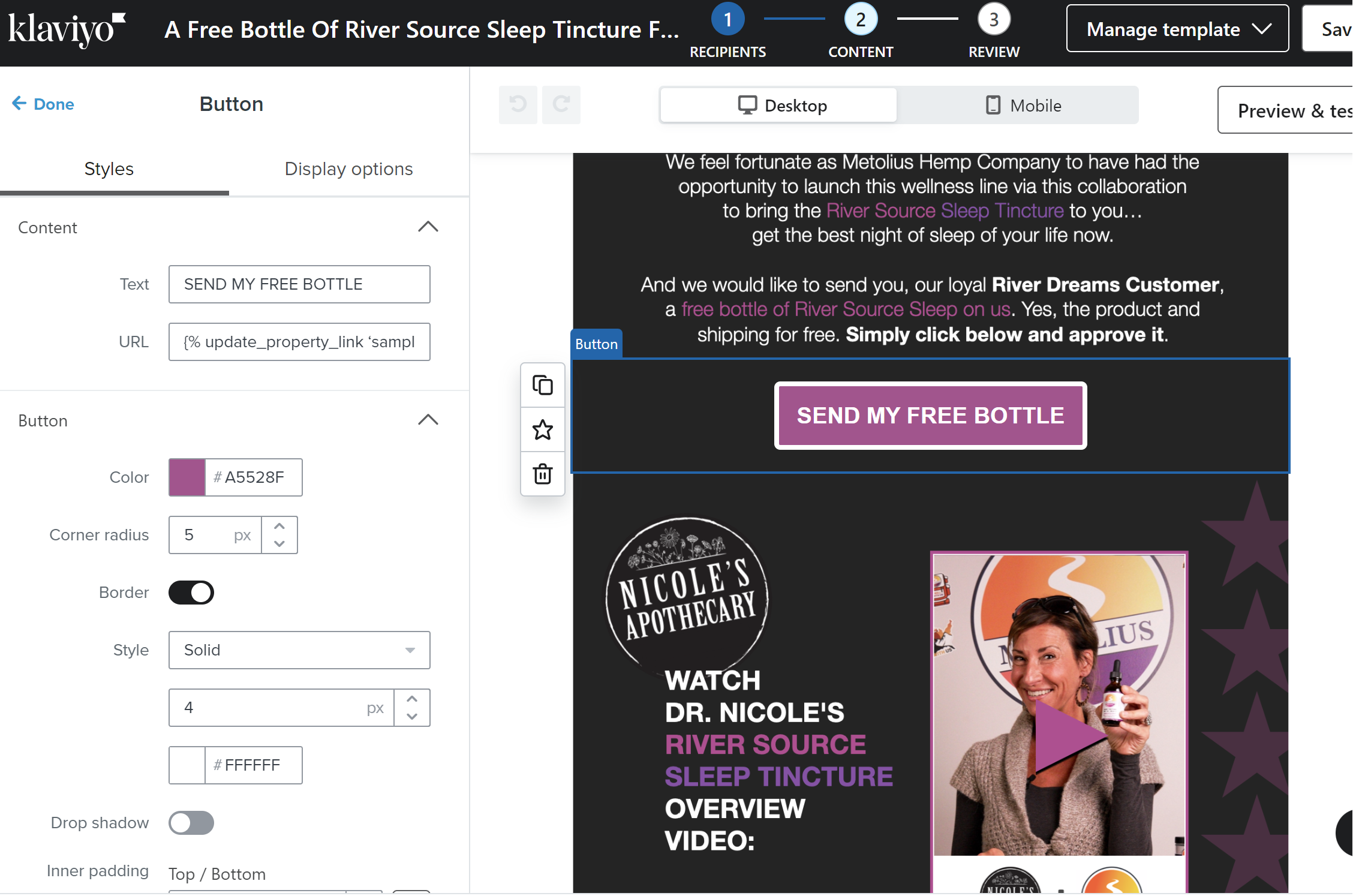


I’ve read the other posts with similar issue but the answers all point to Page Note Found in the knowledgebase.

    This topic has been closed for replies.
    Best answer by Bobi N.

    @davidmu 

    It may not be it but just to be sure remove _ from sample_requested and make it sample requested instead.. if that is not fixing it then I would suggest checking the ‘’ and make sure you are using the exact same ones as klaviyo suggest in their article. If the problem is not one of these 2 then honestly I don’t know what can be the problem..

    3 replies

    Bobi N.
    Partner - Platinum
    Bobi N.Answer
    Champion & Partner
    October 19, 2023

    @davidmu 

    It may not be it but just to be sure remove _ from sample_requested and make it sample requested instead.. if that is not fixing it then I would suggest checking the ‘’ and make sure you are using the exact same ones as klaviyo suggest in their article. If the problem is not one of these 2 then honestly I don’t know what can be the problem..

    Head Email Marketing Technician at Flowium
    Taylor Tarpley
    Community Manager
    Community Manager
    October 20, 2023

    Hi @davidmu


    Thanks for hopping in here @Bobi N. Bobi with your troubleshooting suggestions!


    @Bobi N. is right, whenever adding code into a tempalte, you need to be meticulous and make sure there is not missing or additional spaces or letters as that will render the code unsuccessful!


    I would investigate your website URL, it seems that there is an extra ‘t’ and the ‘https://’ is missing the ‘s’. 


    Hope this helps!

    -Taylor 

    davidmuAuthor
    Contributor I
    October 20, 2023

    Thanks for the responses. Yes, I noticed and fixed the ‘t’.  My problem ended up being I had curved quotes instead of straight quotes.