


Problem Solver II
April 9, 2023
Solved

Flow Metric Trigger Filtering

  • April 9, 2023
  • 1 reply
  • 98 views

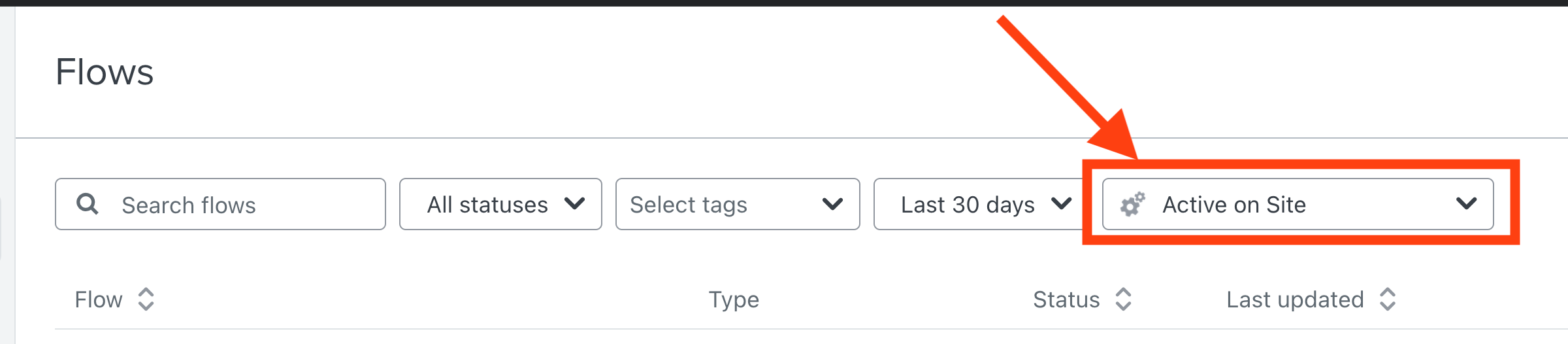
I’m not quite sure what this Filtering section does. On first glance, I would assume that it filters the Flows based on the triggering metric, but it seems it doesn’t do this. For example, if I want to only see flows that have the Active on Site trigger, it still shows flows that don’t have this as a trigger. So I’m a bit confused as to what this filtering parameter does.



    This topic has been closed for replies.
    Best answer by David To

    Hey @jmacman,

    Great question!

    That metric you’re pointing to isn’t a filter for flows but rather the conversion metric you can set for your flows. 

    For example, after selecting Active on Site, when you navigate into any flow and select either the Show Analytics option or navigating directly into each email’s analytics, you’ll see the conversion metric will display as Active on Site. 

    This is similar to how you’re able to select a conversion metric for campaigns.

    I’ll also share this slight confusion with both our product and documentation to clarify further. 

    Thanks for being a part of our Klaviyo Community!

    David 

    1 reply

    David To
    Klaviyo Employee
    David ToAnswer
    Klaviyo Employee
    April 10, 2023

    Hey @jmacman,

    Great question!

    That metric you’re pointing to isn’t a filter for flows but rather the conversion metric you can set for your flows. 

    For example, after selecting Active on Site, when you navigate into any flow and select either the Show Analytics option or navigating directly into each email’s analytics, you’ll see the conversion metric will display as Active on Site. 

    This is similar to how you’re able to select a conversion metric for campaigns.

    I’ll also share this slight confusion with both our product and documentation to clarify further. 

    Thanks for being a part of our Klaviyo Community!

    David
