Contributor I
July 29, 2024
Solved

Font Size On Different Phones

  • July 29, 2024
  • 2 replies
  • 701 views

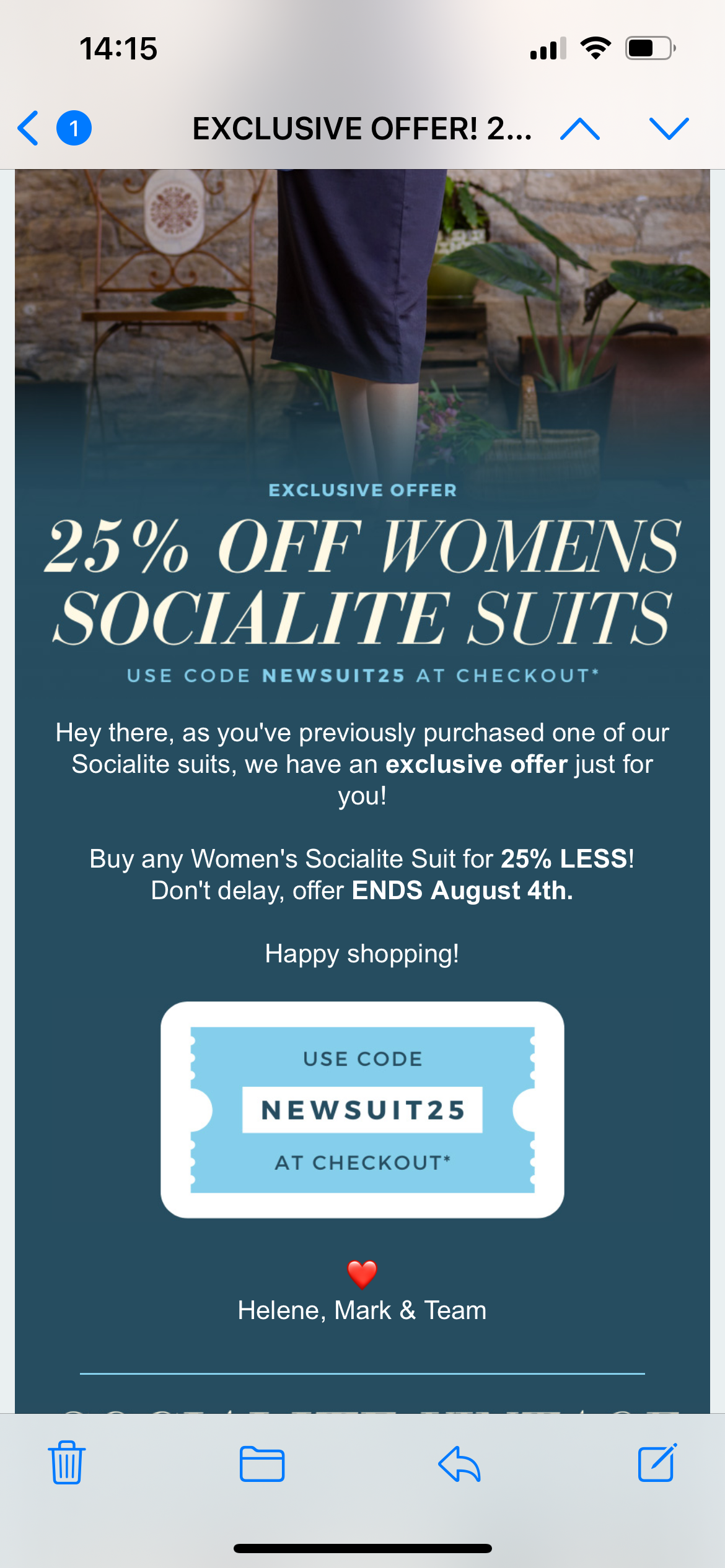
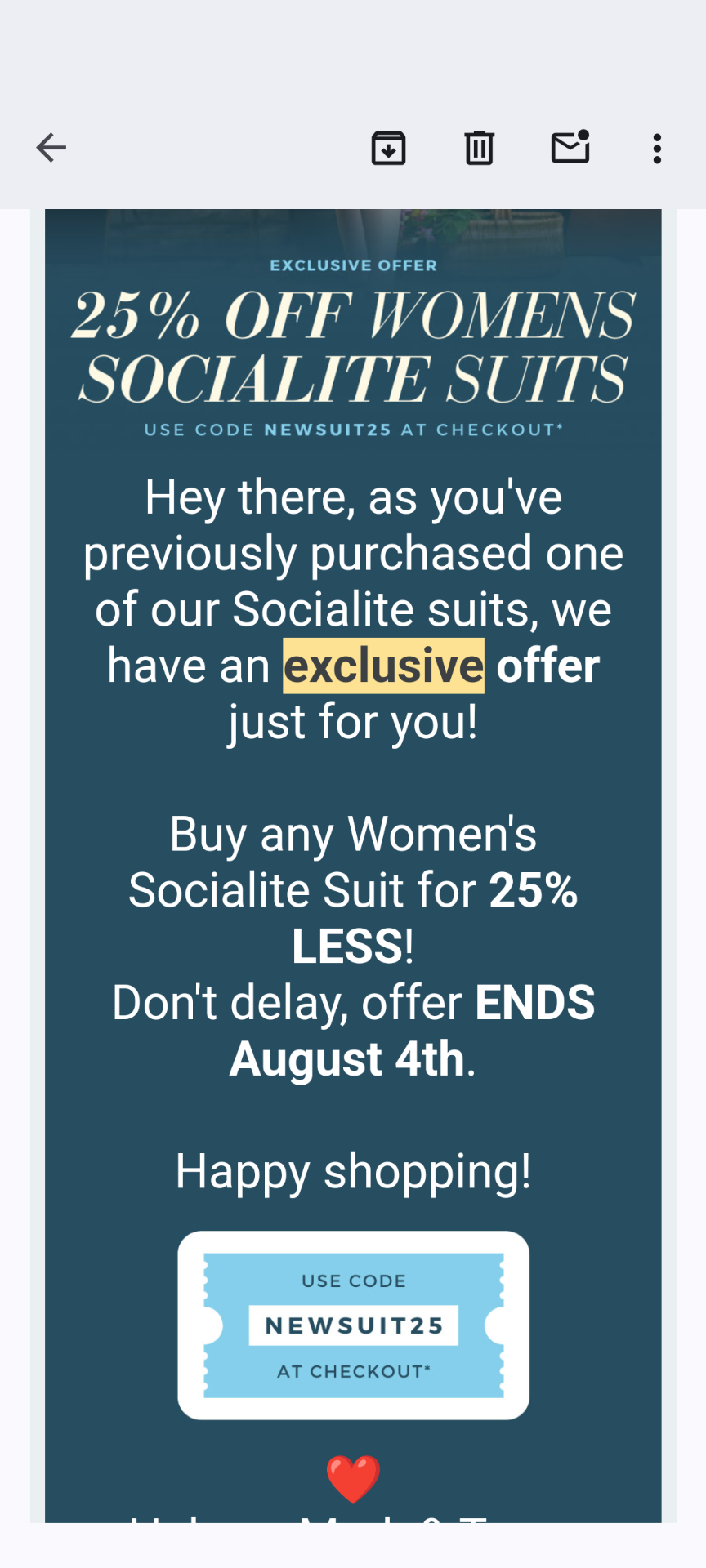
Hi there, I’m having some issues with how our emails are being displayed on different mobile phones. I use an iPhone (1st screenshot) and the text appears at the correct size when I view an email sent via Klaviyo. However my boss uses a Google Pixel phone (2nd screenshot) and the text on the version he received looks massive. We checked that he doesn’t have the display options changed on his phone and everything looked pretty standard to us. There is no difference between the emails sent, both have the text set at 14px but they look completely different and this will be affecting the way our customers see our emails as well. Is there a way to rectify this at all? Thanks.


    This topic has been closed for replies.
    Best answer by ArpitBanjara

    Hey @Revival Vintage 

    welcome to the Klaviyo community

    I think it’s helpful to first understand that emails will typically render differently based on a number of things. Most notable, the inbox provider you’re using, the device you’re viewing the email on, and the medium (browser, app, etc) you’re viewing the email from. Any combination of these along with some other known rendering quarks - such as Outlook - may cause your emails to look different from one another. For this reason, we typically recommend using tools such as Litmus or Email on Acid which are email preview tools to allow you to view how your email will appear. You can then use these previews to help guide how to design your emails to appear as consistant as possible across the all mediums.

    Essentially, various aspects being reorganized to appear in columns rather than rows and your font changing size are all attributed to viewing the email on mobile. I believe taking a look at our Optimize Your Emails for Mobile Help Center article and some additional Community posts I’ve linked below could be helpful to wrapping your head around the behavior you’re describing:

    Logo appearing twice in abandonment email

    Wrong Display of Preview Mail in different Mailing Providers

    Why is the mobile preview not the same when sending?

    I hope this helps. However, if the issue still persists, I would suggest connecting with klaviyo chat support and they should be able to investigate better as they will be able to access your email template.

    Cheers

    Arpit

    2 replies

    ArpitBanjara
    Principal User II
    Principal User II
    July 29, 2024

    Hey @Revival Vintage 

    welcome to the Klaviyo community

    I think it’s helpful to first understand that emails will typically render differently based on a number of things. Most notable, the inbox provider you’re using, the device you’re viewing the email on, and the medium (browser, app, etc) you’re viewing the email from. Any combination of these along with some other known rendering quarks - such as Outlook - may cause your emails to look different from one another. For this reason, we typically recommend using tools such as Litmus or Email on Acid which are email preview tools to allow you to view how your email will appear. You can then use these previews to help guide how to design your emails to appear as consistant as possible across the all mediums.

    Essentially, various aspects being reorganized to appear in columns rather than rows and your font changing size are all attributed to viewing the email on mobile. I believe taking a look at our Optimize Your Emails for Mobile Help Center article and some additional Community posts I’ve linked below could be helpful to wrapping your head around the behavior you’re describing:

    Logo appearing twice in abandonment email

    Wrong Display of Preview Mail in different Mailing Providers

    Why is the mobile preview not the same when sending?

    I hope this helps. However, if the issue still persists, I would suggest connecting with klaviyo chat support and they should be able to investigate better as they will be able to access your email template.

    Cheers

    Arpit

    Arpit Banjara - Lead Email Marketing Specialist at Flowium
    ebusiness pros
    Partner - Platinum
    2025 Champion
    July 30, 2024

    Hi @Revival Vintage!


    Have you checked the email template settings in the “Styles” tab of the email editor? Sometimes your mobile and desktop font sizes might be incorrectly or inconsistently configured here. 


    See this screenshot of the desktop section


    And this screenshot of the mobile section


    You also might do a quick spot check to confirm no text is formatted with an H1, H2, etc. tag when it’s intended to be “normal” or “body” text. One way to quickly reset this after confirming the template settings under “Styles” is by selecting all text and choosing the “clear formatting” option in the editor toolbar. Then revise the formatting to match what you originally intended!

    Warmly,

    Gabrielle


    Klaviyo Champion + ATX Klaviyo Meetup host | Client Strategy Director at ebusiness pros - a lifecycle marketing agency based in Austin