Contributor I
December 5, 2024
Solved

Help me create Browse Abandonement Code

  • December 5, 2024
  • 4 replies
  • 359 views

Hi,

I’m new to Klaviyo and tried building a browse abandonment flow using one of Klaviyo’s pre-built templates. I found templates for cart abandonment but not the browse version.

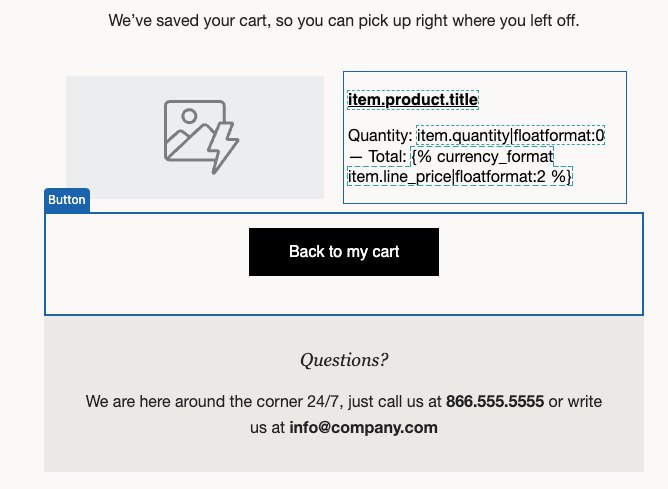
The issue is that I need the code to be correct (please see the screenshot).

  1. How can I ensure the product shown is what my customer has browsed, not added to their cart? What is the right code/url to add in?
  2. What is the correct code for the CTA? Currently, it’s {{ event.extra.checkout_url }}, but I don’t think that’s correct, as this link won’t work if my customer is just browsing.

Thank you!
 

    This topic has been closed for replies.
    Best answer by ali786

    Easy way to do this:
    Go to klaviyo by default flows

    Search : Browse abandon flow

    Use its dynamic bloc and dynamic URL and customize it as per your audience and biz.

    ps: make sure view product metric is functional

    4 replies

    Problem Solver IV
    December 5, 2024

    To ensure the product shown is what your customer has browsed, you need to use the Viewed Product metric. Here's how you can set it up:

    1. Enable Viewed Product Tracking: Make sure you have Viewed Product tracking enabled on your website. This is necessary for Klaviyo to track which products customers have viewed. https://help.klaviyo.com/hc/en-us/articles/115002775252?form=MG0AV3

    2. Create a Browse Abandonment Flow: Navigate to Flows > Create Flow > Browse Abandonment. This will use the default dynamic block that contains the necessary tag to pull users back to the item they browsed.

    3. Use the Correct Code: In your email template, use the dynamic block with the tag {{ event.URL }}. This tag will link back to the specific product the customer viewed.

    4. Correct CTA Code: For the Call-to-Action (CTA), you should use {{ event.URL }} instead of {{ event.extra.checkout_url }}. The latter is meant for cart abandonment flows, while the former will work for browse abandonment.

    Does this help clarify things for you?

    Von_PonzAuthor
    Contributor I
    December 8, 2024

    Thanks Pranay. Will give this one a try. Just out of curiosity -  I lost the default dynamic block of the Browse Abandonment Flow on Klaviyo. Is there a way to get it back? Thank you.

    Von_PonzAuthor
    Contributor I
    December 9, 2024

    ~ update ~

    I have found the default block. Thank you.

    ali786
    Expert Problem Solver I
    ali786Answer
    Expert Problem Solver I
    December 9, 2024

    Easy way to do this:
    Go to klaviyo by default flows

    Search : Browse abandon flow

    Use its dynamic bloc and dynamic URL and customize it as per your audience and biz.

    ps: make sure view product metric is functional

    ali raza -🔎www.aliXemail.com