


Contributor I
May 27, 2023
Solved

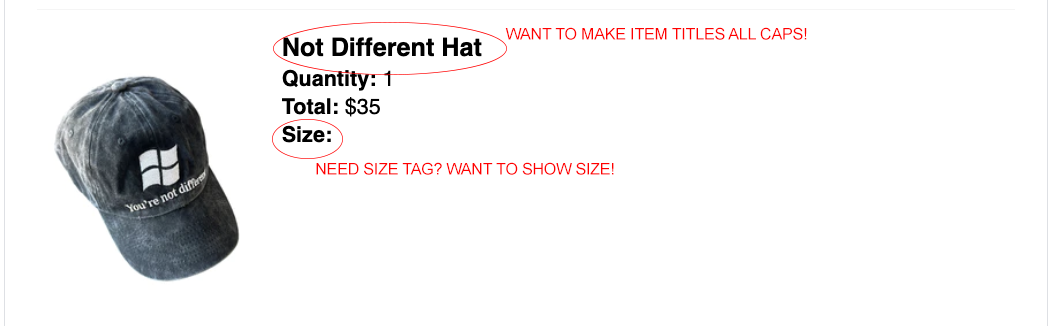
How can I change the item title to be in all caps and add size field into order confirmation email?

  • May 27, 2023
  • 1 reply
  • 636 views

Hello everyone. When editing my order confirmation email for Shopify, I keep running into an issue where I cannot add the size field or capitalize the purchased item(s) name. I have attached a picture for reference! Please let me know if I’m doing something wrong or if there is a specific tag etc. that I should use/add. 
 

    This topic has been closed for replies.
    Best answer by Taylor Tarpley

    Hi there @julesheridan


    Thanks for your question! 


    Can you confirm that the all caps version of your product name is how it displays in the backend of your product catalog? Klaviyo doesn’t change any product information itself on our side, but simply displays what already is in your integration backend. 


    Another Community user had a similar issue, solved by a Community champion I’ve linked below! 


    Thanks for participating in the Community!

    -Taylor

    1 reply

    Taylor Tarpley
    Community Manager
    Community Manager
    May 30, 2023

    Hi there @julesheridan


    Thanks for your question! 


    Can you confirm that the all caps version of your product name is how it displays in the backend of your product catalog? Klaviyo doesn’t change any product information itself on our side, but simply displays what already is in your integration backend. 


    Another Community user had a similar issue, solved by a Community champion I’ve linked below! 


    Thanks for participating in the Community!

    -Taylor

