Contributor I
April 5, 2023
Solved

How Do I Redirect an embedded form to a URL after someone submits

  • April 5, 2023
  • 2 replies
  • 2523 views

I have a form embedded on my website.

When someone fills it out there is a message that appears 

How do I get the form to redirect to a custom URL instead of having this message appear?

This topic has been closed for replies.
Best answer by Bobi N.

@TheIntuitiveQueen 

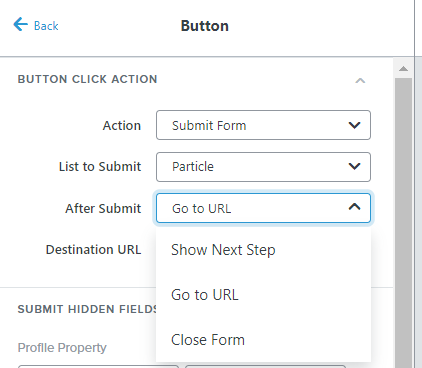
While you are in form editing mode click on the button for your embed form and then button options will show.

The third option is After Submit and automatically it is set to Show Next Step.

Change it to Go to URL and when you pick that another field will show up below it named Destination URL


2 replies

DavidSandel
Partner - Silver
Partner - Silver
April 5, 2023

In the form settings in Klaviyo.

Klaviyo Silver Master --> LowGravitySolutions.com
Bobi N.
Partner - Platinum
Bobi N.Answer
Champion & Partner
April 6, 2023

@TheIntuitiveQueen 

While you are in form editing mode click on the button for your embed form and then button options will show.

The third option is After Submit and automatically it is set to Show Next Step.

Change it to Go to URL and when you pick that another field will show up below it named Destination URL


Head Email Marketing Technician at Flowium