


Contributor I
December 27, 2024
Solved

How do I set up Post-Purchase Conditional Split
  • December 27, 2024
  • 2 replies
  • 108 views
(Conditional Split on Post-Purchase Flow)

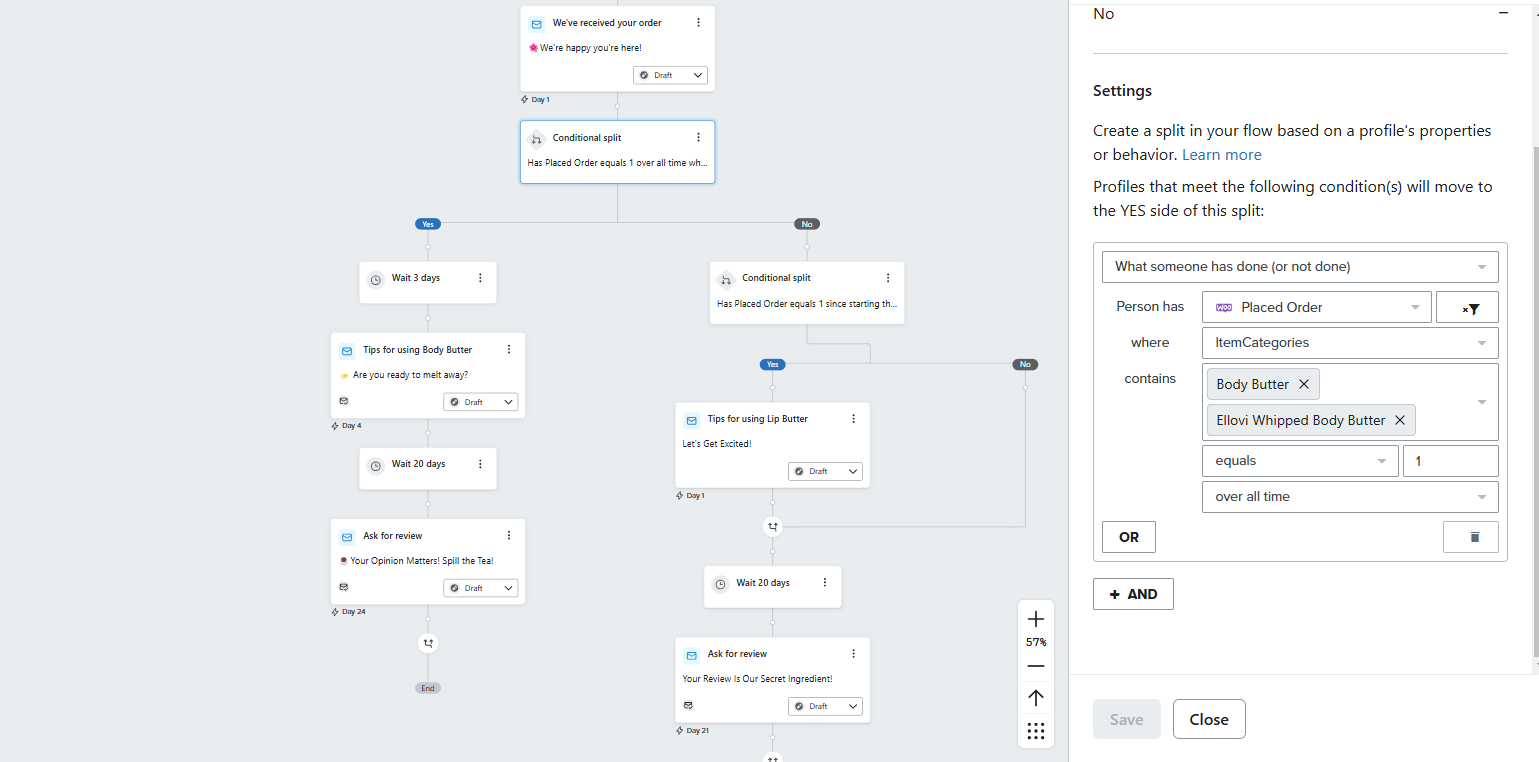
I am trying to set up the conditional splits I am having trouble figuring out how to properly track post-purchase orders using the conditional splits. Every time I have previewed the flow with placeholder emails more than 70% of the time it has not matched to the purchase history (It’ll say they didn’t purchase when they have). 


To be clear, the different product categories I’m sorting between are people who have purchased a body butter or lip butter. This is using woo commerce. The condition split I’m having trouble with is Placed Order- Item Categories containing a variety of that are in the same collection. 

    This topic has been closed for replies.
    Best answer by retention

    Hi ​@khariangel290, welcome to the community.

    Just to extrapolate on what ​@MANSIR2094 mentioned, if you have changed/added/updated category names, they don’t update retroactively for past events.  Meaning, if someone purchased from the category “Body Butter” in the past, but that category use to be called “Body Lotion” - then that user technically hasn’t purchased an item that belongs to “Body Butter” (even though that category is was just renamed).  So if you are previewing with emails that historically purchased but for some reason aren’t going through the right conditional splits, that could be why.  

    As a tip, I would try setting your Flow up in “Manual” mode so that you can safely see “real data” go through the Flow (without the risk of sending any emails) from this point on.  That way you can properly trace each profile that goes through your Flow and see if they are behaving as you expected.  

    2 replies

    MANSIR2094
    Expert Problem Solver IV
    Expert Problem Solver IV
    December 27, 2024

    Hello ​@khariangel290 


    To resolve this issue, ensure that the condition "Placed Order - Item Categories" is correctly set to match the exact category names or collections in your WooCommerce setup. It’s important that the product categories are defined consistently in both WooCommerce and the email flow conditions. Also, verify that your placeholder emails are properly aligned with the customer’s order data. You may need to adjust the flow's trigger to accurately pull the product category for post-purchase orders. Test with real data to ensure proper tracking.


    Mansir Digital Portfolio
    retention
    Partner - Platinum
    retentionAnswer
    2025 Champion
    December 30, 2024

    Hi ​@khariangel290, welcome to the community.

    Just to extrapolate on what ​@MANSIR2094 mentioned, if you have changed/added/updated category names, they don’t update retroactively for past events.  Meaning, if someone purchased from the category “Body Butter” in the past, but that category use to be called “Body Lotion” - then that user technically hasn’t purchased an item that belongs to “Body Butter” (even though that category is was just renamed).  So if you are previewing with emails that historically purchased but for some reason aren’t going through the right conditional splits, that could be why.  

    As a tip, I would try setting your Flow up in “Manual” mode so that you can safely see “real data” go through the Flow (without the risk of sending any emails) from this point on.  That way you can properly trace each profile that goes through your Flow and see if they are behaving as you expected.  

    Joseph Hsieh // retentioncommerce.com // X: @retention