


Julia.LiMarzi
Klaviyo Employee
Klaviyo Employee
November 27, 2020

How to add a clickable phone number to an email

  • November 27, 2020
  • 12 replies
  • 27873 views

There are many reasons you might want to provide a phone number for customers to reach you at, and it’s a great way to keep an open line of communication with your customers if you offer phone support. So how do you easily share that with a customer in an email?

There are two ways you can add a click-to-call link to your emails:

  1. Add it as linked text. If you mention your phone number within a text block, you can hyperlink it to your phone number by adding the following HTML to your text block’s source code: 
    <a href="tel:+18881235467">1-888-123-5467</a>.


  2. Add it as a button. Drag and drop a button into your message. Add an appropriate call to action in the Button Text field, and instead of a Link URL, add “tel:+18881235467” 
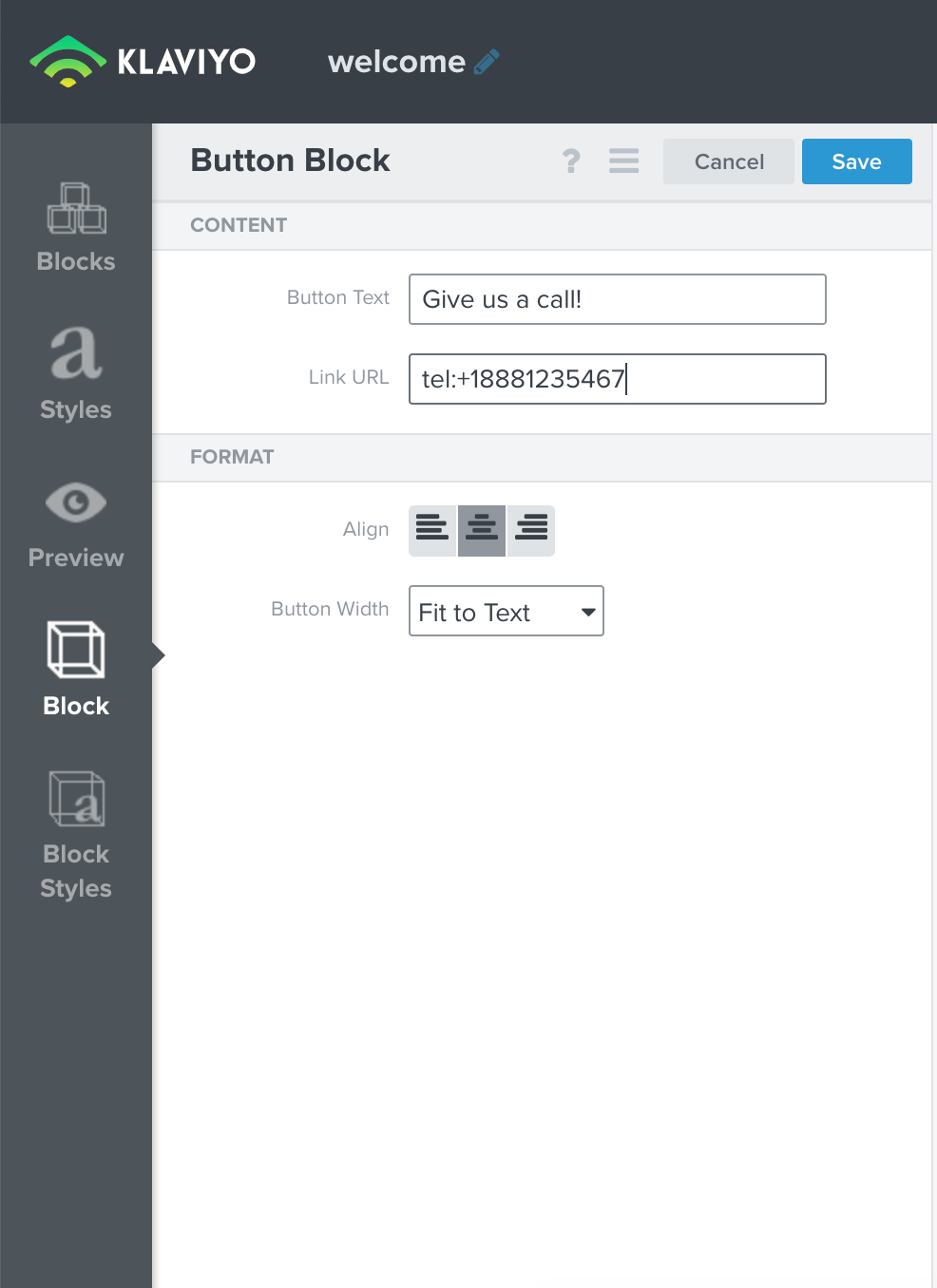
Be sure to replace the example number with your own number, and keep the same formatting as in the example.

    This topic has been closed for replies.

    12 replies

    monaserpco
    Contributor I
    Contributor I
    June 11, 2021

    This is great! Been looking for this in awhile now, thank you!
    Serp Co

    Problem Solver II
    June 27, 2021

    Hi @Julia.LiMarzi, this is a great tip and I’ve just used it in an email. However, is there a way to track if this link is clicked? 


    Thanks!

    David To
    Klaviyo Employee
    Klaviyo Employee
    June 27, 2021

    Hello @wernstrom,

    Great question!

    Klaviyo can only track how many people clicked on a link if the link goes to a webpage. This is because Klaviyo tracks clicks via the _ke parameter that Klaviyo automatically appends at the end of URL links. Since this function does not redirect users a website but instead provide an action, clicking on this tel: function would not be tracked in Klaviyo’s link activity. 

    Thanks for being a member of the Klaviyo Community!

    David

    Problem Solver II
    June 27, 2021

    Thanks for clarifying @david.to, appreciate it!

    Contributor I
    July 20, 2021

    This is not working for me. I typed in the phone number exactly as shown above in the first post example. Then hit Save. When I come back into the Button Block, the field has changed to “tel://+1234567890” (but my number), it adds //. When I test this, the button breaks in Outlook. I have tried in Chrome and Firefox, any assistance would be helpful. 


    Thanks! 

    David To
    Klaviyo Employee
    Klaviyo Employee
    July 21, 2021

    Hello @Tyler,

    Despite the change in your button block’s URL link which adds the “//”; this should not hinder the feature which would automatically launch your default phone app or software (on desktop) to make a call to the listed number. One thing to keep in mind though is that the capability of this function is highly dependent on the the email client and device you are working on. Campaign Monitor has a great write up in their following blog: Email, Phone Home: Initiating Voice Calls from HTML Email Newsletters.

    As detailed in the blog, for example if you were viewing the email from an IPhone, unless you were using the default Apple Mail App, this function would not be available. I’ve also included the chart that helps explain this below for your convenience:

    Desktop email clients Tel: Support Skype: Support
    Outlook 2007/2010 No Yes
    Outlook 2003 No Yes
    Apple Mail No Yes
    Windows Live Mail No Yes
    Thunderbird No Yes
    Webmail clients Tel: Support Skype: Support
    Hotmail No No
    Yahoo! Mail No Yes
    Gmail Yes No
    AOL No No
    Mobile email clients Tel: Support Skype: Support
    iPhone Yes Yes
    Android (Gmail) Yes No
    Android (default) Yes No
    BlackBerry 6 OS Yes No
    Windows Mobile 7 Yes No


    I hope this helps!

    David

    Contributor I
    April 14, 2022

    Hi. is there a way to link Australian numbers? I can’t seem to get it to work either way 

    Dov
    Klaviyo Alum
    April 14, 2022

    Hi @maddie_wd,

    This should still be working for you. However, the issue could very well boil down to the platform being used (in reference to David’s chart above).

    With that said, can you share a screenshot of the anchor tag you’re using? And also a screenshot of the button URL. 

    DD
    Contributor I
    August 5, 2022

    Hi! This code doesn't work in a iOS mobiles, in mi iphone 12 pro max, don't work. I need make another steps or something is wrong with my phone? Because i try in a android device, and this link work. But, my customers uses iphone’s. Im very scared, if my email customer don't can call me i trashed all my work of my flows… Help me please!

    chelsgrove
    Partner - Gold
    Partner - Gold
    November 30, 2022

    Hi all - chiming in on this, I just did this for my clients’ email and it is not working on my iphone - can anyone help? I have used tel: before in other applications and even double-checked what’s up top but it still is not working.