



OasisAdaptogens
Contributor II
Contributor II
November 6, 2021
Solved

How to change link text color on NEW email template

  • November 6, 2021
  • 41 replies
  • 9870 views

Hi friends!
I assume this would be an easy answer but I can’t seem to figure it out. With the old/previous “editing templates”, I had no issues changing the Link Text details however using the new/updating editing template, looks what's happening.
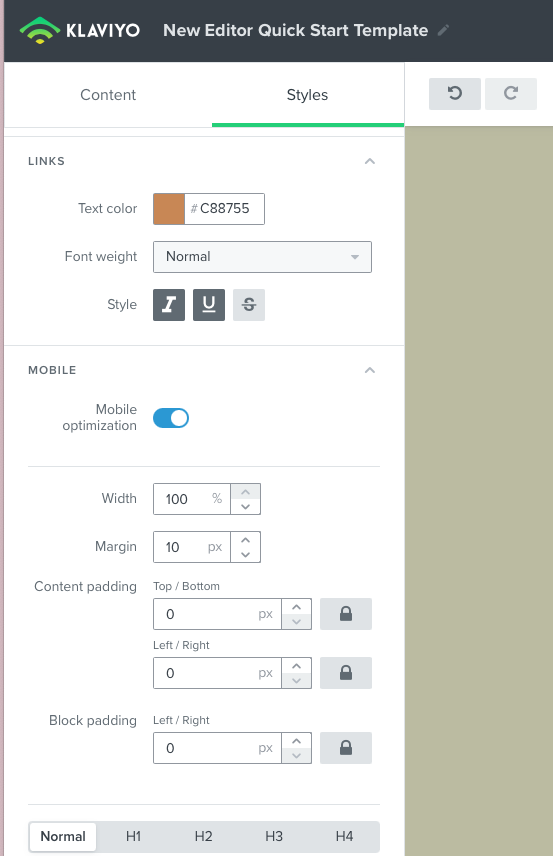
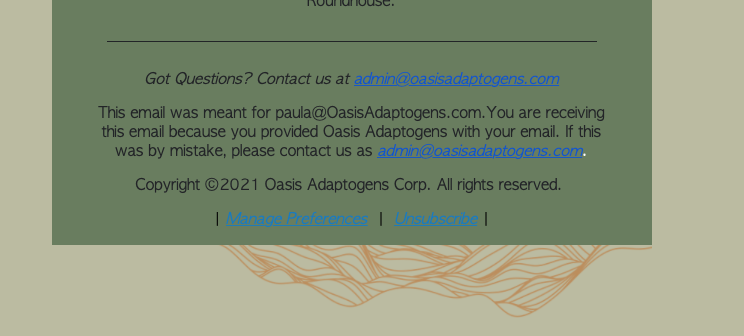
New template link color #C88755
email campaign test run: shows blue link text color when I want #c88755


As you can see I'd like to change Link Text color to #c88755 however, when I test out a campaign and view this in preview, it’s blue! How come? Thanks in advance 🍃 

    This topic has been closed for replies.
    Best answer by David To

    Hey Community members,

    I know it wasn’t that long ago that I posted, but wanted to share that our Product Team did recently release a fix to resolve this behavior of links always turning blue despite what their styling was set as.

    I also just want to thank everyone’s patience as our team worked towards implementing a solution for this bug.

    Have a great day!

    David 


    41 replies

    David To
    Klaviyo Employee
    Klaviyo Employee
    November 8, 2021

    Hello @OasisAdaptogens,

    Thanks for sharing your experience with the Klaviyo Community! I’ll share this insight with our Product Team!

    I’ve seen this occur from time to time when the new template editor doesn’t properly save. To alleviate this I would advise ensuring you’ve clicked the Save and Return to Templates button after making your edits. This will make sure your template is saved and using the most up to date version of itself. 

    Keep us posted on how that works out as we are still working through some of kinks with our new editor! :grinning:

    Thanks for being a part of the Klaviyo Community!

    David

    OasisAdaptogens
    Contributor II
    Contributor II
    November 13, 2021

    Hi @david.to 


    Thanks for the response!!! I definitely did all your suggestions and still no luck.. Ad you can see in the image below the two links are completely different color. That DARN blue!! haha.


    David To
    Klaviyo Employee
    Klaviyo Employee
    November 15, 2021

    Hey @OasisAdaptogens,

    Thanks for that latest screenshot! Since it appears those emails are adhering to the template’s style setting, I would suggest double checking the source code of where that blue text is appearing. I would make sure that both the manage preferences and unsubscribe text aren’t being overridden by any coding.

    This can often times happen if you’ve copied and pasted this code from another source and the formatting comes along with it. The source code will always override the template’s style in cases like this. To alleviate this I would suggest removing the bit of code that is defining that text color that is overriding the template’s style. Alternatively, if you copied this text from a different source, I would suggest copying the text again and pasting it back into this template without the additional formatting and styling.

    David

    November 16, 2021

    @david.to Hello there! I am also facing the same issue. The unsubscribe link was the one I’ve used for the standard template selected so the source code wasnt tampered with.

    I’ve also tried the method of save and return to template method you’ve suggested and it wasnt working too. I am still getting the blue colour text link


    Possible to assist on it please?


    Ps: I am also using the new template editor


    Thank you so much!

    David To
    Klaviyo Employee
    Klaviyo Employee
    November 17, 2021

    Hey @Gang and @OasisAdaptogens 

    Thanks for that additional feedback! I’ve since gone ahead and shared your feedback and experience with our Product Team to investigate this behavior further. 

    At present this appears to be an unexpected behavior restricted only to the new template editor. I’ll share and provide any updates from our Product Team when made available to me! 

    Really appreciate you both for raising this issue and for being members of our Community!

    David


    OasisAdaptogens
    Contributor II
    Contributor II
    November 27, 2021

    Hey @david.to 

    Any updates on this! It seems to still be happening!

    Thank you!

    David To
    Klaviyo Employee
    Klaviyo Employee
    November 29, 2021

    Hey @OasisAdaptogens,

    At this time there aren’t any updates we can provide on this template behavior. However, our team is working diligently to resolving this as soon as they can!

    I’ll provide an update in this thread when I hear anything from our Product Team regarding a resolution!

    David

    Contributor I
    January 5, 2022

    Also having issues with this in the new editor - hope Kaviyo fix this annoying issue soon.

    As a temporary workaround you can use these in your templates:

    {% web_view_link %}

    {% unsubscribe_link %}

    and then add inline styles to your a href links e.g.

    <a style=”color: #c88755 !important;” href="{% unsubscribe_link %}" >unsubscribe</a>

    For other regular links in text blocks you will need to go in and add: style=”color: #c88755 !important;” to your href tags.


    Contributor I
    January 10, 2022

    Has there been any progress on this issue? All of the links in my emails are bright blue even though I changed the link color under “Styles”. I am also using the new editor and am using the drag and drop text boxes.

    This is frustrating as the blue is a jarring color and not what I want in my emails.

    I read the workaround @jand proposed but was not able to make it work. Anything I add to my source code is not saved, even when I click Done and Save. 

    Please advise @David To and thank you in advance.

    David To
    Klaviyo Employee
    Klaviyo Employee
    January 12, 2022

    Hey @NatalieP,

    Sorry to hear you’re being effected by this as well!

    After reaching out to our Product Team regarding this behavior, it appears they are aware and confirmed that this is currently a bug causing this behavior. They’ve since escalated the case to our engineering. 

    We really appreciate everyone’s patience as our teams work towards a resolution to squashing this bug!

    David