



OasisAdaptogens
Contributor II
Contributor II
November 6, 2021
Solved

How to change link text color on NEW email template

  • November 6, 2021
  • 41 replies
  • 9870 views

Hi friends!
I assume this would be an easy answer but I can’t seem to figure it out. With the old/previous “editing templates”, I had no issues changing the Link Text details however using the new/updating editing template, looks what's happening.
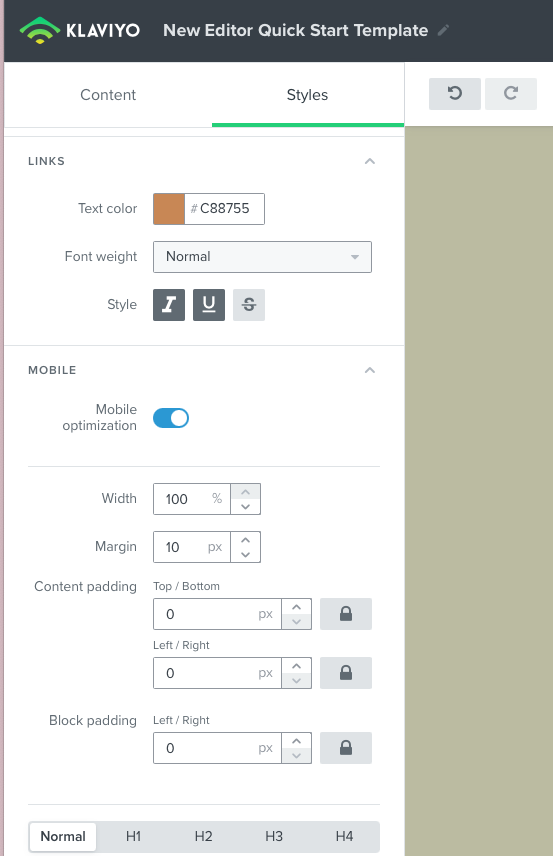
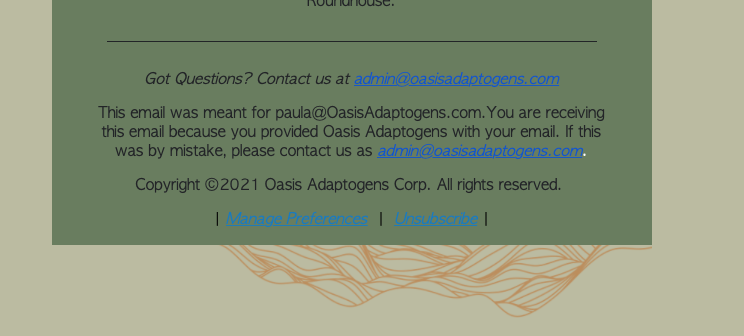
New template link color #C88755
email campaign test run: shows blue link text color when I want #c88755


As you can see I'd like to change Link Text color to #c88755 however, when I test out a campaign and view this in preview, it’s blue! How come? Thanks in advance 🍃 

    This topic has been closed for replies.
    Best answer by David To

    Hey Community members,

    I know it wasn’t that long ago that I posted, but wanted to share that our Product Team did recently release a fix to resolve this behavior of links always turning blue despite what their styling was set as.

    I also just want to thank everyone’s patience as our team worked towards implementing a solution for this bug.

    Have a great day!

    David 


    41 replies

    Contributor I
    January 21, 2022

    Hey there, I know it’s just been 8 days but I’m also experiencing this issue. I’ve tried hyperlinking text rather than using the “Add Personalization” and I’m either stuck with the blue or I get a code error. I checked the code but it’s like it won’t save at all. I also noticed it appears to (sometimes) be adding %22 in place of quotations in the source code if that helps at all. 

    Here’s the preview: 


    Here’s the editor: 


    Please please help! Thank you.


    Contributor I
    March 5, 2022

    Hey there, I’m also experiencing this issue where once I type in a URL in the button, it overrides the text color. Is there a workaround for it at this moment? How do I accomplish setting the color?

    Contributor I
    March 5, 2022

    Also, in the new template, the “Product” block button URL is not working at all (I set to assign a URL automatically). When I test it in the email, it does not link anywhere (it is not even a link at all because when I hover the cursor does not even change)

    David To
    Klaviyo Employee
    Klaviyo Employee
    March 31, 2022

    Hey Community members, 

    Just wanted to provide a quick update on this bug that’s been impacting link in the new template editor always turning blue.

    Our Product team is actively working on a resolution to this behavior and I look forward to updating this post when it has been resolved. In the interim, @Anna McCarthy, our Senior Template Specialist has created a very helpful Loom video walkthrough for a workaround which i’ve included below! If you’re having trouble with the video, you can also access it by going to this link here


    Anna also spoke to this in the video, but also just wanted to note that this workaround will not work for the unsubscribe/web view links. You can also find the code that Anna used to paste in the Source tab of a text block below for your convenience. Keep in mind to swap in your own hex code color, link, and text!

    <p><a style="color: #addhexcodehere;" href="www.google.com"> Add your text here </a></p>

    Thanks for being members of the Klaviyo Community!

    David

    David To
    Klaviyo Employee
    David ToAnswer
    Klaviyo Employee
    April 5, 2022

    Hey Community members,

    I know it wasn’t that long ago that I posted, but wanted to share that our Product Team did recently release a fix to resolve this behavior of links always turning blue despite what their styling was set as.

    I also just want to thank everyone’s patience as our team worked towards implementing a solution for this bug.

    Have a great day!

    David 


    Contributor I
    April 7, 2022

    Hi David, 


    Did you guys find a solution for the unsubscribe/web view links yet? Mine are still showing blue in both the new and the old editor now when before, the Klaviyo update, I did not have these issues. 


    Thanks!

    Problem Solver II
    April 12, 2022

    Hey Community members,

    I know it wasn’t that long ago that I posted, but wanted to share that our Product Team did recently release a fix to resolve this behavior of links always turning blue despite what their styling was set as.

    I also just want to thank everyone’s patience as our team worked towards implementing a solution for this bug.

    Have a great day!

    David 


    Hi @David To

    I’m experiencing this exact same problem now in the OLD editor. No code edits, saved and returned to templates etc. If you have any insight that would be great.

    Thanks!

    David To
    Klaviyo Employee
    Klaviyo Employee
    April 12, 2022

    Hey @Kathleen and @wernstrom,

    Are either of you by chance testing this through a Gmail inbox provider? Although Gmail is most prominent for this, a variety of inbox providers will override the styling when it comes to an unsubscribe or manage preference link as Litmus explains in both their Frustrated by Blue Links in Email? Conquer Them for Good and How to Fix Gmail Blue Links for an Email Dream Come True blog articles. 

    You can typically combat this by using a tag to provide only the URL for your unsubscribe link and wrapping it within <a href></a> tags similar to what is mentioned in the How to Add an Unsubscribe Link to Klaviyo Emails Help Center article. For example, if I wanted to force the unsubscribe link to display as black I can use <a href ="{% unsubscribe_link %}" style="color: #000000 !important;">Unsubscribe</a>

    David

    Problem Solver II
    April 12, 2022

    Hi @David To , thanks for your reply. Yes, I’m testing in gmail, however, up until extremely recently this has not been an issue, so I would tend to think that gmail isn’t the problem (or at least it wasn’t until now). Will give your workaround a try. Thanks!

    Problem Solver II
    April 13, 2022

    Hi @David To I haven’t had any luck implementing this solution, could you please provide a bit of extra context?

    My previously working block contained:

    <p style="text-align: center;"><span style="font-size:14px;"><span style="color:#d4d4d4;">Update&nbsp;your email&nbsp;preferences:</span> <strong><span style="color:#F5A623;">{% manage_preferences %}</span></strong>.</span></p>

    <p style="text-align: center;"><span style="font-size: 14px;"><span style="color:#d4d4d4;">No longer want to receive any marketing emails?</span> <span style="color:#F5A623;"><strong>{% unsubscribe %}.</strong></span></span></p>

    <p style="text-align: center;"><span style="color:#FFFFFF;"><span style="font-size:14px;">{{ organization.name }} {{ organization.full_address }}.&nbsp;</span></span></p>

    I’m not super familiar with html… is this how the the <a href> tag is supposed to be added? because this doesn’t seem to work and I’m sure I’m probably missing something:

    <p style="text-align: center;"><span style="font-size: 14px;"><span style="color:#d4d4d4;">No longer want to receive any marketing emails? </span><a href="{% unsubscribe %}" style="color: #F5A623 !important;">Unsubscribe</a> </span></p>

    Thanks!