



OasisAdaptogens
Contributor II
Contributor II
November 6, 2021
Solved

How to change link text color on NEW email template

  • November 6, 2021
  • 41 replies
  • 9870 views

Hi friends!
I assume this would be an easy answer but I can’t seem to figure it out. With the old/previous “editing templates”, I had no issues changing the Link Text details however using the new/updating editing template, looks what's happening.
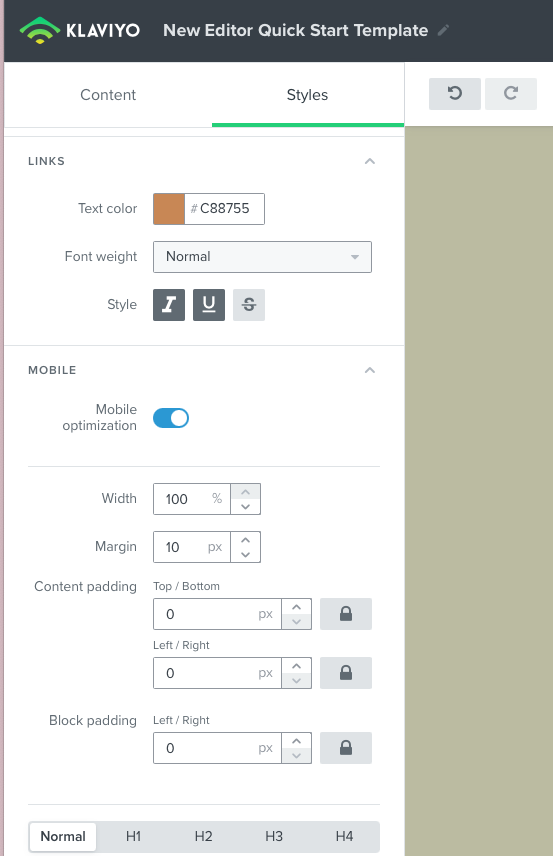
New template link color #C88755
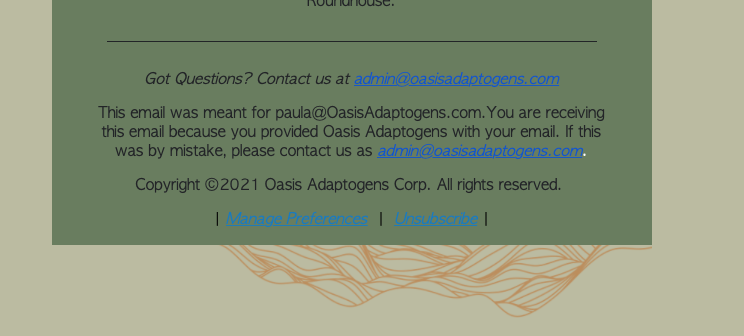
email campaign test run: shows blue link text color when I want #c88755


As you can see I'd like to change Link Text color to #c88755 however, when I test out a campaign and view this in preview, it’s blue! How come? Thanks in advance 🍃 

    This topic has been closed for replies.
    Best answer by David To

    Hey Community members,

    I know it wasn’t that long ago that I posted, but wanted to share that our Product Team did recently release a fix to resolve this behavior of links always turning blue despite what their styling was set as.

    I also just want to thank everyone’s patience as our team worked towards implementing a solution for this bug.

    Have a great day!

    David 


    41 replies

    Problem Solver II
    April 13, 2022

    I feel like even with my poor html skills something is buggy. 

    @David To here’s an example, as far as I can tell, both tags are the same. One is for managing preferences, one is for unsubscribing:

    <p>Update your email preferences:<a href="{% manage_preferences %}" style="color: #F5A623 !important;">Manage Preferences</a></p>

    <p>Don't want to receive any marketing emails?<a href="{% unsubscribe_link %}" style="color: #F5A623 !important;">Unsubscribe</a></p>

    Both display fine in Klaviyo, except this time, when I send a preview to gmail, the unsub displays the correct color while the preference one is like this:

    Am I missing something, or is something wrong?

    Thanks!

    David To
    Klaviyo Employee
    Klaviyo Employee
    April 13, 2022

    Hey @wernstrom,

    So close! Looks like you’re actually using the default manage preference variable as opposed to one that generates a link. Instead of using {% manage_preferences %}, you’ll want to use {% manage_preferences_link %} to create this hyperlink experience. More details on using different forms of the variable tags can be found in the Guide to Template Tags and Variable Syntax Help Center article.

    Awesome to hear you’re heading in the right direction! 

    David

    Problem Solver II
    April 13, 2022

    OH! Duh! Thank you once again @David To !

    Contributor I
    April 20, 2022
    <span>{% unsubscribe '<span style="color: #000000;"><u style="text-decoration-color: #000000;">Unsubscribe</u></span>' %}</span>


    Contributor I
    April 21, 2022

    Hi ! 
    I still have this strange behavior on gmail… I also tried the fix with the # but it didn’t change anyhting… Do you have any update? 
    Thanks, 

    Contributor I
    May 23, 2022

    Hello,

    I’m having the same issue so fixed it with the code above for the Manage Preferences and Unsubscribe link but how do I fix for an ‘email’ link (example below)? Could someone pls supply the source code to change this from blue to the colour of my choice (this goes blue when I send the email)?


    Contributor I
    May 27, 2022

    Hello,

    I’m having the same issue so fixed it with the code above for the Manage Preferences and Unsubscribe link but how do I fix for an ‘email’ link (example below)? Could someone pls supply the source code to change this from blue to the colour of my choice (this goes blue when I send the email)?


    I am having this same issue! I am attempting to put an email address in the body of the email, but I do not want this to turn into a blue link. I added <span style="color:#ffffff;"> to the code, in the text block where this is included, but it is still showing as a blue link when I send the preview email in both outlook and gmail. Should I be putting this in a different spot in the code? Does the email address or link need to be wrapped in a specific code? 

    David To
    Klaviyo Employee
    Klaviyo Employee
    May 27, 2022

    Hey @WhlM and @MBrown,

    As you may have noticed, the provided workaround for hyperlinks by overriding the CSS typically wouldn’t work for email addresses. Unlike hyperlinks, Gmail and some other inbox providers will actually automatically see email addresses, telephone numbers, and sometimes street addresses as “functions” to launch a compatible app or software. Because of this, inbox providers will typically have much stricter CSS weight to them that would oftentimes not allow you to override them. 

    David

    Contributor I
    May 30, 2022

    Hello,

    I’m having the same issue so fixed it with the code above for the Manage Preferences and Unsubscribe link but how do I fix for an ‘email’ link (example below)? Could someone pls supply the source code to change this from blue to the colour of my choice (this goes blue when I send the email)?


    I am having this same issue! I am attempting to put an email address in the body of the email, but I do not want this to turn into a blue link. I added <span style="color:#ffffff;"> to the code, in the text block where this is included, but it is still showing as a blue link when I send the preview email in both outlook and gmail. Should I be putting this in a different spot in the code? Does the email address or link need to be wrapped in a specific code? 

    Hello,

    I ended up fixing this by making the email into a link and it has stayed the colour I wanted (white) even in gmail. See below. 

    <a href="{{ email }}" style="color: #ffffff !important;">{{ email }}</a>
     

    Problem Solver I
    June 22, 2022

    Does this bug extend to metric variables as well? In those cases the info (email or phone number) cannot be stylized, but are still blue in gmail.
    The styles are set to a color and the variable is enclosed in a span tag

    For example
    If “{{ event.person.email }}” returns “name@domain.com” the email will be blue
    Email: name@domain.com