Active Contributor I
Nov 28, 2023 12:29 AM UTC
Solved

How to change the text of a button within the "Product" block?

I’m still fairly new to this, so learning what’s what and where things are.

My current roadblock is trying to change the text of the pre-made button within the Product block. Is this possible?

I want to change the Shop Now to something else.

Thanks.

    Taylor Tarpley
    Community Manager
    Nov 28, 2023 8:26 PM UTC

    Hi there @fandf, 


    Thanks for sharing your question with us! Happy to help! 


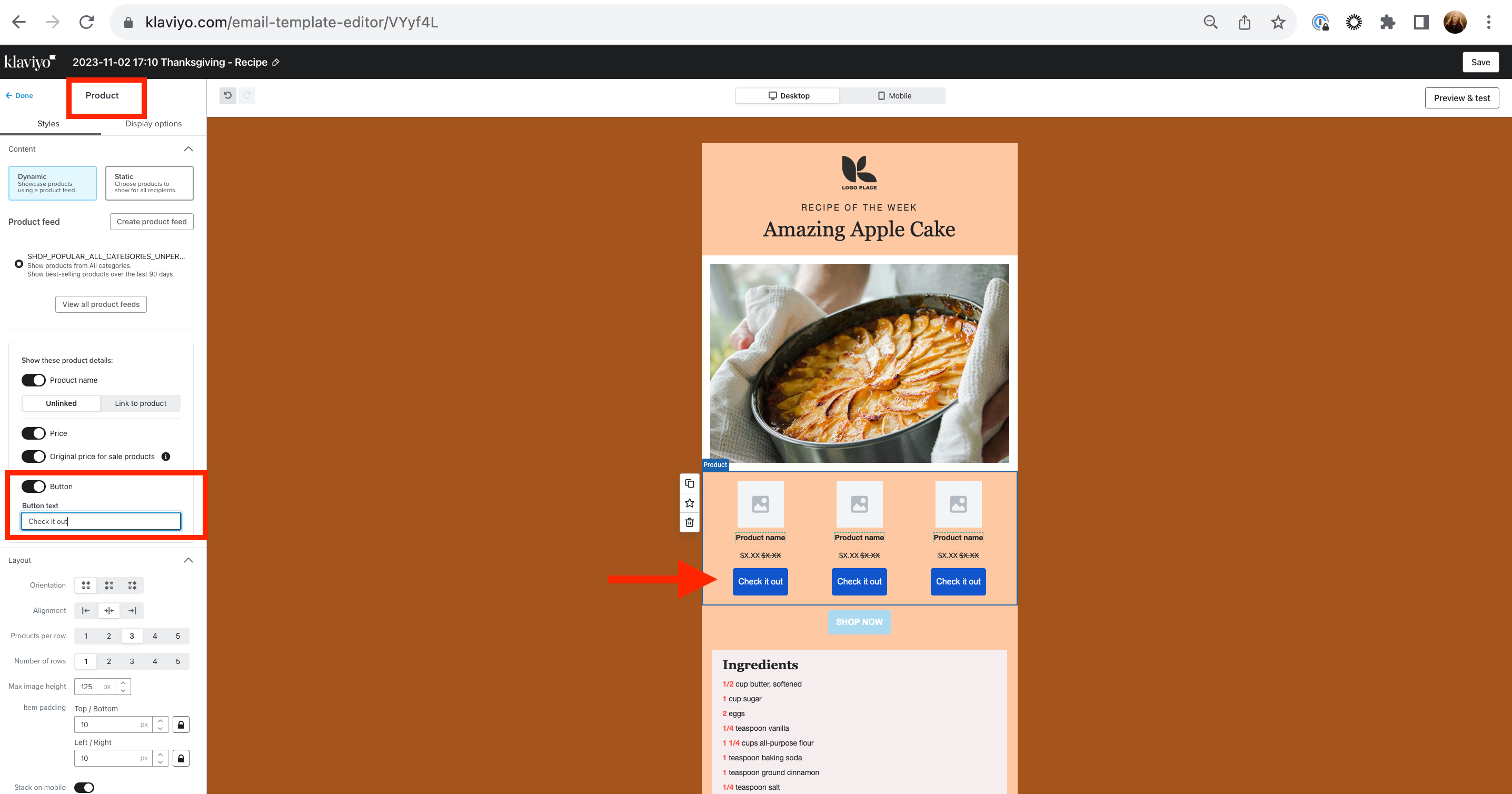
    Yes, this is definitely possible! I suggest clicking into the product block button and finding the text box under the ‘Button text’ title and changing the text there. You can check out this screenshot for more guidance!


    Additionally, as your a very new to Klaviyo, here are some more resources to get you started with a strong foundation! Make sure to join a user group based on your industry , learn from our experts in the industry, and check out our Academy courses and live trainings as well!  


    Thanks for participating in the Community!

    -Taylor 


    11 replies

    Contributor I
    Nov 8, 2026 11:37 AM UTC

    Solution: How to change the product button text in Klaviyo

    If you're using Shopify products in a Klaviyo newsletter and want to change the CTA button text (for example, from “Shop now” to “Notify Me”), the setting is now located within the individual product settings.

    Here's how to find it:

    1. Select the Product block in your Klaviyo email editor.

    2. Under Styles, look for the Products section at the top.

    3. Click the small arrow next to the individual product you want to edit.

    4. This expands additional settings, including Button text.

    5. Simply change the text to whatever you'd like (e.g. “Notify Me”).

    You need to do this individually for each product in the block.

    I've attached two screenshots showing exactly where to find the setting.

    Hope this helps anyone else who was looking for it!