


Contributor II
April 16, 2023
Solved

How to change URL previews, to Tool Tips on-hover

  • April 16, 2023
  • 4 replies
  • 437 views

We use lots of images through our templates, and link these off to our website. 
However the URL previews, with tracking look terrible in some mail clients, blocking all the content as they are so large eg:
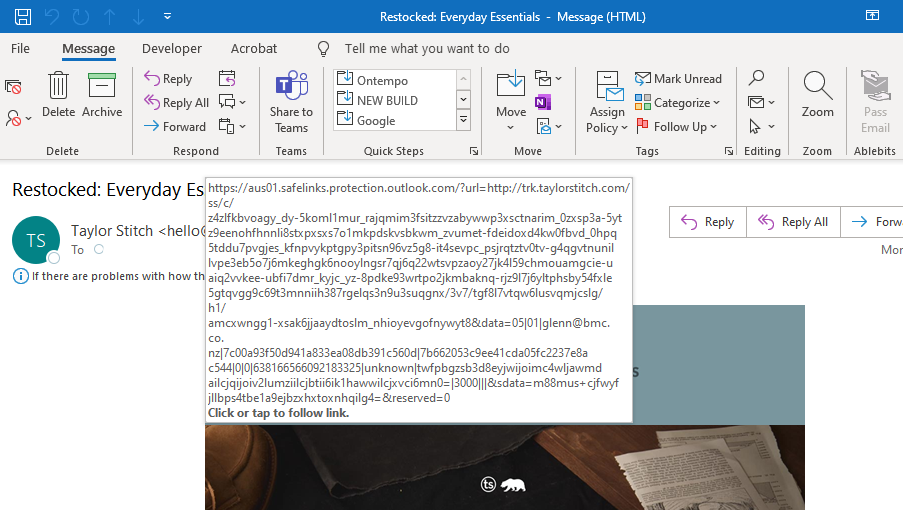


I have seen some Klaviy clients achieve an onhover tool tip approach, which is much better.
They still maintain the tracking links behind this and the on-hover does not hide all the actual content eg:
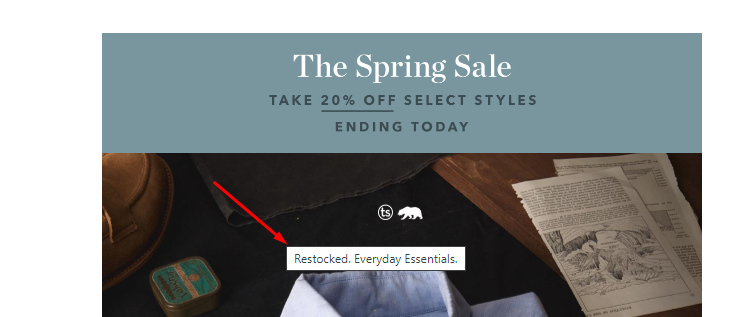


How are they doing this as I want to achieve the same thing?

Thanks :)

    This topic has been closed for replies.
    Best answer by Omar

    @Josh NZ are you using Alt Tags to your images? 

    This hover text is actually coming from adding the Alt Tag attribute to an image. It's a best practice to use - https://help.klaviyo.com/hc/en-us/articles/360034711931-Accessibility-in-emails-and-forms-best-practice-reference
     

    Or as Klaviyo also says it here
    Always add alt text to your images. Certain inboxes, including Outlook and Apple Mail, will not display images until a recipient opts in to see them. Including alt text helps recipients using these inboxes to understand what an image is meant to convey, and also supports accessibility. 


    Omar Lovert // Polaris Growth // Klaviyo Master Platinum Partner

    We help with e-commerce growth through CRO, Klaviyo and CVO


    4 replies

    Omar
    Partner - Platinum
    OmarAnswer
    2025 Champion
    April 17, 2023

    @Josh NZ are you using Alt Tags to your images? 

    This hover text is actually coming from adding the Alt Tag attribute to an image. It's a best practice to use - https://help.klaviyo.com/hc/en-us/articles/360034711931-Accessibility-in-emails-and-forms-best-practice-reference
     

    Or as Klaviyo also says it here
    Always add alt text to your images. Certain inboxes, including Outlook and Apple Mail, will not display images until a recipient opts in to see them. Including alt text helps recipients using these inboxes to understand what an image is meant to convey, and also supports accessibility. 


    Omar Lovert // Polaris Growth // Klaviyo Master Platinum Partner

    We help with e-commerce growth through CRO, Klaviyo and CVO


    Helping E-commerce brands maximize Lifetime Value & Profits with Klaviyo, CRO & CVO - Get your free Audit - https://link.polarisgrowth.com/free-audit
    Josh NZAuthor
    Contributor II
    April 17, 2023

    @Omar 
    Thanks for the pointer. 
    We are setting Alt Tags, using the standard fields like this. 
     

    However unfortuantley they still show links like this in some mail clients. Outlook rendering the worst of the bunch eg:


    Omar
    Partner - Platinum
    2025 Champion
    April 17, 2023

    In the end… it's always Outlook!

    And to make matters worse it's always the CEO who's using it and getting thes emails… 

    Helping E-commerce brands maximize Lifetime Value & Profits with Klaviyo, CRO & CVO - Get your free Audit - https://link.polarisgrowth.com/free-audit
    Kylie W
    Partner - Silver
    Champion & Partner
    April 18, 2023

    Thanks @Josh NZ for the great question in the Klaviyo community and @Omar for answering! 

    This too has been a bit of a bug-bear for me and I’ve struggled to find a solution even after all the helpful information and research available via Klaviyo. 

    Glad I am not the only one 😅

    Berridge Strategy Group, Your eCommerce Partner - eCommerce results, without the Complexity | Klaviyo Partner & 2024 Klaviyo Community Champion | www.berridgestrategy.com
