New Member
March 14, 2021
Solved

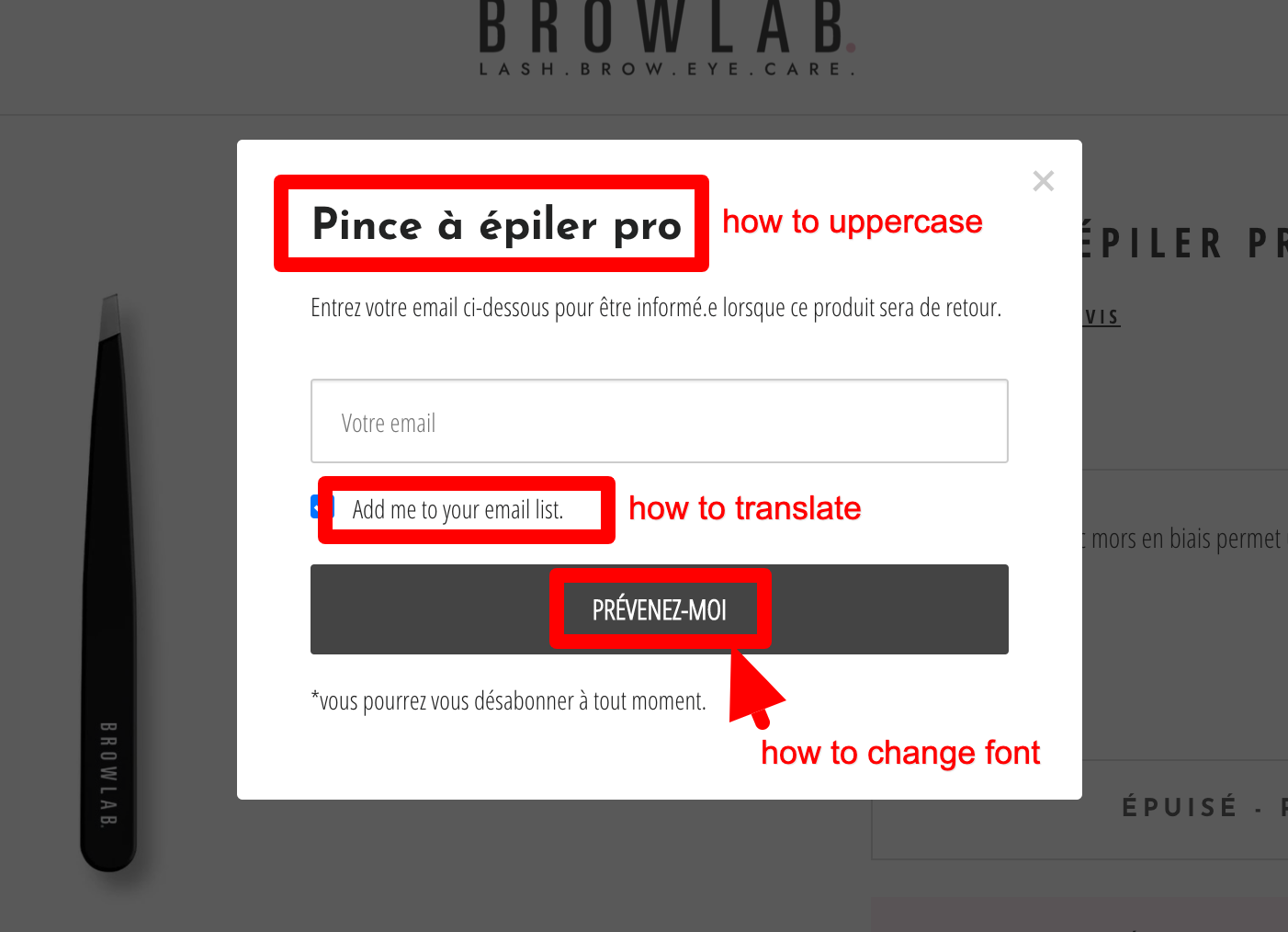
How to customize back in stock popup

  • March 14, 2021
  • 10 replies
  • 2393 views

Hi everybody, I would like if there a way to more customize the back in stock popup form please.
 

    This topic has been closed for replies.
    Best answer by caroline

    Hi @Browlab,

    Did you install Back in Stock for Shopify by following these steps? If so, this forum post covers how to change the styling and text of the modal.

    Best,

    Caroline

    10 replies

    julie.accardo
    Klaviyo Employee
    Klaviyo Employee
    March 14, 2021

    Hi @Browlab,


    If this form was designed as a signup form in Klaviyo, you do have the option to adjust the font in a button block. If the font you’re looking to use isn’t available by default in the signup form editor, you have the ability to apply custom fonts to signup forms. 


    As for the translation and uppercase requests, you should have the power in the editor to modify these. Here’s the link to our overview of the signup form builder.


    Hope this helps!

    Julie

    JA
    BrowlabAuthor
    New Member
    March 14, 2021

    I’m using the normal integration not a custom one !!! Do you mean in every needs I have to pay a developper to have Klaviyo in my language on front end? Are you killing?

    julie.accardo
    Klaviyo Employee
    Klaviyo Employee
    March 14, 2021

    Hi @Browlab,


    Custom fonts can be applied directly to Klaviyo signup forms. You do not need a custom signup form in order to apply custom fonts. 


    Using Klaviyo’s signup form designer, you should be able to adjust the the language (as long as it’s a multi-checklist block) and uppercase (as long as it’s a text block) in the signup form. You will not need a custom form for this either.


    Best,

    Julie

    JA
    BrowlabAuthor
    New Member
    March 14, 2021

    Sorry but it’s a Shopify integration so I don’t have any “back in stock” form in back end...

    caroline
    carolineAnswer
    Klaviyo Alum
    March 16, 2021

    Hi @Browlab,

    Did you install Back in Stock for Shopify by following these steps? If so, this forum post covers how to change the styling and text of the modal.

    Best,

    Caroline

    Caroline Lu
    BrowlabAuthor
    New Member
    March 16, 2021

    Yes, I’ve installed Back in Stock for Shopify by following these steps? So I’ll try to follow the forum post instructions, thanx. Concerning the “add me to your mailing list” translation, no way?

    caroline
    Klaviyo Alum
    March 16, 2021

    Hi @Browlab,

    Yes, you can change that text as well -- please read this Help Center article which details the instructions on how to do so.

    Best,

    Caroline


    Caroline Lu
    BrowlabAuthor
    New Member
    March 16, 2021

    Sorry but no way to change the “add me to your mailing list” translation… I already know this article.

    David To
    Klaviyo Employee
    Klaviyo Employee
    April 26, 2021

    hey @Browlab,

    Building off of both @julie.accardo and @caroline, you can translate the “Add me to your mailing list” to be whatever language or phrasing you wish by adding a line of code within the "modal" section as highlighted in the Prompt Customers to Opt-In to Marketing section of the article and screenshot that Caroline had provided.

    For example, adjusting the default code from: 

    modal: {
    newsletter_subscribe_label: "Add me to your email list."
    ...
    }

    to

    modal: {
    newsletter_subscribe_label: "Join Newsletter List."
    ...
    }


    Will allow that checkbox to read “Join Newsletter List” as opposed to “Add me to your email list”. This would allow you to manually translate that phrase to be whatever language or however you want that phrase to appear as to allow users to join your list when signing up for back in stock. 

    -David

    Contributor I
    January 31, 2023

    In case someone else is looking up “how to style the back in stock pop up” and lands here - The solution is to import a custom CSS sheet, as noted in this forum post. Hope that helps!