

Contributor II
June 12, 2021
Solved

How to edit Preference Pages?

  • June 12, 2021
  • 9 replies
  • 1035 views

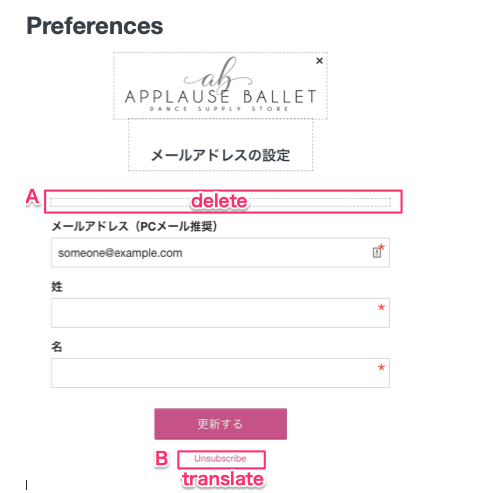
On the preference page: https://www.klaviyo.com/email/pages, I can’t edit out an empty text box or change the text language. Please advice where I can do.

 

    This topic has been closed for replies.
    Best answer by David To

    Hello @applause,

    Thank you for bringing this behavior to our attention! 

    This behavior you are observing does seem odd and I’m going to flag it to our Product Team and Engineering team to investigate further. 

    I’ll provide any updates I receive from my team members regarding this behavior. 

    Thank you for being a member of the Klaviyo Community!

    David

    9 replies

    jen.keith
    Klaviyo Employee
    Klaviyo Employee
    June 13, 2021

    Changing the language on your preference and opt-in related pages can be done under the list settings. At the bottom, there is a language option that will affect all of the boilerplate text that is on your forms: 


    The text block with dashes around the edges will not appear on the preference pages that customers see, but is a placeholder for you to add text to if you would like. It is unable to be further deleted. Let me know if this helps!

    applauseAuthor
    Contributor II
    June 13, 2021

    Hi Jen,

    Thank you for your response.
    I could edit some of them. However, I still can’t do that. For example, the following part, Email.


    David To
    Klaviyo Employee
    David ToAnswer
    Klaviyo Employee
    June 16, 2021

    Hello @applause,

    Thank you for bringing this behavior to our attention! 

    This behavior you are observing does seem odd and I’m going to flag it to our Product Team and Engineering team to investigate further. 

    I’ll provide any updates I receive from my team members regarding this behavior. 

    Thank you for being a member of the Klaviyo Community!

    David

    Jakub
    Partner - Silver
    Partner - Silver
    November 9, 2022

    Is changing the language on your preference and opt-in related pages functionality not available any more? I cannot find it in new structure?

    -=JB=-
    alex.hong
    Klaviyo Alum
    November 9, 2022

    Hi @Jakub ,

    Klaviyo does not currently have a built-in feature that automatically translates email content into different languages. However, if you want to configure email templates in a variety of languages, they will certainly be supported. Klaviyo allows full customization and translation of all email content and in-email tags (unsubscribe links, manage preferences, etc). In this article, you will learn how to customize email content, target based on language preferences, and change signup form opt-in text. For more information, please see this guide How to Customize Content Based on Language
     

    Jakub
    Partner - Silver
    Partner - Silver
    November 9, 2022

    So this functionality is no longer available right?


    -=JB=-
    alex.hong
    Klaviyo Alum
    November 9, 2022

    Hi @Jakub ,

    Are you not talking about the Language setting that says english?

    Jakub
    Partner - Silver
    Partner - Silver
    November 10, 2022

    Hi @Jakub ,

    Are you not talking about the Language setting that says english?

    Yes exactly earlier it was possible to change the language there and all preference pages was automatically translated to that language i think this is not supported anymore.

    -=JB=-
    Active Contributor II
    February 2, 2023

    Customize your Preference pages
    Set up new preferences in Subscribers > Preferences, if needed.
    Go to Pages > Preferences.
    In the form, click on the Preferences block. 
    Click on the preferences you would like to add to the form. 
    Upload your logo. 
    Save and Publish. 
    Click the Use as Default button.


    Regards,

    Rachel Gomez
