


Contributor I
February 18, 2021
Solved

How to get Shopify language Data to Segment List?

  • February 18, 2021
  • 23 replies
  • 4862 views

We want to use klaviyo for sending newsletter. Currently our shopify store has 2 languages, french and english. Customers and subscribers are added in a klaviyo list automatically, however there is no language information...?

Inside shopify, there are filters to segment customer into different language lists, but this data doesnt seem to get transfered to klaviyo…?
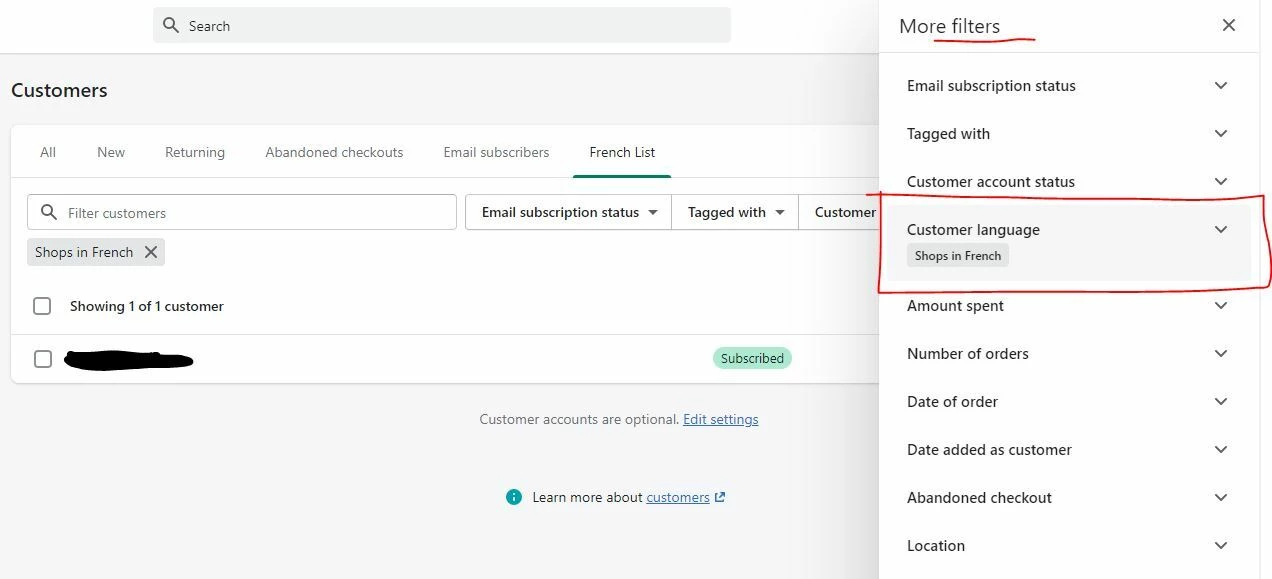


We need to somehow get the language information for each customer/subscriber in order to send them newsletter in the correct language… How can this be done? What is the easiest method to achieve this?

We are using shopify native multi language feature, but will also be adding a language addon to better control/manage translations. We would be using one of the addon that officially support the native shopify language feature here : https://apps.shopify.com/collections/apps-for-store-languages
Any recommendations? Would one of these allow us to more easily get the language data in shopify?


This topic has been closed for replies.
Best answer by Omar

Hi @Loons,

There are a couple of ways to go about this.

Separate sites - separate accounts
For the end user I think this creates the best experience.
Why? Let's say you're target audience 1 is from France and second is from UK or USA or maybe even another EU country.
Trying to do all with 1 Shopify shop will i.e. add a lot of irrelevant payement options or just simply because in France it's 10€ while in most other EU countries it's €10. These small differences have a big impact on specific country related relevant differences. Having 2 sites and 2 separate Klaviyo accounts will also keep things much clearer. Each country is different and tailoring and being relevant to specific countries just increases your conversions. Also, Klaviyo can set 1 default currency which is getting used, multicurrency, without some fancy updating and customized work will probably be an issue since dynamic products have 1 price which is the main price of the shop.


That being said if you do feel you want to go the one account for klaviyo and shopify route you could add the question in signup forms which language they prefer and also adding that in a welcome flow to gather some additional info.

If you're using multilanguage that also changes the URL for each language (/EN/ or /FR/) you could use this as a way of filtering people. Even maybe adding a flow that adds a custom profile tag with latest language used.

Last you could use something like Tagmanager (or just code it in your site) to send an event or profile property with the latest language use.


Hope it helps.

Omar


23 replies

Contributor II
October 7, 2021

This is something I’ve also been waiting for. Shopify has native multi-language support for 2 years now. 

Please Klaviyo integrate the property “locale” from Shopify. It’s in the Shopify customer object, see: https://shopify.dev/api/admin-graphql/2021-10/objects/Customer#fields-Customer-OBJECT (=> locale)


It would be super helpful to have acces to that property inside Klaviyo. (Segment customers based on locale, Setup flows based on locale etc...)


*In the mean time we’ve setup a MechanicApp task to auto tag customers inside Shopify with their last used locale. (And that get’s synced to Klaviyo)

Taylor Tarpley
Community Manager
Community Manager
October 9, 2021

Hi all, 


First, I wanted to give a thanks to @simong for going out of your way to give your peers a workaround for this present pain point! It is much appreciated!

Second @DriesP, I can understand the frustration you might be experiencing with this Klaviyo limitation at this point. I am sorry for the inconvenience it’s caused, but I am grateful that you have used your voice to tell us what features you would like to see happen. We need that from our customers, so thank you! Additionally, thank you for giving another workaround for this as well!


Thank you all for being a part of our Community! 


-Taylor


Contributor I
February 4, 2022

Hi all, 


First, I wanted to give a thanks to @simong for going out of your way to give your peers a workaround for this present pain point! It is much appreciated!

Second @DriesP, I can understand the frustration you might be experiencing with this Klaviyo limitation at this point. I am sorry for the inconvenience it’s caused, but I am grateful that you have used your voice to tell us what features you would like to see happen. We need that from our customers, so thank you! Additionally, thank you for giving another workaround for this as well!


Thank you all for being a part of our Community! 


-Taylor


Is this feature now on Klaviyo’s roadmap at all or nothing for the foreseeable future? 

Problem Solver I
March 4, 2022

Hi,


Can we please get a follow up from a Klaviyo team member. I’m pretty sure this feature is quite easy to implement directly in your app and has been requested for over 2 years now. Can you please make this a priority the community needs this and I need this for all my clients as well. I’ve always prefer Klaviyo but now competitors like Mailchimp are now offering the customer locale in their app so I guess it’s time for you to add it as well if you wanna stay ahead.

Thank you

March 9, 2022

This is something I’ve also been waiting for. Shopify has native multi-language support for 2 years now. 

Please Klaviyo integrate the property “locale” from Shopify. It’s in the Shopify customer object, see: https://shopify.dev/api/admin-graphql/2021-10/objects/Customer#fields-Customer-OBJECT (=> locale)


It would be super helpful to have acces to that property inside Klaviyo. (Segment customers based on locale, Setup flows based on locale etc...)


*In the mean time we’ve setup a MechanicApp task to auto tag customers inside Shopify with their last used locale. (And that get’s synced to Klaviyo)

@DriesP would you be able to share the Mechanic task you’re using? I can’t seem to find the one that would add the locale as a tag for the customer.

Contributor II
March 10, 2022

We’re actually no longer using the Mechanic solution. I would advise against tags now, as they can create conflicts (as it’s an array and can contain multiple values).

Best solution we’re using atm: Use Shopify Flow and setup a task that pushes the customer locale to a Klaviyo action (Profile property).

*Shopify flow is only available for Shopify Plus, but will soon be available for advanced plan I’ve been told.

* I’ve also reported that the “locale” property is missing on the customer object inside Shopify’s REST API. It’s on their roadmap now. Since Klaviyo uses the REST API, it should be easier for Klaviyo to integrate. So hopefully in a few months this issue will be fixed :-)

Taylor Tarpley
Community Manager
Community Manager
March 10, 2022


Hi all, 


Thanks for sharing your feedback and Thanks @DriesP for popping back in here and pointing out that the locale tag isn’t a viable option and sharing the best solution here that pushes the data in a way Klaviyo can ingest! 

Best solution we’re using atm: Use Shopify Flow and setup a task that pushes the customer locale to a Klaviyo action (Profile property).


As stated before, language information its not something that is native with our Klaviyo X Shopify integration at this time. However, there are many feasible workarounds, as shared above, that can collect and share the data with Klaviyo that enables you to utilize for your personal business needs! Although they may require custom work or a developer! 


Thanks for participating in this conversation! 

-Taylor 

Contributor I
March 14, 2022

Hi all, 

Im having same issues. I want to send Abandoned cart reminder in different Languages.

(We use the translation App Weglot with subdomains for each language). I have set different subscription forms for each language and filtered it by the domain. As an example the English sub-form is only Displayed on the domain which includes 

en.semode.de and adds the subscriber to my Newsletter list. I have setup 3 different Newsletter lists each for one Language. This was my Solution for the newsletter part.


Now i want to send Abandoned cart reminder Emails. I edited my source code and pasted a code from Weglot to tag the customer with the right Language. ( if the customer switches to English and orders or starts a checkout weglot adds the Tag : lang : en)

The issue Im facing is that i cant find the correct filter to set it up in my flow.


I checked for the Trigger Setup Preview and look at the Variables created from me which selected the language Türkish (tr) i noticed that the language tag is located in the note_attributes section. But as i described i cant find the right filter for that. I tested everything but cant set it up so i need help :)


Thanks for everyone to reply to this message

Semode

Contributor I
July 27, 2022

Hi @DriesP

Could you please share how you set up your Shopify Flow? 

I haven’t succeeded in setting it up properly for the moment, so that would help me a lot! (And many other I’m sure)

Thank you!

Contributor II
July 27, 2022

Hi @Pauline_Syos 

I currently have it setup like this. (See screenshot)


Trigger: Customer created
Action: Klaviyo Event