If you're on Shopify, the easiest way is to add the back-in-stock feature. This will display a web button on any product page where the product is out of stock.
Clicking on that button opens a pop-up where they can register their interest in the product. When it's back in stock (or launched as in your case), Klaviyo will automatically send an email to notify those contacts. More info on that here: https://help.klaviyo.com/hc/en-us/articles/360001895651
If you're not on Shopify, or want greater control over the form and notifications, you achieve this as follows in Klaviyo:
Create a list for your product waitlist
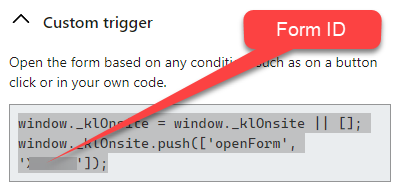
Create a form and set the submit button to submit contacts to your waitlist. Also under the form's display settings, set to 'Only on custom trigger'. At the bottom of that configuration panel grab the form ID (see below).
Create your web button “Join the waitlist” on the product page and add the following code snippet to that button (replace form ID with your form ID):
If you're on Shopify, the easiest way is to add the back-in-stock feature. This will display a web button on any product page where the product is out of stock.
Clicking on that button opens a pop-up where they can register their interest in the product. When it's back in stock (or launched as in your case), Klaviyo will automatically send an email to notify those contacts. More info on that here: https://help.klaviyo.com/hc/en-us/articles/360001895651
If you're not on Shopify, or want greater control over the form and notifications, you achieve this as follows in Klaviyo:
Create a list for your product waitlist
Create a form and set the submit button to submit contacts to your waitlist. Also under the form's display settings, set to 'Only on custom trigger'. At the bottom of that configuration panel grab the form ID (see below).
Create your web button “Join the waitlist” on the product page and add the following code snippet to that button (replace form ID with your form ID):