Contributor I
April 14, 2023
Solved

How to remove form teaser message at bottom of screen?

  • April 14, 2023
  • 3 replies
  • 554 views

Hello Team,

Hope you are doing well.

Can you please help me to remove the GET 15% Off that is popping from the bottom of my screen (attached screen-shot).

I think it is due to the Klaviyo Exit Intent message , as when I click on it, it takes me to the same message.

Regards,

Alireza 

 

    This topic has been closed for replies.
    Best answer by retention

    Hi @alirezaasadi, welcome to the community!

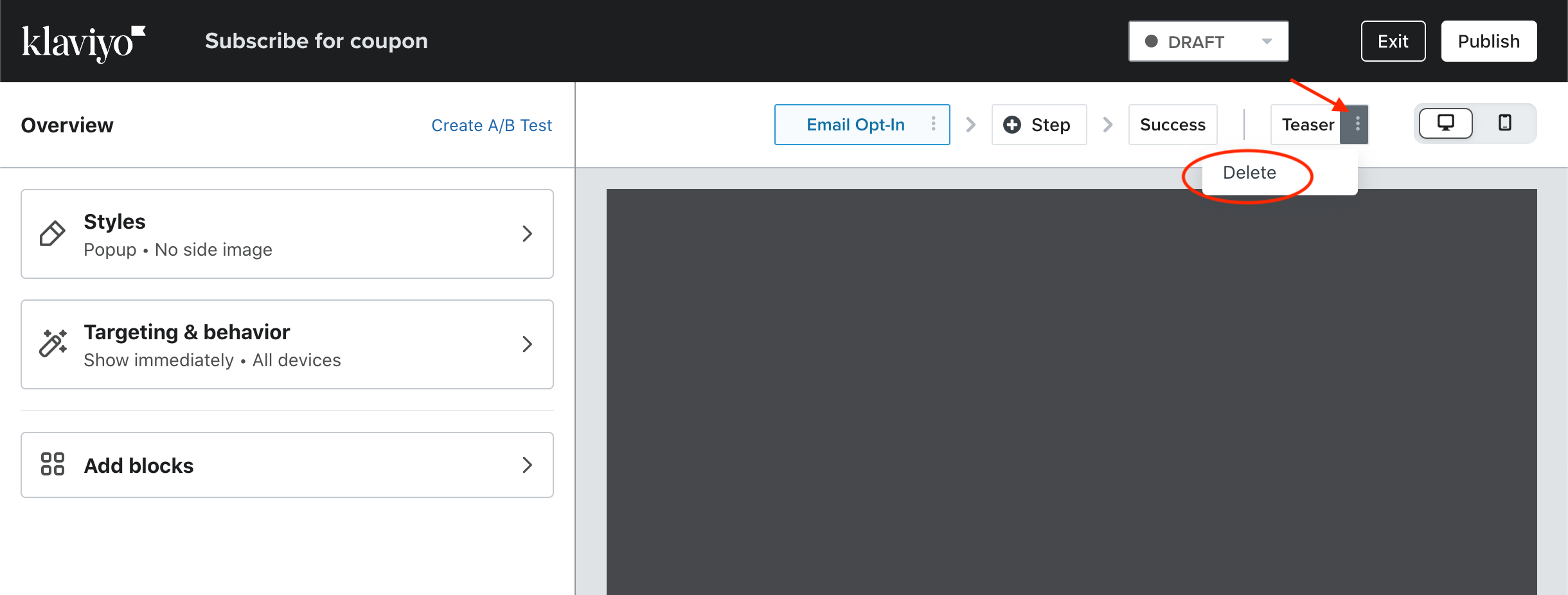
    I don’t see the screenshot, but I assume it’s the “teaser” element of your Signup Form.  You can go into the Sign Up Form and disable it by deleting it here:

    Let me know if that worked for you.

    3 replies

    Taylor Tarpley
    Community Manager
    Community Manager
    April 14, 2023

    Hi @alirezaasadi


    Welcome to the Community! 


    That is your form teaser! If you choose to edit it or toggle this option off by checking out this similar  thread below!


    Thanks for participating in the Community!

    -Taylor 

    retention
    Partner - Platinum
    retentionAnswer
    2025 Champion
    April 14, 2023

    Hi @alirezaasadi, welcome to the community!

    I don’t see the screenshot, but I assume it’s the “teaser” element of your Signup Form.  You can go into the Sign Up Form and disable it by deleting it here:

    Let me know if that worked for you.

    Joseph Hsieh // retentioncommerce.com // X: @retention
    Contributor I
    April 14, 2023

    Many thanks Taylor / Champion for your help an support - it is highly appreciated .