Contributor I
November 12, 2022
Solved

How to remove underline hyperlinks

  • November 12, 2022
  • 2 replies
  • 1428 views

Where can I find the settings to remove the underline from all hyperlinks? So we standard don’t want hyperlinks to be underlined in emails. 

    This topic has been closed for replies.
    Best answer by Spark Bridge Digital LLC

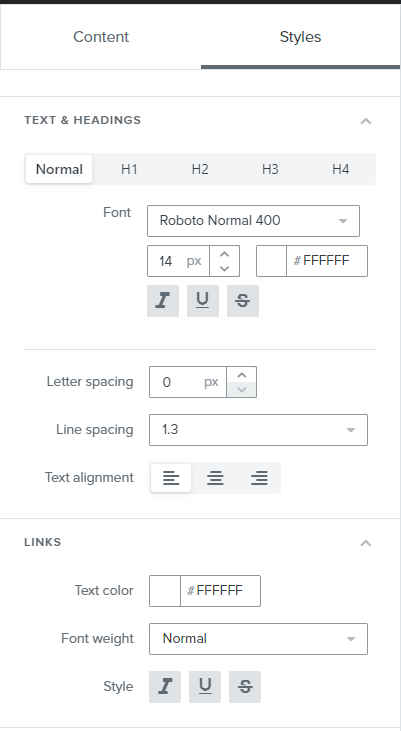
    In your template editor, under the Styles section there is an area for Links settings! There you can remove underlines as a style default. 


    2 replies

    Spark Bridge Digital LLC
    Partner - Platinum
    2025 Champion
    November 14, 2022

    In your template editor, under the Styles section there is an area for Links settings! There you can remove underlines as a style default. 


    Klaviyo Champion | Your Email Marketing BFF
    Brian Turcotte
    Klaviyo Alum
    November 14, 2022

    Hi @Sander and welcome to the Community! 


    Just as @Spark Bridge Digital LLC mentioned, you can remove the underline from hyperlinks by navigating to the Styles tab of the email editor:

    Then, find the Links section of the menu and click the Underline button to toggle it off:

    If you are using the Classic Editor, the process is the same but the Styles tab is just in a different location, and the Links style selector is a drop-down menu:


    It might also be helpful to understand that if an email looks different in an inbox than it did while you were editing in Klaviyo, it’s because every inbox provider has its own styling and formatting protocol that cannot be overridden from Klaviyo’s side - just something to keep in mind in case the links are still underlined in certain inboxes.


    I hope this helps, and thanks for using the Community!


    - Brian