Contributor I
July 26, 2023
Solved

How to set up a repeating flow?

  • July 26, 2023
  • 3 replies
  • 1396 views

We have a subscription program and ecommerce store, and I’d like to set up an evergreen series of emails to send 2-3x per year to our entire email list (excluding current subscribers) to encourage sign-up. 

Is there a way to set-up a flow that repeats 2x per year? 

I set up a profile update to create a First Purchase Date, then figured I could do a date property trigger. However, the date property trigger gives the option of repeating monthly or annually with no options for more frequent delivery. If there is no workaround, I could do it annually and space out the emails in the flow (or maybe list the emails 2x in the flow with correct spacing so they get sent out 2x per year), but if there is a cleaner way to do it, I’m open to suggestions. Thank you!

This topic has been closed for replies.
Best answer by Omar

Hi @kellyk,

You're almost there, I suggest you to take a look at this great resource from Klaviyo about using and setting up date property triggered flows in Klaviyo - https://help.klaviyo.com/hc/en-us/articles/360002732652

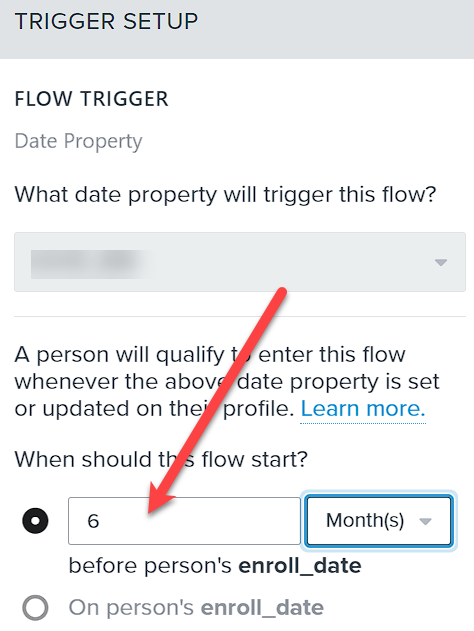
You should choose yearly and then have a 6 months wait as shown in the image below.
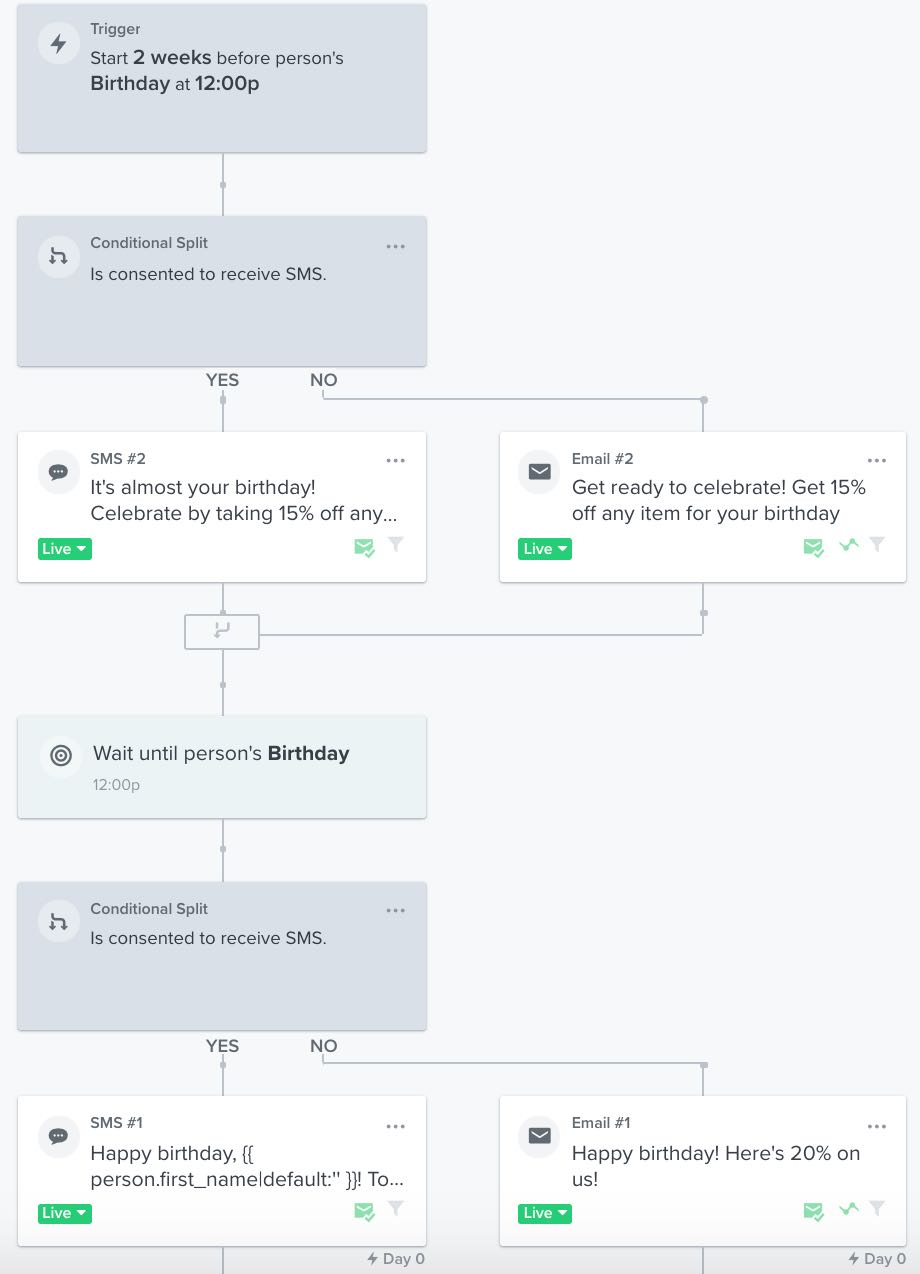
This will give you the option to setup your flow correctly by also adding time delays in the flow (see screenshot 2 - grabbed from the Klaviyo article mentioned above)


Was this helpful?
 

Omar Lovert // Polaris Growth // Klaviyo Master Platinum Partner

We help with e-commerce growth through CRO, Klaviyo and CVO

3 replies

Omar
Partner - Platinum
OmarAnswer
2025 Champion
July 26, 2023

Hi @kellyk,

You're almost there, I suggest you to take a look at this great resource from Klaviyo about using and setting up date property triggered flows in Klaviyo - https://help.klaviyo.com/hc/en-us/articles/360002732652

You should choose yearly and then have a 6 months wait as shown in the image below.
This will give you the option to setup your flow correctly by also adding time delays in the flow (see screenshot 2 - grabbed from the Klaviyo article mentioned above)


Was this helpful?
 

Omar Lovert // Polaris Growth // Klaviyo Master Platinum Partner

We help with e-commerce growth through CRO, Klaviyo and CVO

Helping E-commerce brands maximize Lifetime Value & Profits with Klaviyo, CRO & CVO - Get your free Audit - https://link.polarisgrowth.com/free-audit
kellykAuthor
Contributor I
August 2, 2023

Thank you! I’m still getting a little bit stuck. I’d like to send a 3-part series of emails. Is that possible with this type of delay or can it only be 1 email? The issue I am running into is the wait step BEFORE the trigger date (the one below that says configure time delay) will not allow me to do X number of days like the wait steps after the Trigger Date. See screenshot. 


retention
Partner - Platinum
2025 Champion
August 3, 2023

@kellyk - If you look at the example from  @Omar - he put a 6 month delay before the anniversary (annual) date, and then a “Wait 6 Months” time delay (instead of 3 days in your example) for the second message to fall on the actual “Purchase Date.”  You scan set this as a setting of the “Wait until person’s … “ block in the Flow (on the left hand side). 

So basically, 6 months before the date, is Email 1, then wait 6 months, and Email 2 falls on the “Purchase Date.”

You can also add a third (or more) emails after that in the same way (with additional time delays, and additional messages).  

The how-to guide Omar shared should walk you through it! 

Joseph Hsieh // retentioncommerce.com // X: @retention