

shoshana.antunes
Klaviyo Employee
Klaviyo Employee
November 27, 2020

I have a password protected landing page on my Shopify store and my subscribers aren't being added to a list. What should I do?

  • November 27, 2020
  • 19 replies
  • 5659 views

This is likely happening due to your signup form not being configured properly to ensure that new signups get added to your list. There are two main steps to take to resolve this issue! The first will take place in your Klaviyo account and the second will take place from your Shopify Admin page. Ensure you’re logged into both for a speedy fix! 

  • Login to Klaviyo, navigate to the Integrations tab, and select your Shopify integration

From here, ensure that the “Subscribe customers who Accept Marketing to a Klaviyo list” check box is selected. If it isn’t, check this box and select the list you’d like subscribers added too. Be sure to click the Update Shopify Settings button when done.
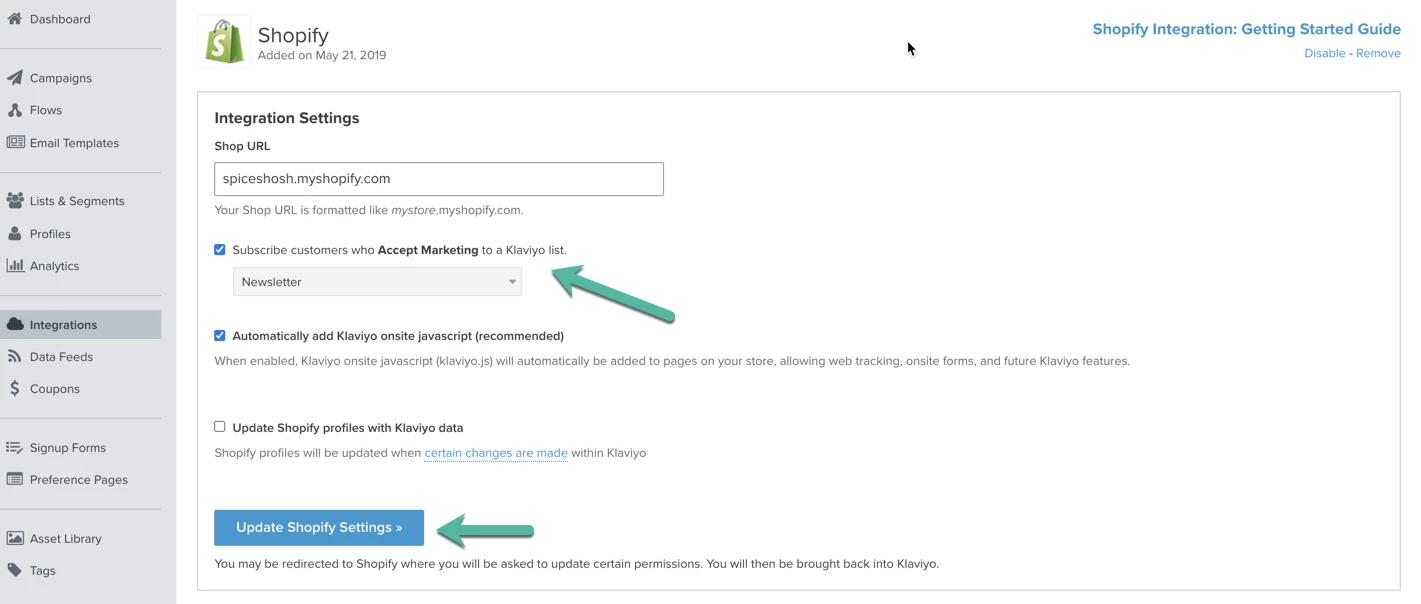
 

  • Login to Shopify Admin and search for the password-content.liquid template within your store’s theme

When you find the page, look within that .liquid file for this code snippet:

<input type="hidden" name="contact[tags]" value="prospect, password page">​


You’ll need to update this snippet to include "newsletter" within the value section. It should end up looking like this:

<input type="hidden" name="contact[tags]" value="prospect, password page, newsletter">​


Once this has been updated, new subscribers will be correctly added to your Klaviyo account! Note that they will be added to the list you selected in your Shopify Integration Settings page (screenshot above). If you’ve done the above steps and are still experiencing issues with adding people to your main list in Klaviyo, reach out to our support team at success@klaviyo.com for assistance! 

19 replies

Contributor II
May 14, 2021

Hi @shoshana.antunes!

Thanks for the step-by-step description of the above issue. It has half-helped me so far: I have successfully selected the list I’d like subscribers added to and updated the Shopify Settings. That step seems to be all good. 

I’m using the Broadcast theme for oceanmeetsgreen.com. And have already had a few people subscribe via the password page. But they aren’t added to the selected list. 

But when trying to edit the code, I got stuck: In my Shopify Theme I can’t find the password-content.liquid template. I only see the password.liquid template, which doesn’t include the code snippet <input type="hidden" name="contact[tags]" value="prospect, password page">​

Have you got any tips on how to solve this issue?

Thank you :)

Alena


shoshana.antunes
Klaviyo Employee
Klaviyo Employee
May 14, 2021

Hi @Alena I’m glad it was helpful!

Have you tried looking in other .liquid files within your Shopify theme? We don’t have a way to know for sure exactly what file this tag will be located in, since it can vary from theme to theme. If you do a command F (or control F if you’re on a PC!) and search for <input type="hidden" name="contact[tags]" in each liquid file you should be able to locate the correct code snippet and amend it as described in the post! This will ensure a double opt-in email is sent to the user so that they can subscribe to your designated list.

I hope this helps! :) 

SA
Contributor II
May 18, 2021

Thank you so much @shoshana.antunes !

That helped a lot. I found it in the password.liquid file, located under the ‘Sections’ folder. And it worked :)

New subscribers now receive the email for the double opt-in. 

Have you got any tips how to make it work retrospectively (for the few users that already subscribed prior to making the above change) ?

Thank you!


David To
Klaviyo Employee
Klaviyo Employee
May 18, 2021

Hello @Alena,

Thanks for that tip! Also, great question! 

Since the double opt-in confirmation email pertains to one’s consent, there would not be a way to retroactively send the double opt-in confirmation email to contacts who may have signed up prior to you updating the form settings. 

These contacts who signed up through the form would need to subscribe again in order to receive the double opt-in confirmation email to join your designated list. 

-David

shoshana.antunes
Klaviyo Employee
Klaviyo Employee
May 18, 2021

Great, I’m glad to hear it @Alena ! 


Like @david.to mentioned, we can’t retroactively send double opt-in emails to people who previously subscribed. But there is the work around of creating a segment in Klaviyo of these people, then re-importing them into your list! Klaviyo will never create duplicate profiles so you don’t need to worry about the re-import causing any duplicates :)


The best way to make this segment is to use the Shopify tags that get attached to profiles who subscribed through your signup form:

  • Use the Properties About Someone definition in the segment builder > select Shopify Tags > then contains > prospect
  • Then add an AND connector and use Properties About Someone > select Shopify Tags > contains > password page
  • Add another AND connector and select If Someone Is or Is Not in a List > is not in list *name of your list they’re subscribing to*
  • Lastly, add a final AND connector and select If Someone Is or Is Not Suppressed > is not suppressed

Once you’ve created this segment, export it as a csv, then re-import the file to the list people are subscribing to! This will add these customers to your list, bypassing double opt in. 


Fun fact - you can also create a signup form targeted to only show to users in this segment asking them to subscribe again to emails. Once they re-subscribed, they would receive the double opt-in email again!

SA
Contributor II
May 20, 2021

Once again, thank you very much @shoshana.antunes ! 

Creating the segment, exporting the contact and importing them to the list worked out very well :) And was super easy too.


shoshana.antunes
Klaviyo Employee
Klaviyo Employee
May 20, 2021

Awesome @Alena ! We’re glad to hear it!

SA
organikmonster
Contributor I
Contributor I
November 15, 2021

Thanks for solving the password protected landing page issues. I have found you from this interesting post ( mailchimp alternatives ) and subscribed to Klaviyo for trial and error email campaigns. I found your tools is interesting.

Taylor Tarpley
Community Manager
Community Manager
November 15, 2021

Hi @organikmonster


Happy to hear you’re enjoying our tools and Klaviyo experience so far! 

Here are some additional resources to gain more understanding of our product and the kind of Help documentation we offer: 


Hope you enjoy the Community and your experience with Klaviyo!

-Taylor  

Problem Solver I
March 7, 2022

@shoshana.antunes and others, thanks this is a useful thread. 

Since I am experiencing the same issues I tried to follow the above mentioned solutions. 
I have a password protected page (lexxcontacts.com) and I connected Klaviyo a while ago. Integration and sync are working, since I do see the new subscribers under ‘profiles’. My issue is that they aren’t showing in the newsletter list.

I did update the liquid code. Hopefully correct? See screen.
Any other advise you can give me? Many thanks! Wouter