Jessie Sigler
Klaviyo Alum
February 18, 2021

I integrated with Facebook, so why don't I see my Facebook page on the dropdown menu?

  • February 18, 2021
  • 22 replies
  • 2697 views

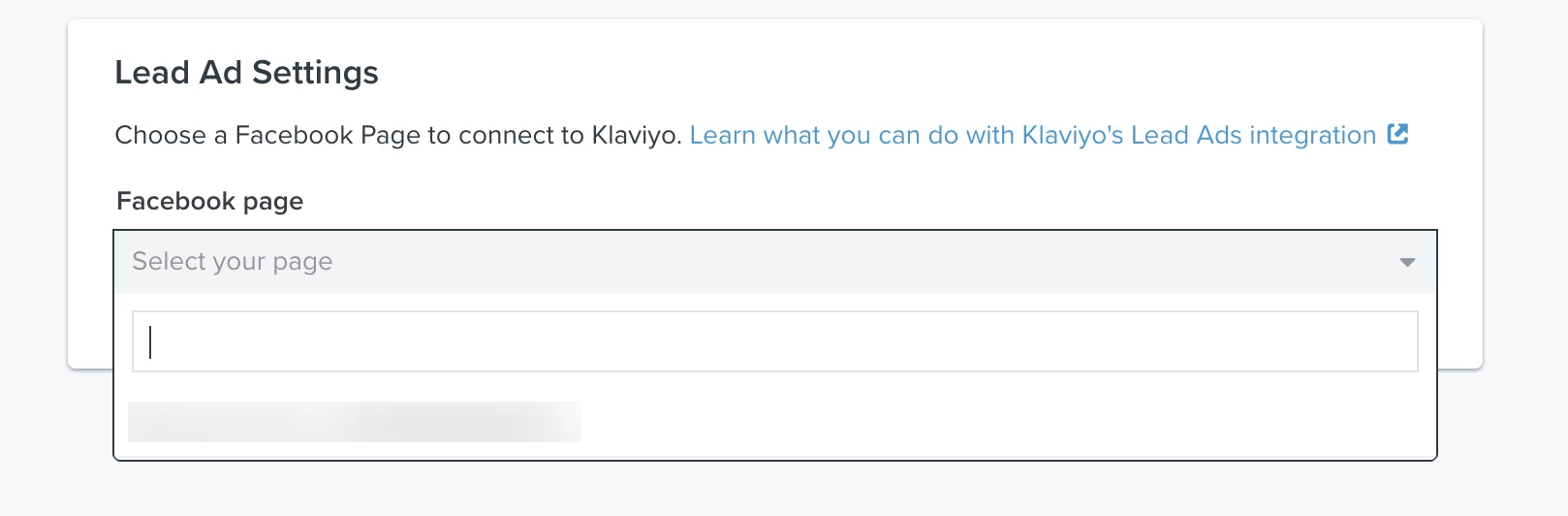
If you integrated with Facebook, but don’t see your Facebook page on the dropdown menu for Lead Ad settings in Klaviyo, the problem might be that the Facebook user who integrated with Klaviyo doesn’t have admin permissions on the associated page. 

The Facebook user who integrates with Klaviyo must have admin permissions on the associated Facebook Page in order for Lead Ads to work correctly. The only Facebook Pages available are those where the user has admin permissions. If you don't see the page you’re looking for when integrating, then the user who integrated with Facebook doesn't have admin permissions. 
After adding a user as an admin, it’s important to remove and re-add the integration so that it will work properly. To learn how to add a user as an admin, check out this post:

Another way to solve this issue is by removing and re-adding the integration, and when you re-add, make sure to use a profile who already has admin permissions for the page. The Facebook user with the proper page permissions should follow these steps:

1. Log into your Klaviyo account
2. Navigate over to the Facebook integration page within Klaviyo.
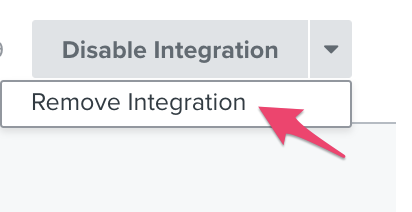
3. Click the arrow next to Disable Integration and select Remove Integration.
?name=inline1761596194.png
kC0mcaEnxCT1Qa7J4EkXWgHvpmc8OcC-zM1lxvHhRRwtGe7qx3GmMMM2fqYOepXLa7Fe3UNQmvcGdjcYvP0SYQltZdNSznomUDRV2veZSKvCgDIBhiBwb6N5AhA_cctTSPf6v43s
4. Go to the Integrations tab. You should not see Facebook as an enabled integration since you removed it in step 3. You can now re-add the Facebook integration.
?name=inline508678235.png​5. When re-adding the integration, you will get routed to Facebook. Instead of "Continue as", you will select "Edit Settings". If you manage multiple Facebook pages, you will need to make sure this step is done.

?name=inline104904443.png
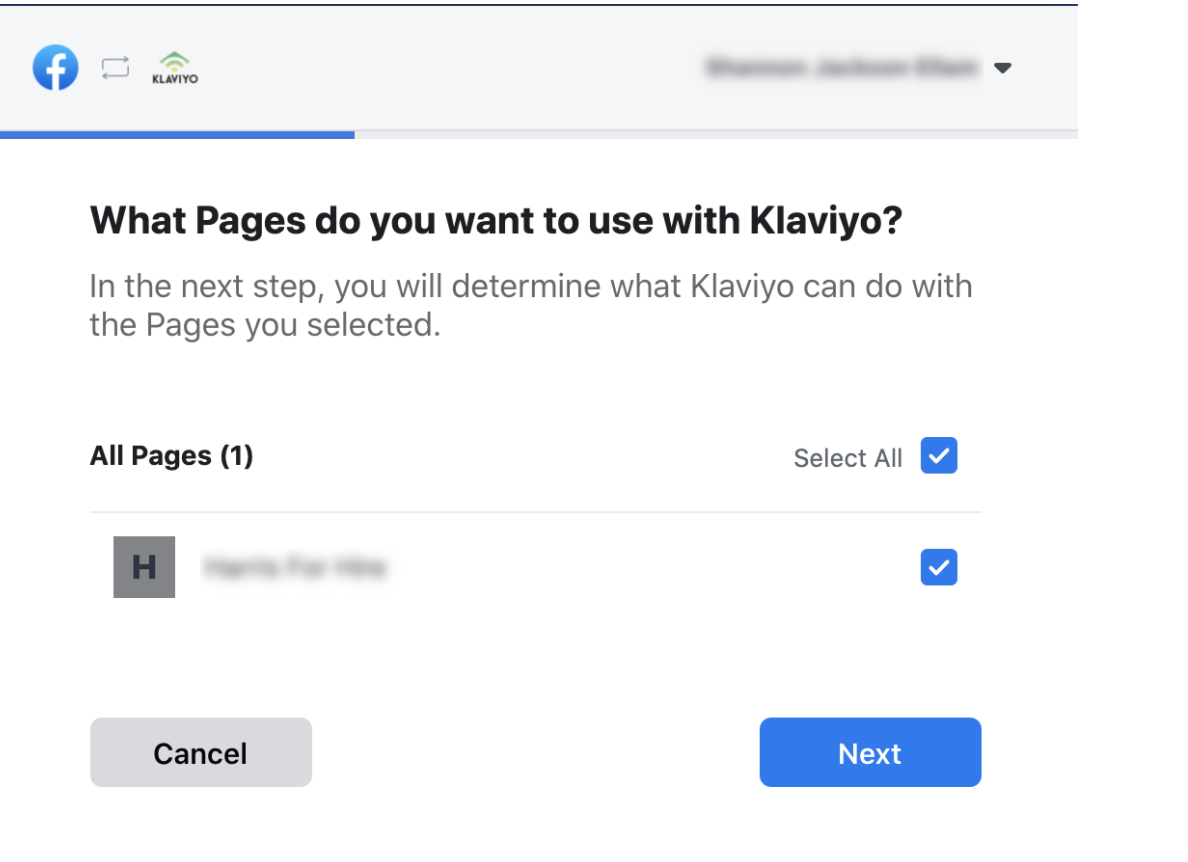
6. The next option will show all of the pages you are associated with. From there, you select the page in question. If it does not show up at this step, make sure you are listed as an admin. 
?name=inline-1969117506.png


7. Enable all permissions for the Facebook page
klaviyoallow.png
Once you've taken all of the steps listed above, you should see your page listed.

    This topic has been closed for replies.
    Pinned Reply By Dov

    Hi @Nicklin,

    @The Sample Stop @quentin @nasa @Portraitful @Legeakademiet @marco0

    Thanks for your follow-up note.

    The team has completed a change that alters the admin check, this should now allow users to see their pages while using the new facebook page experience.

    Thanks for being community members!

    22 replies

    Contributor I
    June 21, 2021

    Hi there,

    I am having this exact issue, however, I created the Facebook page and have all the relevant admin level access but the page I need to link does not appear.

    Are there any other ways to troubleshoot this?


    Many thanks,

    KMH

    David To
    Klaviyo Employee
    Klaviyo Employee
    June 23, 2021

    Hello @kmh2021,

    I would double check to make sure that the Facebook page you are trying to access itself has also been granted access to your Facebook Business Account/Facebook Ad account you are working with that is connected to your Facebook login credentials. 

    I hope this helps!

    David

    Problem Solver I
    August 4, 2022

    I have done all these steps as outlined and my page still won’t appear. Yes I am an admin on the page.


    What is the problem?

    Dov
    Klaviyo Alum
    August 5, 2022

    Hi @jessicamdf,

    Thanks for sharing this with the community.

    Can you clarify if you are using Facebook's New Pages Experience?

    If you are, then you will not be able to set up your Lead Ads integration at this time. Facebook has acknowledged that the 'New Pages Experience' limitation is an issue that they are investigating on their end. During this time, a workaround is to switch back to the 'Classic' view, set up the integration with Klaviyo, and then you can switch back to the 'New Page Experience' view once the integration with your lead ads has been set up. Please switch to the 'Classic' view then remove the integration and follow the steps from my pervious email to add it back

    I hope that’s helpful.

    DD
    Contributor IV
    October 5, 2022

    I would just like to confirm that switching the page back to the Facebook “classic pages” view (or whatever they call it) is what allowed me to finally integrate everything properly. Like the post above, just do that and then once integrated you can switch back to the new pages. I hope this saves someone a headache.

    Contributor I
    October 6, 2022

    @The Sample Stop 


    Thank you for your feedback, I am about to use this workaround.

    Can you confirm that the Switch to Classic Page did not impact your current page content whatsoever? I

    The Facebook wording seems quite ominous but I suspect it is to force everyone to migrate to New Page Experiences…


    Contributor I
    October 6, 2022

    There are issues with switching from the new page to classic page apparently (https://www.morecanvas.com/resources/2021/12/28/classic-vs-new-page-experience-on-facebook)


    All of my classic pages show up but no new pages. Unfortunately looks like there are no options other than switching back, which we do not want to do.

    Contributor I
    October 6, 2022

    Thanks for the link.

    The ads is the most worrisome part for me, really hope that Klaviyo can figure out how to workaround the new Facebook pages limitations.

    Contributor IV
    October 7, 2022

    It worked for me but my page is quite new so nothing much on it. I can’t say the same for older pages I’m afraid.

    Contributor I
    October 7, 2022

    Just created my fanpage today and started to integrate klaviyo with facebook, but for the lead ad integration it is not showing up the fanpage in the dropdown menu even though I am the admin.

    Looked up online and youtube on how to switch back to classic, but that option is not appearing for me. Looks like this new page can’t be changed to classic fan page…

    I signed up with klaviyo to hook up with fb for the lead form ads… and it doesn’t function. What do you suggest Klaviyo?