Contributor I
March 29, 2024
Solved

If/then logic working for desktop preview but not mobile

  • March 29, 2024
  • 3 replies
  • 154 views

Hi everyone! One of the brands that I partner with includes assorted gifts and add-ons with every purchase. For the Abandon Checkout email, I want to include a preview image of the main item they added to cart, not one of these extra gifts or add-ons.

I was able to come up with code that works perfectly when I view the test email on desktop, but for some reason it still shows the add-on when I view the email from my mobile Gmail app. Does anyone know if there’s any way to make conditional logic mobile compatible?

This is what I have so far:

<div><center>

{% if not 'Digital Gift Card' in event.extra.line_items.0.product.title and event.extra.line_items.0.product.title != 'Shipping Insurance' and event.extra.line_items.0.product.title != 'Secrets For The Closest Shave (eBook)' and event.extra.line_items.0.product.images.0.src %}

<img class="center" style="width: 400px; text-align: center;" src="{{ event.extra.line_items.0.product.images.0.src|default:'' }}" width="400">

{% elif not 'Digital Gift Card' in event.extra.line_items.1.product.title and event.extra.line_items.1.product.title != 'Shipping Insurance' and event.extra.line_items.1.product.title != 'Secrets For The Closest Shave (eBook)' and event.extra.line_items.1.product.images.0.src %}

<img class="center" style="width: 400px; text-align: center;" src="{{ event.extra.line_items.1.product.images.0.src|default:'' }}" width="400">

{% elif not 'Digital Gift Card' in event.extra.line_items.2.product.title and event.extra.line_items.2.product.title != 'Shipping Insurance' and event.extra.line_items.2.product.title != 'Secrets For The Closest Shave (eBook)' and event.extra.line_items.2.product.images.0.src %}

<img class="center" style="width: 400px; text-align: center;" src="{{ event.extra.line_items.2.product.images.0.src|default:'' }}" width="400">

{% elif not 'Digital Gift Card' in event.extra.line_items.3.product.title and event.extra.line_items.3.product.title != 'Shipping Insurance' and event.extra.line_items.3.product.title != 'Secrets For The Closest Shave (eBook)' and event.extra.line_items.3.product.images.0.src %}

<img class="center" style="width: 400px; text-align: center;" src="{{ event.extra.line_items.3.product.images.0.src|default:'' }}" width="400">

{% else %}

<img class="center" style="width: 400px; text-align: center;" src="{{ event.extra.line_items.0.product.images.0.src|default:'' }}" width="400">

{% endif %}

</center></div>

    This topic has been closed for replies.
    Best answer by Omar

    Hi @nikkiwombwell,

    It's been a long while I have worked on this case but the main issue you have with this setup is that if more than 4 products are bought it won't take the 5 product into account.

    In regards to your question:

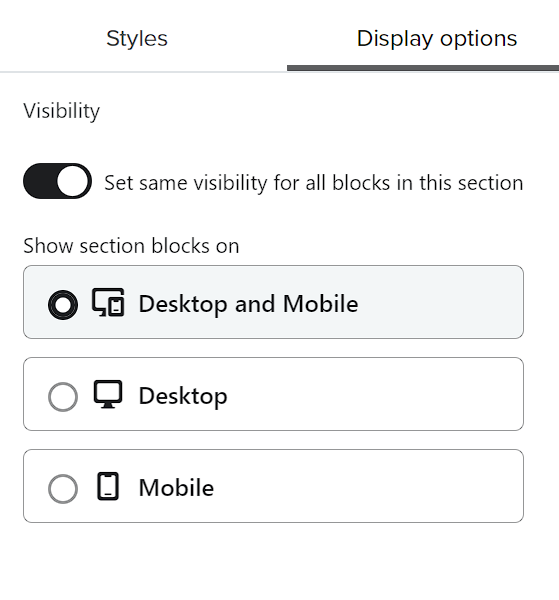
    The rendering of the email happens before sending - the logic is removed from the email you receive so deducting that information means you might have different mobile and desktop versions configured in Klaviyo - check the display options tab to make sure.


    Hope it helps


    Omar Lovert // Polaris Growth // Klaviyo Master Platinum Partner

    We help with e-commerce growth through CRO, Klaviyo and CVO

    3 replies

    Omar
    Partner - Platinum
    OmarAnswer
    2025 Champion
    March 30, 2024

    Hi @nikkiwombwell,

    It's been a long while I have worked on this case but the main issue you have with this setup is that if more than 4 products are bought it won't take the 5 product into account.

    In regards to your question:

    The rendering of the email happens before sending - the logic is removed from the email you receive so deducting that information means you might have different mobile and desktop versions configured in Klaviyo - check the display options tab to make sure.


    Hope it helps


    Omar Lovert // Polaris Growth // Klaviyo Master Platinum Partner

    We help with e-commerce growth through CRO, Klaviyo and CVO

    Helping E-commerce brands maximize Lifetime Value & Profits with Klaviyo, CRO & CVO - Get your free Audit - https://link.polarisgrowth.com/free-audit
    Contributor I
    March 30, 2024

    @Omar Thanks so much! I hadn’t edited the code properly in the mobile version so I just went in and had the desktop version show for both!

    As for only checking the first 4 items, my thought process was that since I’m only checking for 3 add-on items total, if the first 3 items are all add-ons, the 4th one must be something else.

    Either way it’s working perfectly now on mobile and desktop! Thank you for your help!

    Omar
    Partner - Platinum
    2025 Champion
    March 31, 2024

    You're welcome!


    Omar Lovert // Polaris Growth // Klaviyo Master Platinum Partner

    We help with e-commerce growth through CRO, Klaviyo and CVO

    Helping E-commerce brands maximize Lifetime Value & Profits with Klaviyo, CRO & CVO - Get your free Audit - https://link.polarisgrowth.com/free-audit