Contributor I
December 30, 2020
Solved

Is there a way to have a pop up appear only one time during a site visit?

  • December 30, 2020
  • 9 replies
  • 3440 views

I would like to a pop-up to appear when someone first comes to our website, but then once they close the pop-up, not have it appear again.  I have not been able to figure out how to do that, as it keeps popping up when they change pages, for example.


I do not want to limit the pop-up to only certain urls, because we use several landing pages.  So can a pop-up appear one time, no matter where someone lands, and then once they close it, does not appear again?


Thank you.

    This topic has been closed for replies.
    Best answer by retention

    @danschreiber Hello,

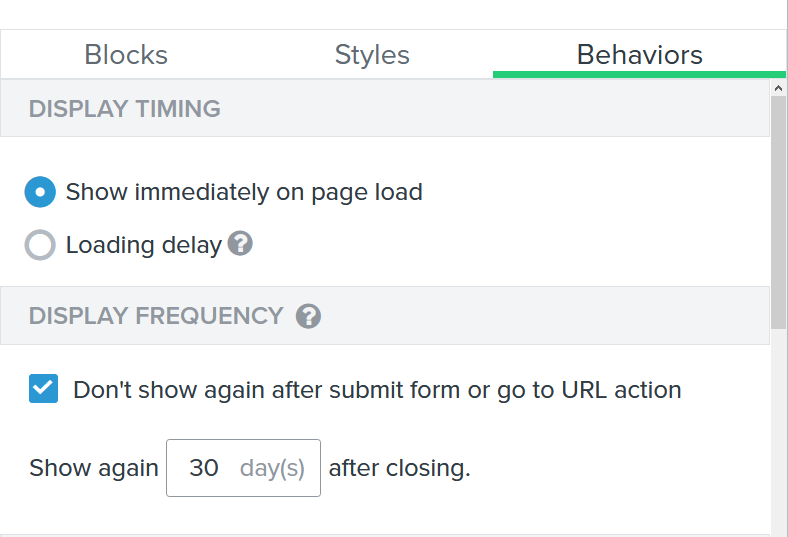
    In the Behaviors section, under Display Frequency options, you can set how frequent the pop up will appear.


    If you set the “Show again _____” to be 0 days, the pop up will appear on every page reload or every new page opened. If you set it to be 30 days, the pop up won’t appear for the same person in the next 30 days after closing it.

    If this option is not set to 0 for you, but you still see the pop up appear every time you open a new page, please test it in a incognito browser and clean your cookies.

    Hope this helps!

    9 replies

    retention
    Partner - Platinum
    retentionAnswer
    2025 Champion
    December 30, 2020

    @danschreiber Hello,

    In the Behaviors section, under Display Frequency options, you can set how frequent the pop up will appear.


    If you set the “Show again _____” to be 0 days, the pop up will appear on every page reload or every new page opened. If you set it to be 30 days, the pop up won’t appear for the same person in the next 30 days after closing it.

    If this option is not set to 0 for you, but you still see the pop up appear every time you open a new page, please test it in a incognito browser and clean your cookies.

    Hope this helps!

    Joseph Hsieh // retentioncommerce.com // X: @retention
    Contributor I
    April 2, 2021

    Hi Klaviyo Success Team! 
    I have the same problem as Dan, but unfortunately your solution doesn’t work on our site. 
    Do you have another solution or do you know the problem, why it didn’t work out on our website? 

    Thank you very much for your response!

    Kind regards, 

    Tim

    marissanunez
    Klaviyo Alum
    April 4, 2021

    Hi @TimWolf 


    Are you able to clear your cache/cookies or view your site on an incognito browser? I’m wondering if your behaviors are set to not show to Klaviyo profiles or set to show to all profiles? If it’s set to not show to Klaviyo profiles there’s a possibility you’re not seeing the form on your browser because you’re already a cookied user. 


    I’m linking this article that talks through form behaviors for you to take a look at. It goes pretty in depth to display frequency and the settings behind it.


    If you’re able to provide a screenshot of your current behavior settings for the form I could get a better idea of what is causing your problem if that article doesn’t clear everything up for you


    Hope this helps!

    Marissa

    MSN
    Contributor I
    April 7, 2021

    Hi Marissa! 

    Thanks for the response! 
     

    Unfortunately the settings linked in the article don’t work properly. What I want is that the popup doesn’t appear again after a customer presses the ‘X / Close Window’ of the popup. Doesn’t matter on which side he is. The popup should only appear one time. After the customer submits or presses the ‘X / Close Window’ it should not appear again - simple.
    Here are my settings: 


    Thank you.

    Kind regards, 

    Tim

    Contributor I
    April 12, 2021

    Hi Marissa!

    Do you have a best practice solution for our problem? 

    marissanunez
    Klaviyo Alum
    April 12, 2021

    Hi @TimWolf,


    Are you able to try the same setup but remove the https:// from the link in the value? I’m wondering if there is a redirect happening or the value is throwing off the logic.


    I hope this helps!

    MSN
    Contributor I
    April 13, 2021

    Hi Marissa! 
     

    But is there a way we can configure our popup that it is shown to the customer only once? And after he shows Subscribe or X that it doesn’t appear again? 
     

    Thank you! Kind regards, 


    Tim 

    Contributor III
    March 10, 2023

    Hi Klaviyo Success Team! 
    I have the same problem as Dan, but unfortunately your solution doesn’t work on our site. 
    Do you have another solution or do you know the problem, why it didn’t work out on our website? 

    Thank you very much for your response!

    Kind regards, 

    Tim

    Same here; the pop-up keeps appearing yet we have switch on the button “don’t show again” as wel as entered a certain number of days in which it should not be showed again after closing the form.


    No matter what we do, visit the webshop via incognito or cleaning cookies, it keeps appaearing on every page.

    Taylor Tarpley
    Community Manager
    Community Manager
    March 17, 2023

    Hi @Lien Mamzel


    Thanks for sharing this question with us! Happy to help! 


    If you are intending to target your new visitors with this form’s behavior, any not cookied or known browsers’s activity on your website essentially cannot be tracked until they give permission and are thus seen as a net new user.  This means that for every page this kind of browser visits or lands on your website, they are always seen as a “new visitor” and the form doesn’t know to apply this behavior to them and will keep displaying the form despite targeting instructions.


    As a workaround, while you can’t ensure a non-cookied users won’t see this popup every time they visit your site, you could reserve the form to only show on one URL vs every page a new visitor lands on.


    Thanks for participating in the Community!

    -Taylor