Contributor I
October 15, 2024
Solved

Issue with Changing the Color of the "View in Browser" Link in Template

  • October 15, 2024
  • 1 reply
  • 134 views

Hello everyone,

I’m trying to customize the "View in Browser" link in my Klaviyo email template to display in a specific color that matches our branding. Currently, I’m using the standard code {% web_view %}, but I haven’t found a way to change the color of this link text.


Thank you for your help!

    This topic has been closed for replies.
    Best answer by bluesnapper

    Hi @ichliebedesign 

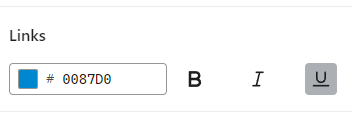
    In the styles configuration of the email editor, you can change the colour of all links in the email to your brand colour (below).

    Does that answer your question?

    Regards

    Andy

    Editor Styles


    1 reply

    bluesnapper
    Partner
    Champion & Partner
    October 15, 2024

    Hi @ichliebedesign 

    In the styles configuration of the email editor, you can change the colour of all links in the email to your brand colour (below).

    Does that answer your question?

    Regards

    Andy

    Editor Styles


    https://bluesnapper.com - Klaviyo Champion '24 & Partner