Contributor I
September 11, 2022
Solved

Klaviyo Forms: Option selected not visible

  • September 11, 2022
  • 1 reply
  • 178 views

Hi there, I have recently built a sign-up form and embedded the link on my Shopify website.

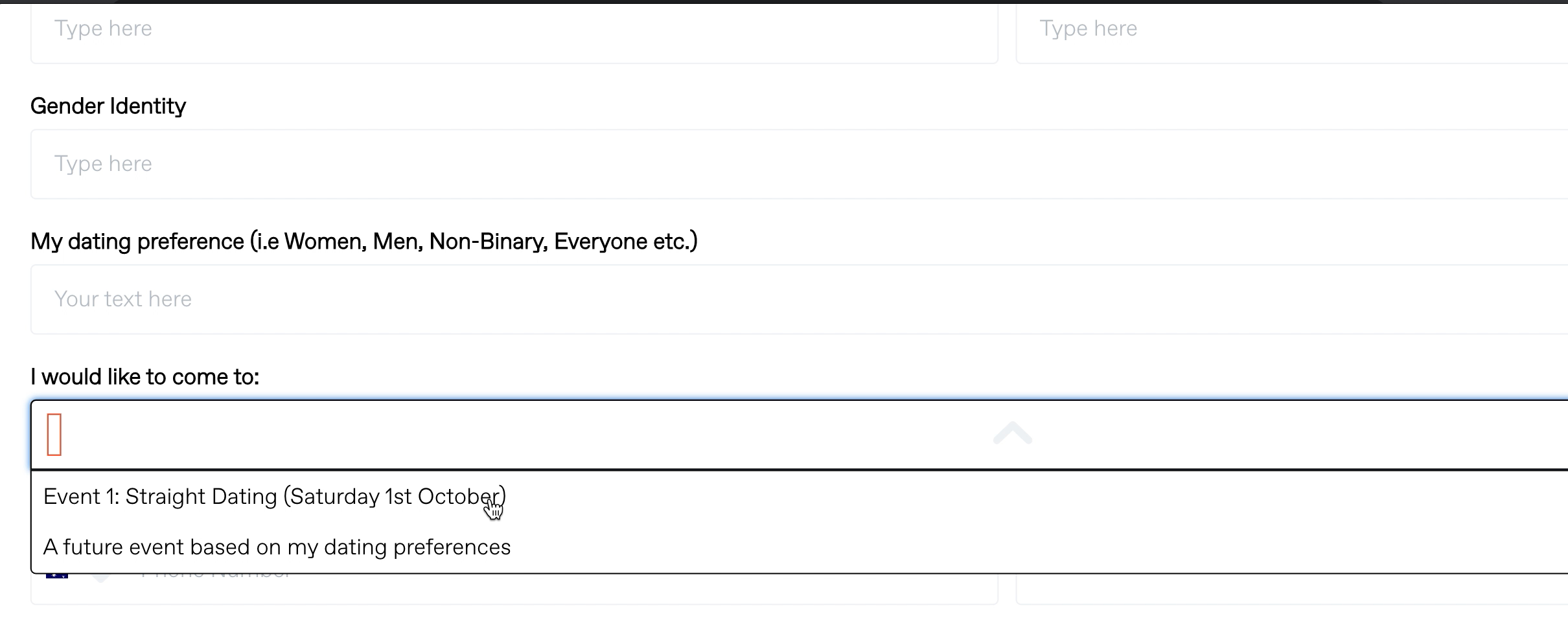
I have a drop down menu and when the users click on their option, the selected option is not clearly visible and I’m afraid this will cause confusion. The same thing occurs for the check box option - a large black dot appears on selection, but again, it’s not clear to the use which option has been checked.

I have attached screenshots below.

Can anyone please assist?
Thank you!


Drop down menu option:
Check box option:

 

This topic has been closed for replies.
Best answer by Omar

Hi @FIGR,

I think your website's coding or CSS is messing up the styling of your form.

So please check with your dev's what is overriding the styling so it can be fixed.

Also whenever you only have 2 max 3 options I recommend to have radio buttons instead of a dropdown. This saves people 1 click and lowers friction.


Omar Lovert // Polaris Growth // Klaviyo Master Platinum Partner

1 reply

Omar
Partner - Platinum
OmarAnswer
2025 Champion
September 12, 2022

Hi @FIGR,

I think your website's coding or CSS is messing up the styling of your form.

So please check with your dev's what is overriding the styling so it can be fixed.

Also whenever you only have 2 max 3 options I recommend to have radio buttons instead of a dropdown. This saves people 1 click and lowers friction.


Omar Lovert // Polaris Growth // Klaviyo Master Platinum Partner

Helping E-commerce brands maximize Lifetime Value & Profits with Klaviyo, CRO & CVO - Get your free Audit - https://link.polarisgrowth.com/free-audit