Contributor III
January 15, 2025
Solved

Klaviyo profile creation in make.com

  • January 15, 2025
  • 1 reply
  • 126 views

Hello,
I am encoutering an issue with make.com and Klaviyo and your help will be much appreciated :pray:
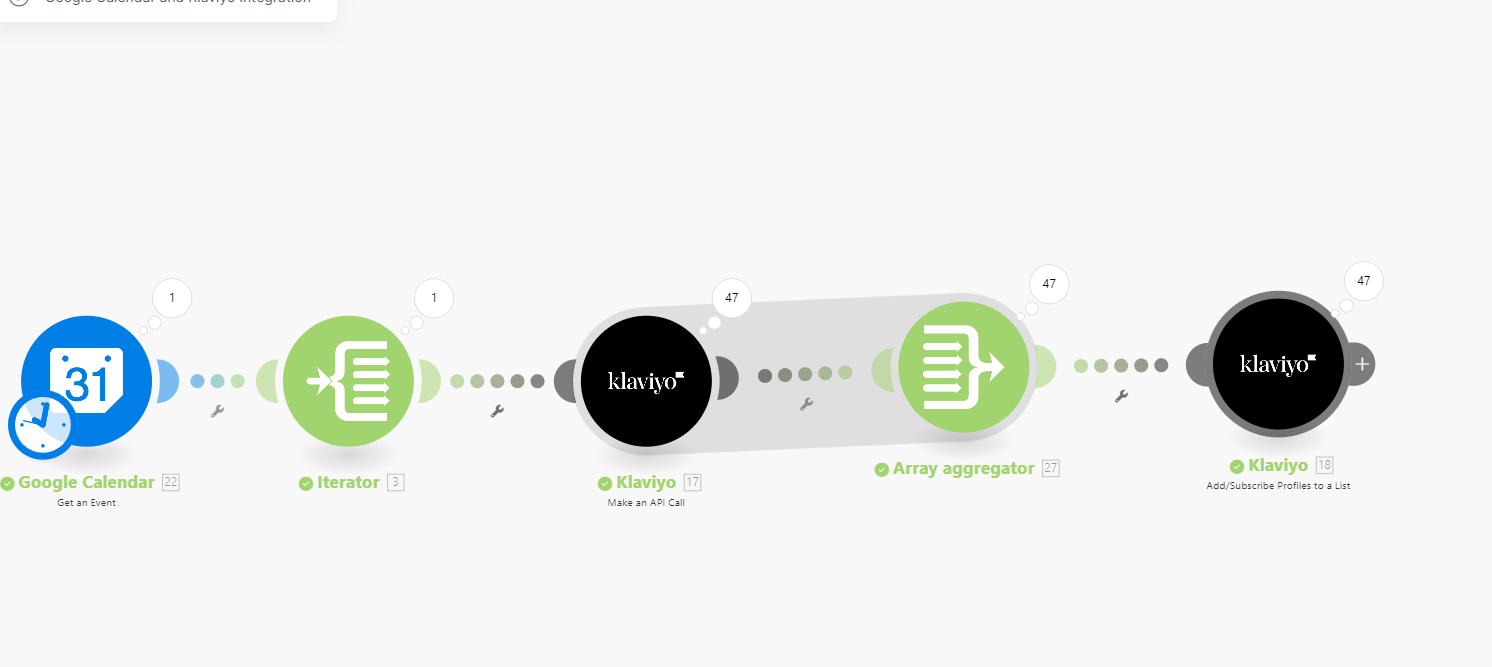
I want to get an event on google calendar and get its attendees, then send the attendees to a list on klaviyo.
The issue that I am encountering is that
The reason I made the APi call is that only one profile is added to the list instaed of the 47 listed. Can it be related to some modules missing or json ?
Also Can I create profile using ?
posthttps://a.klaviyo.com/api/profile-import


    Best answer by Mich expert

    To handle your issue with importing multiple attendees from Google Calendar into a Klaviyo list via Make.com, here are some clarifications and solutions:

    Why Only One Profile is Added

    This could be due to:

    1. Incorrect API Call Structure: You may only be sending data for a single attendee instead of all 47.
    2. Missing Loops in Make.com: If you’re not iterating over the list of attendees, the API call will only process the first attendee.
    3. Rate Limits or Errors: Klaviyo might reject bulk data if improperly formatted.

    Correct Approach to Add Multiple Profiles

    Step 1: Use Loops in Make.com

    Ensure you iterate over the list of attendees and make an API call for each attendee. In Make.com:

    1. Retrieve Google Calendar event attendees.
    2. Use a "Iterator" module to split the list of attendees into individual items.
    3. Pass each item to the API module for creating or updating profiles.

    Step 2: Use the Correct Klaviyo API for Profile Creation

    To add profiles, use the Profile Import API: Endpoint:
    https://a.klaviyo.com/api/profile-import
    Method: POST
    Payload Example:


    json

    CopyEdit

    { "profiles": [ { "email": "attendee1@example.com", "first_name": "John", "last_name": "Doe" }, { "email": "attendee2@example.com", "first_name": "Jane", "last_name": "Smith" } ] }

    Headers:


    plaintext

    CopyEdit

    Authorization: Klaviyo-API-Key YOUR_API_KEY Content-Type: application/json

    This method allows you to send multiple profiles in one API call.

    Filtering Logic

    1. If some attendees are already in Klaviyo, use the Identify API to check if they exist before adding them.
    2. Alternatively, rely on Klaviyo's deduplication. It automatically updates existing profiles with new data instead of creating duplicates.

    Debugging Tips

    • Check Make.com logs to ensure all attendees are processed.
    • Validate API responses to identify if errors are causing skipped profiles.
    • Test the payload using tools like Postman before automating.

    Next Steps:

    1. Implement the loop in Make.com to iterate over the attendees.
    2. Use the Profile Import API for bulk creation.
    3. Debug any errors by testing individual API calls.

    Let me know if you'd like help setting this up or troubleshooting!

    1 reply

    Mich expert
    Expert Problem Solver II
    Expert Problem Solver II
    January 16, 2025

    To handle your issue with importing multiple attendees from Google Calendar into a Klaviyo list via Make.com, here are some clarifications and solutions:

    Why Only One Profile is Added

    This could be due to:

    1. Incorrect API Call Structure: You may only be sending data for a single attendee instead of all 47.
    2. Missing Loops in Make.com: If you’re not iterating over the list of attendees, the API call will only process the first attendee.
    3. Rate Limits or Errors: Klaviyo might reject bulk data if improperly formatted.

    Correct Approach to Add Multiple Profiles

    Step 1: Use Loops in Make.com

    Ensure you iterate over the list of attendees and make an API call for each attendee. In Make.com:

    1. Retrieve Google Calendar event attendees.
    2. Use a "Iterator" module to split the list of attendees into individual items.
    3. Pass each item to the API module for creating or updating profiles.

    Step 2: Use the Correct Klaviyo API for Profile Creation

    To add profiles, use the Profile Import API: Endpoint:
    https://a.klaviyo.com/api/profile-import
    Method: POST
    Payload Example:


    json

    CopyEdit

    { "profiles": [ { "email": "attendee1@example.com", "first_name": "John", "last_name": "Doe" }, { "email": "attendee2@example.com", "first_name": "Jane", "last_name": "Smith" } ] }

    Headers:


    plaintext

    CopyEdit

    Authorization: Klaviyo-API-Key YOUR_API_KEY Content-Type: application/json

    This method allows you to send multiple profiles in one API call.

    Filtering Logic

    1. If some attendees are already in Klaviyo, use the Identify API to check if they exist before adding them.
    2. Alternatively, rely on Klaviyo's deduplication. It automatically updates existing profiles with new data instead of creating duplicates.

    Debugging Tips

    • Check Make.com logs to ensure all attendees are processed.
    • Validate API responses to identify if errors are causing skipped profiles.
    • Test the payload using tools like Postman before automating.

    Next Steps:

    1. Implement the loop in Make.com to iterate over the attendees.
    2. Use the Profile Import API for bulk creation.
    3. Debug any errors by testing individual API calls.

    Let me know if you'd like help setting this up or troubleshooting!

    (+2348087340172) whatsapp