Contributor I
August 6, 2023
Solved

Mobile View Issue

  • August 6, 2023
  • 5 replies
  • 783 views

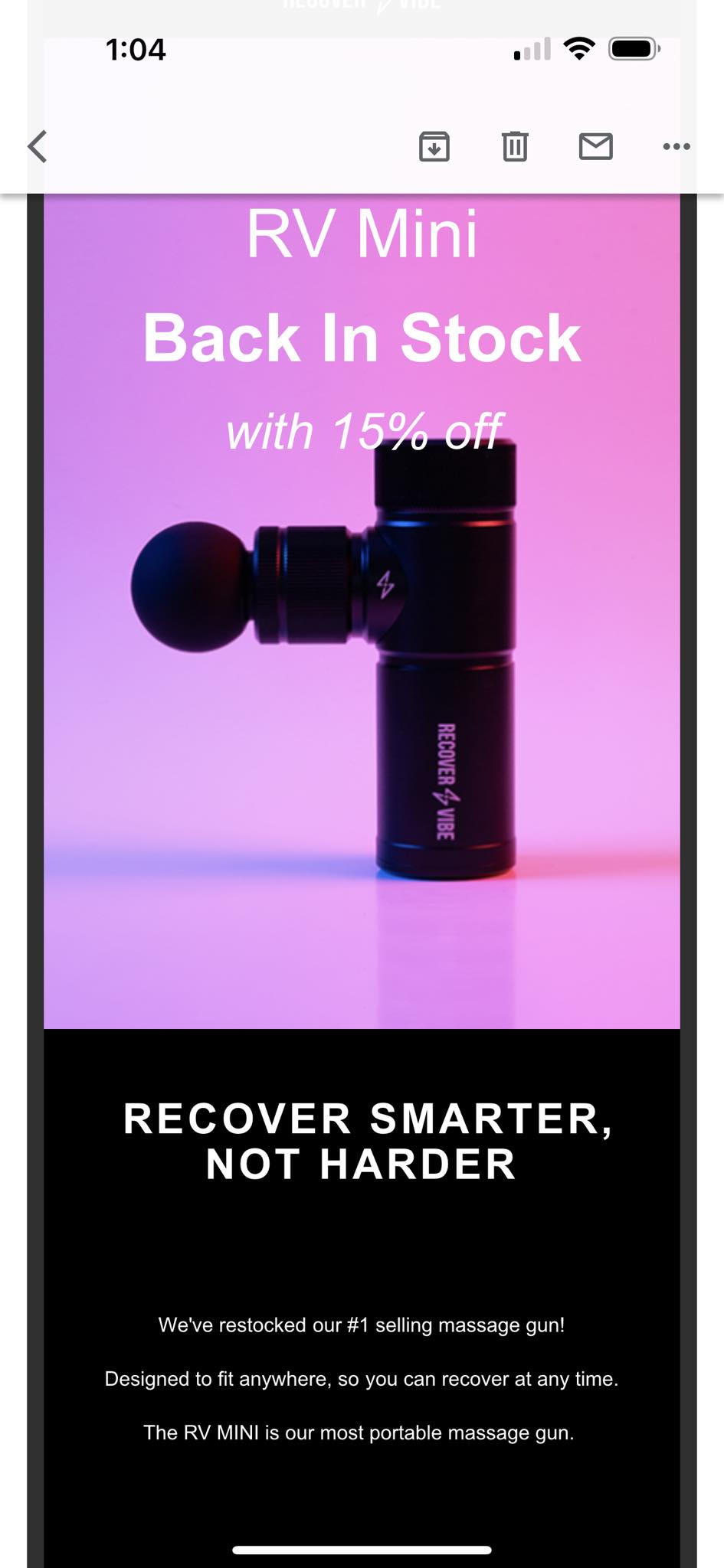
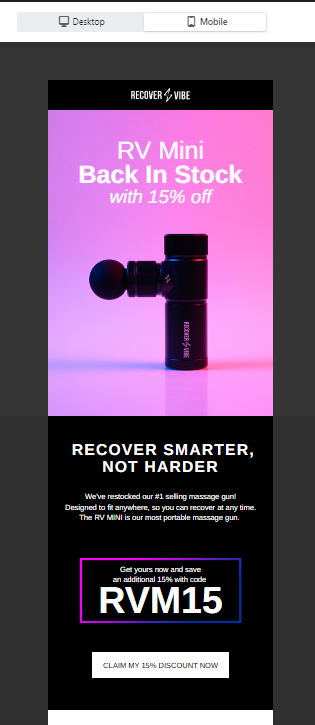
Hello! On mobile preview, it appears great, but once I send it as test email, it looks different on my iPhone, yet with the desktop view, it is all goods. Please see image for reference. 

Actual Mobile View


Mobile Preview


This topic has been closed for replies.
Best answer by stam_marko

Hi @Orville,

I’m afraid that Klaviyo’s preview is only an approximate estimate of the ‘actual’ mobile view.

Each email provider's way of rendering emails might appear slightly (or significantly) different.

For this reason, I have three test emails (Gmail, Outlook and Yahoo). Most of the time, there are all similar, but there are cases where in Outlook or Yahoo, the email differs from Gmail.

Some tips from my small experience with this:


1. First, I adjust the email to fit my customers’ core email providers without using different blocks for desktop and mobile. That ensures that my email’s code size remains small and less complex.
2. Check your template by sending preview emails to different email providers (Gmail, Yahoo, Outlook) or use Litmus or Email on Acid (or any other tool)
3. Your hero image could have the hero copy embedded in it instead of a background image and a text block. In this way, you can use your custom fonts without risking of them being changed to devices which do not have them downloaded.
4. Let us know what you’ve learned from that process. For example, I’ve noticed that padding reacts strangely (sometimes) in Outlook.


I hope that helps,

 

5 replies

stam_marko
Expert Problem Solver II
August 7, 2023

Hi @Orville,

I’m afraid that Klaviyo’s preview is only an approximate estimate of the ‘actual’ mobile view.

Each email provider's way of rendering emails might appear slightly (or significantly) different.

For this reason, I have three test emails (Gmail, Outlook and Yahoo). Most of the time, there are all similar, but there are cases where in Outlook or Yahoo, the email differs from Gmail.

Some tips from my small experience with this:


1. First, I adjust the email to fit my customers’ core email providers without using different blocks for desktop and mobile. That ensures that my email’s code size remains small and less complex.
2. Check your template by sending preview emails to different email providers (Gmail, Yahoo, Outlook) or use Litmus or Email on Acid (or any other tool)
3. Your hero image could have the hero copy embedded in it instead of a background image and a text block. In this way, you can use your custom fonts without risking of them being changed to devices which do not have them downloaded.
4. Let us know what you’ve learned from that process. For example, I’ve noticed that padding reacts strangely (sometimes) in Outlook.


I hope that helps,
 

Feel free to reach out at: stam@retenso.com
Contributor I
October 21, 2023

I have a similar situation and question.


klaviyo mobile preview:


android gmail screenshot:


would mobile gmail really change colors in backgrounds and fonts?

or is this because the preview/test was from the template editor? (in which case, isn’t this a glaring bug in klaviyo?)


thanks in advance !


les


Contributor I
October 21, 2023

i have figured out what the discrepancy was here.. my phone where i viewed the test email, i have gmail configured for dark mode. 

i may repost this using that as the subject line to see what the options in design are so that a design will work on either light or dark mode..


Contributor II
October 23, 2023

Hello! On mobile preview, it appears great, but once I send it as test email, it looks different on my iPhone, yet with the desktop view for my website, it is all goods. Please see image for reference. 

Actual Mobile View


Mobile Preview


I got the issue same type1 Did you fix yours? I have no dark mode on and images are also compress and optimize according to phone and desktop both. But in email it expand.

Contributor IV
October 28, 2024

hello there, i am using the html-coded method to build my email template; however, the right alignment looks rather off (there is no border like the left side) when i sent myself a preview email, may i know how should i rectify this?