Problem Solver II
May 2, 2022
Solved

New editor - not showing dollar sign for order total

  • May 2, 2022
  • 6 replies
  • 705 views

Hi folks, 

I’m probably missing something here, but I’ve followed this guide https://help.klaviyo.com/hc/en-us/articles/4408802597659-How-to-Build-Dynamic-Blocks-in-a-Flow-Email-new-editor-

and while I can get everything else displaying ok, total value for the order won’t display with a dollar sign, and I can’t figure out why… any suggestions (it’s a Shopify store)? This is what I have in place:
 

Total Order Value: {{ event|lookup:'$value' }}


Thanks!

    This topic has been closed for replies.
    Best answer by stephen.trumble

    Hey @wernstrom 

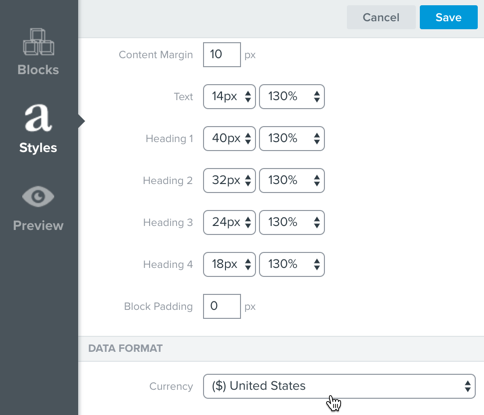
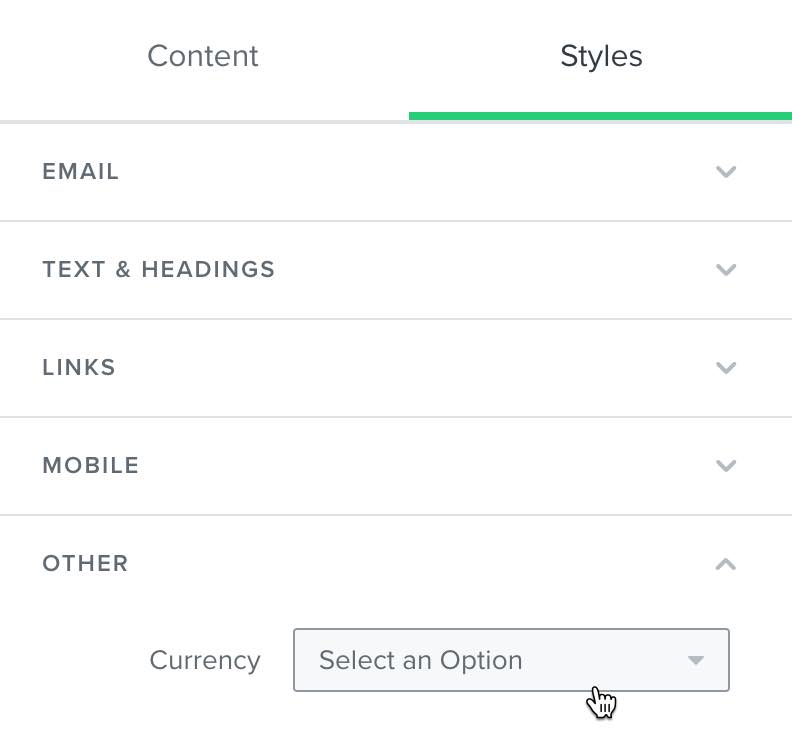
    You can change the currency display for a specific template by navigating to the Styles section of any template. Here, you will see a Currency dropdown.

    Classic Editor

    2017-10-17_14-04-46.png

    New Editor

    New_editor_change_currency.jpg

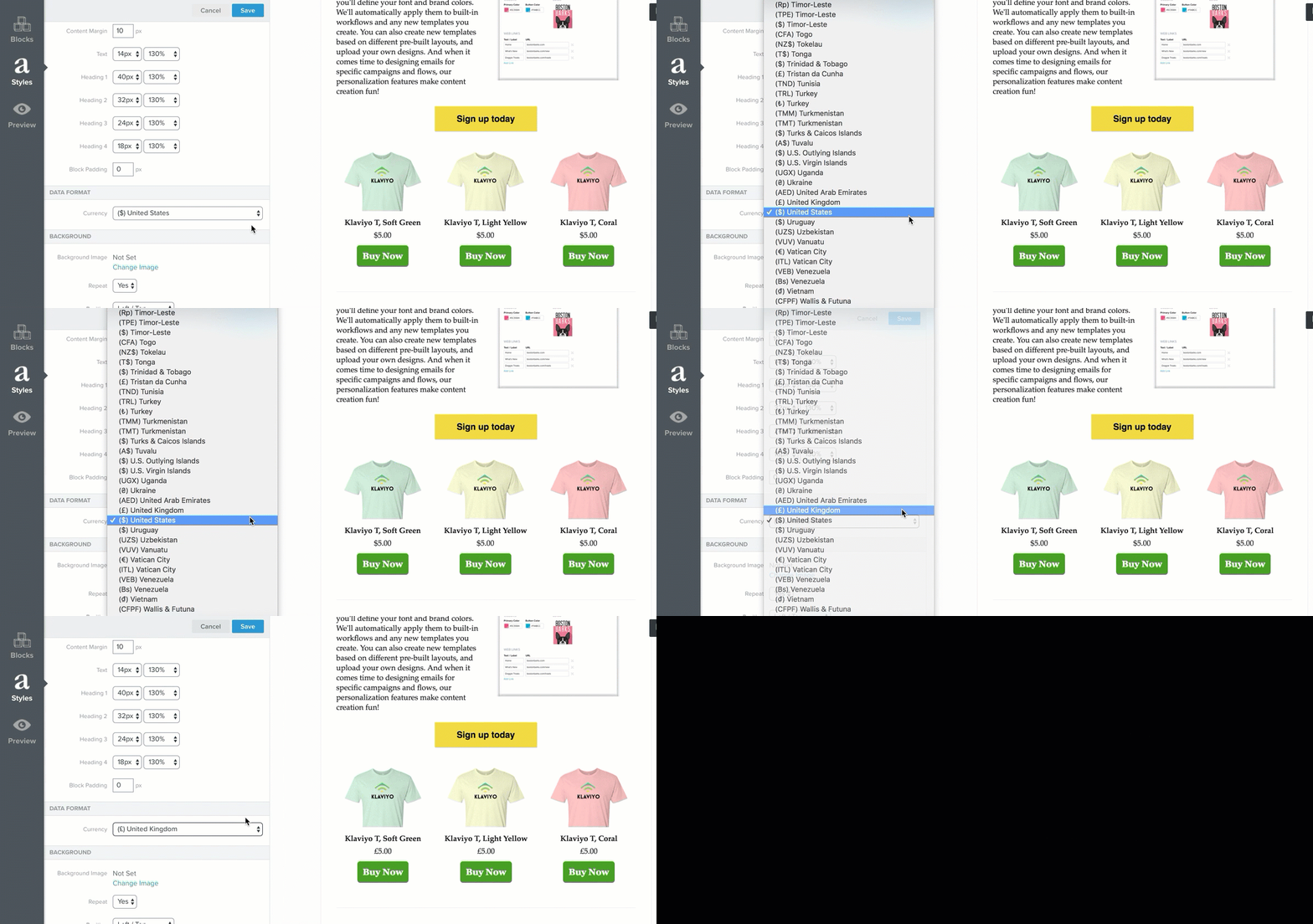
    When you update the currency format on the template level, the display of any values dynamically populated into your template will be updated to reflect the conventions of the new currency:

    • The currency symbol
    • The placement of the currency symbol (i.e. prefix or suffix)
    • The punctuation used in formatting the value (i.e. commas or periods, etc.)

    2017-10-17_14-05-54.gif

    This setting overrides the default currency setting in your account, but only for the current template. This is useful if you are segmenting based on geographical region and are targeting your campaign content based on different locations.

    6 replies

    Problem Solver II
    May 2, 2022

    Sometimes even if you folow the steps properly

    There's gonna be glitch in klaviyo new editor

    Kindly contact klaviyo support team

    Please like these post if it was helpful


    stephen.trumble
    Klaviyo Alum
    May 2, 2022

    Hey @wernstrom 

    You can change the currency display for a specific template by navigating to the Styles section of any template. Here, you will see a Currency dropdown.

    Classic Editor

    2017-10-17_14-04-46.png

    New Editor

    New_editor_change_currency.jpg

    When you update the currency format on the template level, the display of any values dynamically populated into your template will be updated to reflect the conventions of the new currency:

    • The currency symbol
    • The placement of the currency symbol (i.e. prefix or suffix)
    • The punctuation used in formatting the value (i.e. commas or periods, etc.)

    2017-10-17_14-05-54.gif

    This setting overrides the default currency setting in your account, but only for the current template. This is useful if you are segmenting based on geographical region and are targeting your campaign content based on different locations.

    -Stephen
    wernstromAuthor
    Problem Solver II
    May 2, 2022

    Hi @stephen.trumble , thanks for reminding me about the currency settings in the styles tab, I’d missed that - however, it hasn’t fixed the issue:


    wernstromAuthor
    Problem Solver II
    May 4, 2022

    Hi @stephen.trumble, I’ve been able to add 2 decimal places thanks to another post on here, but the dollar sign will still not display… I have updated the style settings. Any suggestions?


    Contributor I
    July 5, 2022

    How about using this:

    {% currency_format event.extra.subtotal_price %}

    {% currency_format event.extra.shipping_lines.0.price %}

    {% currency_format event|lookup:'$value' %}


    wernstromAuthor
    Problem Solver II
    July 17, 2022

    How about using this:

    {% currency_format event.extra.subtotal_price %}

    {% currency_format event.extra.shipping_lines.0.price %}

    {% currency_format event|lookup:'$value' %}


    Thanks, I’ll give that a shot!