Contributor I
July 5, 2023
Solved

Order Summary for Multiple Items

  • July 5, 2023
  • 2 replies
  • 855 views

Hi. I’m creating an order confirmation email flow for placed orders and would like to add the order summary to the email. When the order contains only one item it is pretty easy to add the dynamic item, however I notice that when the order contains multiple products, the test email does not show anything within the order summary box and appears to be empty. Is there a code I can input into the order summary box that would preview the whole order regardless of the number of items purchased?

Thank you

    This topic has been closed for replies.
    Best answer by bluesnapper

    Hi @shademonster 

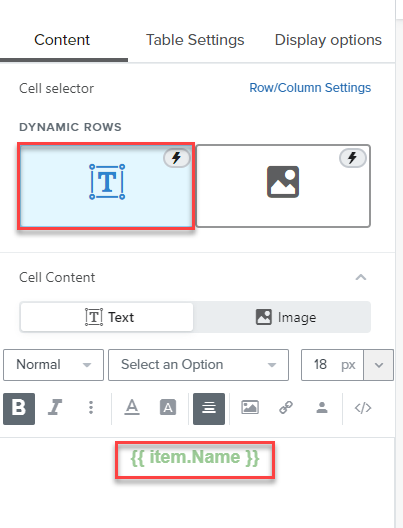
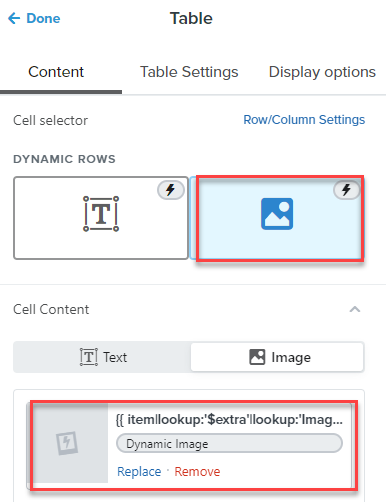
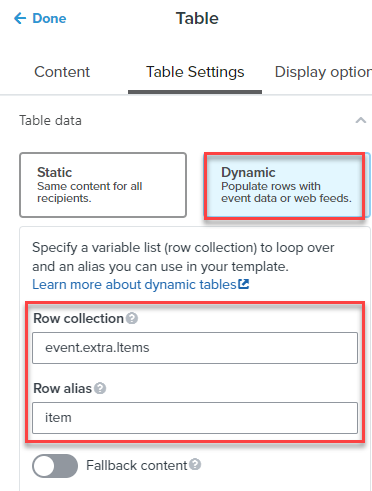
    I use this setup (below) for a WooC client. It’s actually for a post-purchase review request but it does display all the items they purchased. I have a 2-col table in the email and the product name appears in the left col and the product image appears in the right col. 

    Hope that works for you.

    Andy


    Dynamic variable or dynamic URL in the above: {{  item|lookup:'$extra'|lookup:'Images'|lookup:'0'|lookup:'URL' }}


    2 replies

    bluesnapper
    Partner
    Champion & Partner
    July 5, 2023

    Hi @shademonster 

    I use this setup (below) for a WooC client. It’s actually for a post-purchase review request but it does display all the items they purchased. I have a 2-col table in the email and the product name appears in the left col and the product image appears in the right col. 

    Hope that works for you.

    Andy


    Dynamic variable or dynamic URL in the above: {{  item|lookup:'$extra'|lookup:'Images'|lookup:'0'|lookup:'URL' }}


    https://bluesnapper.com - Klaviyo Champion '24 & Partner
    Contributor I
    July 5, 2023

    Thank you. I’ve added that to the email flow and will see how it works.