Contributor I
May 21, 2024
Solved

Pop Newsletter

  • May 21, 2024
  • 2 replies
  • 106 views

Hello,

When the newsletter sign-up is active and someone navigates my shop on their mobile phone while in the cart, the pop-up field with "Get 10%" always covers the checkout button. How can I fix this? I need help! 😅

Thank you!

    This topic has been closed for replies.
    Best answer by JessFosnough

    Hi @Skytrip,

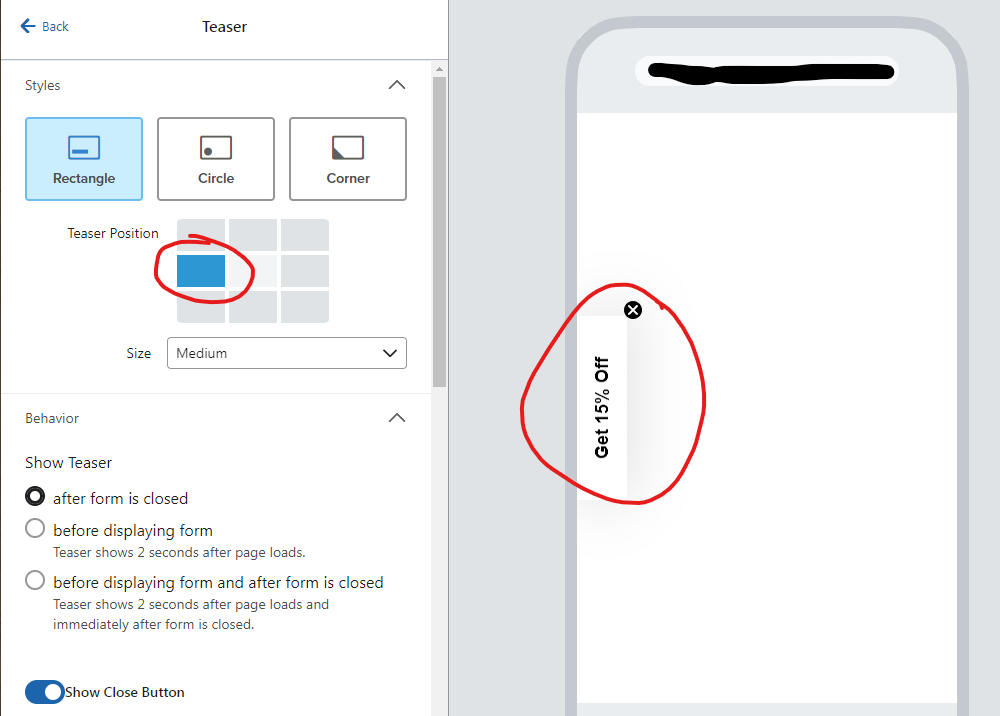
    You might want to try to create 2 different pop-ups - one for mobile and one for desktop. They can submit to the same list. For the mobile pop-up, if you add a teaser, you can change the placement so that it doesn’t cover the checkout button. For example, if your checkout is at the bottom, put the teaser on the side or top. See screen shot example below.

    Hope this helps!


    Teaser shows on the left side


    2 replies

    JessFosnough
    Expert Problem Solver IV
    Expert Problem Solver IV
    May 21, 2024

    Hi @Skytrip,

    You might want to try to create 2 different pop-ups - one for mobile and one for desktop. They can submit to the same list. For the mobile pop-up, if you add a teaser, you can change the placement so that it doesn’t cover the checkout button. For example, if your checkout is at the bottom, put the teaser on the side or top. See screen shot example below.

    Hope this helps!


    Teaser shows on the left side


    Jessica
    SkytripAuthor
    Contributor I
    May 22, 2024

    Many thanks , that worked for me.