


I have been facing some issue related to pop-up. I setup pop up for my site and it’s going well on PC’s but on mobiles it’s not showing up, neither pop-up nor pop-up teaser. what could be the issue?
It would be great if anyone would help me.
Thank you!

Best answer by thepowerofcopy
Hello Everyone,
I have been facing some issue related to pop-up. I setup pop up for my site and it’s going well on PC’s but on mobiles it’s not showing up, neither pop-up nor pop-up teaser. what could be the issue?
It would be great if anyone would help me.
Thank you!
Hello @zamamahmed21
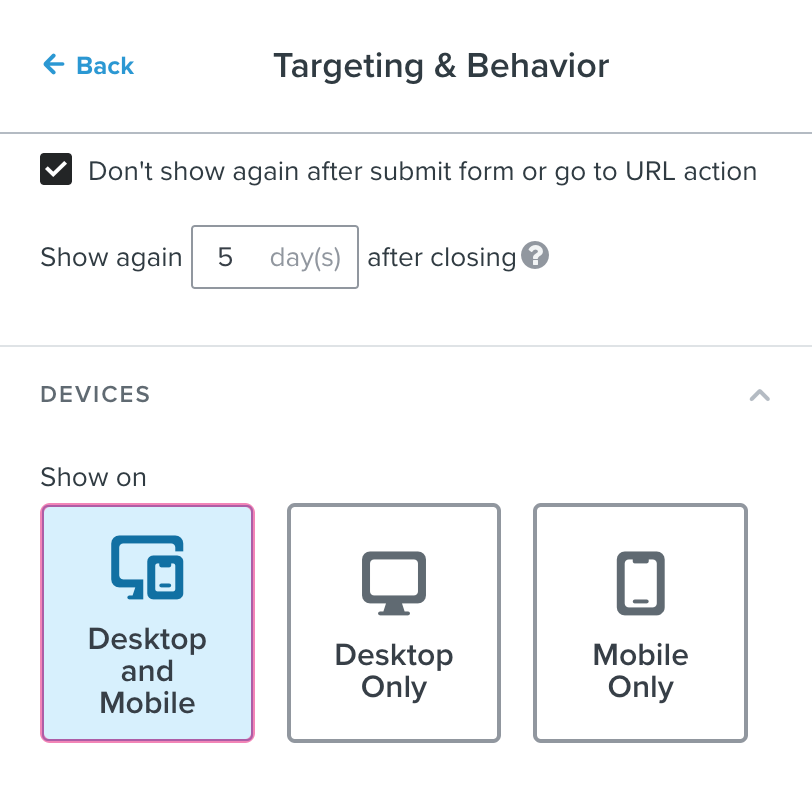
Did you check the targeting & Behavior settings? Inside of it, there is an option for which devices to show the pop-up. Choose Desktop and Mobile. (See image.)
Note: You should use incognito tab if you want to test it.
I have been facing some issue related to pop-up. I setup pop up for my site and it’s going well on PC’s but on mobiles it’s not showing up, neither pop-up nor pop-up teaser. what could be the issue?
It would be great if anyone would help me.
Thank you!
Hello @zamamahmed21
Did you check the targeting & Behavior settings? Inside of it, there is an option for which devices to show the pop-up. Choose Desktop and Mobile. (See image.)
Note: You should use incognito tab if you want to test it.
Pop-ups often behave differently on mobile due to browser restrictions and user experience considerations. Many platforms limit or block pop-ups on mobile devices to avoid intrusive experiences. Also, check if your pop-up settings explicitly enable mobile display, and verify that any teaser or trigger elements are mobile-friendly and visible. Sometimes, conflicts with other scripts or themes can also prevent pop-ups from showing on mobile. Testing with a simplified setup or different device/browser can help identify the issue.
If pop-up forms don’t show on mobile, it’s usually due to display settings. Double-check their visibility rules and make sure “Show on mobile devices” is enabled. Also verify the trigger settings like timing or scroll depth - they might be set too high for mobile screens. Another thing to check is if any mobile-specific CSS or theme override might be hiding them.
Search saves time. Contributing compounds value.
The ROI of your reply? One helpful answer can support dozens of teams, build your credibility, sharpen your own expertise over time, foster connectivity, and create good karma – because what goes around comes around. The community is what YOU make it.