I have created a landing page with a subscribe form that I want to send my social media followers to. The problem is that the popup form also comes up. Is there a way to restrict the popup form not to appear? Like exclude pages option? I would appreciate any type of workaround. Thanks.
Hi @epera - thank you for your question to the Klaviyo community!
To hide your pop up form from this new landing page, you can follow these steps within the settings of the form you want to hide:
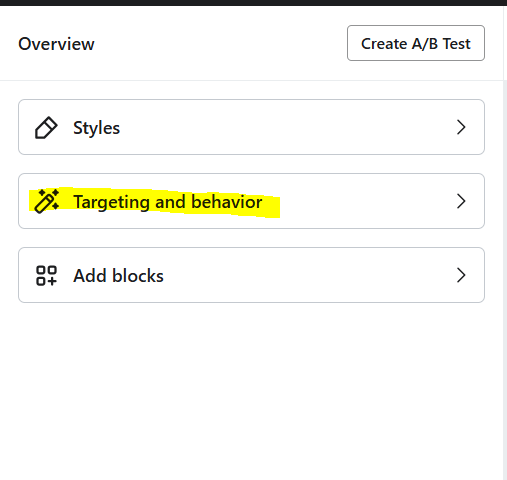
Click ‘Targeting and Behavior’
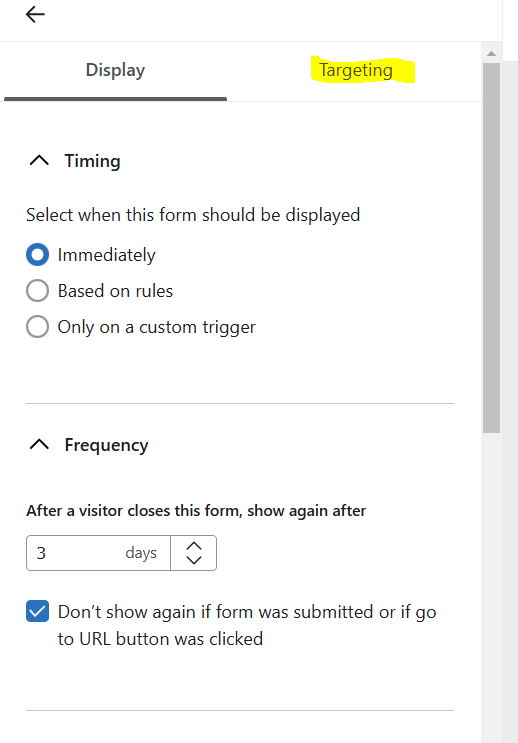
Toggle to ‘Targeting’
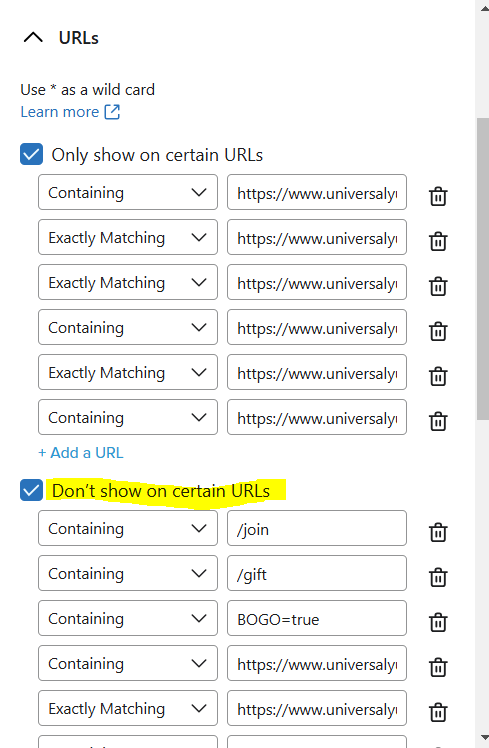
Scroll down to the ‘Don’t show on certain URLs’ section and click the checkbox
Paste in the URL of the landing page where you do not want the pop up to show
To be safe, do this twice, once using the dropdown for ‘containing url’ and once for ‘exactly matching’ URL
These steps will suppress the pop up from showing on your landing page for social media followers. This Klaviyo Help Article also shares more details and specifics on pop up form targeting settings.
I hope this helps solve your issue, and please let me know if you have any further questions!
Hi @epera - thank you for your question to the Klaviyo community!
To hide your pop up form from this new landing page, you can follow these steps within the settings of the form you want to hide:
Click ‘Targeting and Behavior’
Toggle to ‘Targeting’
Scroll down to the ‘Don’t show on certain URLs’ section and click the checkbox
Paste in the URL of the landing page where you do not want the pop up to show
To be safe, do this twice, once using the dropdown for ‘containing url’ and once for ‘exactly matching’ URL
These steps will suppress the pop up from showing on your landing page for social media followers. This Klaviyo Help Article also shares more details and specifics on pop up form targeting settings.
I hope this helps solve your issue, and please let me know if you have any further questions!