Contributor III
February 9, 2022
Solved

PRICE DROP EMAIL CODING

  • February 9, 2022
  • 15 replies
  • 2081 views

Hi,


Trying to set up price drop flows. the flow trigger etc are easy, but cannot find anywhere how to code the emails themselves to populate the image, product name URL etc.

I’ve tried use klavyio example but it is not showing anything in the preview email when in manual

i’ve tried save the klavyio block and put it in there, copy paste the data, nothing works

i’n trying to add a screenshot but not working either ahahh


COPY PASTE

event.image_url


{{ event.product_name }}


Sale Price: ${{ event.reduced_price | floatformat:2 }}
Was: ${{ event.original_price | floatformat:2 }}
You Save: ${{ event.price_drop_amount | floatformat:2 }}


SAVED BLOCK

{ organization.url }}products/{{ item.product.handle }}

{{ item.product.title }}

Quantity: {{ item.quantity|floatformat:0 }} — Total: {% currency_format item.line_price|floatformat:2 %}


I DONT EVEN UNDERSTAND WHY THE SAVED BLOCK ENDED UP BEING DIFFERENT THAN THE COPY PASET

Best answer by Dov

Hi @sophieduer,

Thanks for sharing this question with us.

When you mention using the Klaviyo example I assume you are talking about the Price Drop flow template provided in our Flows Library?

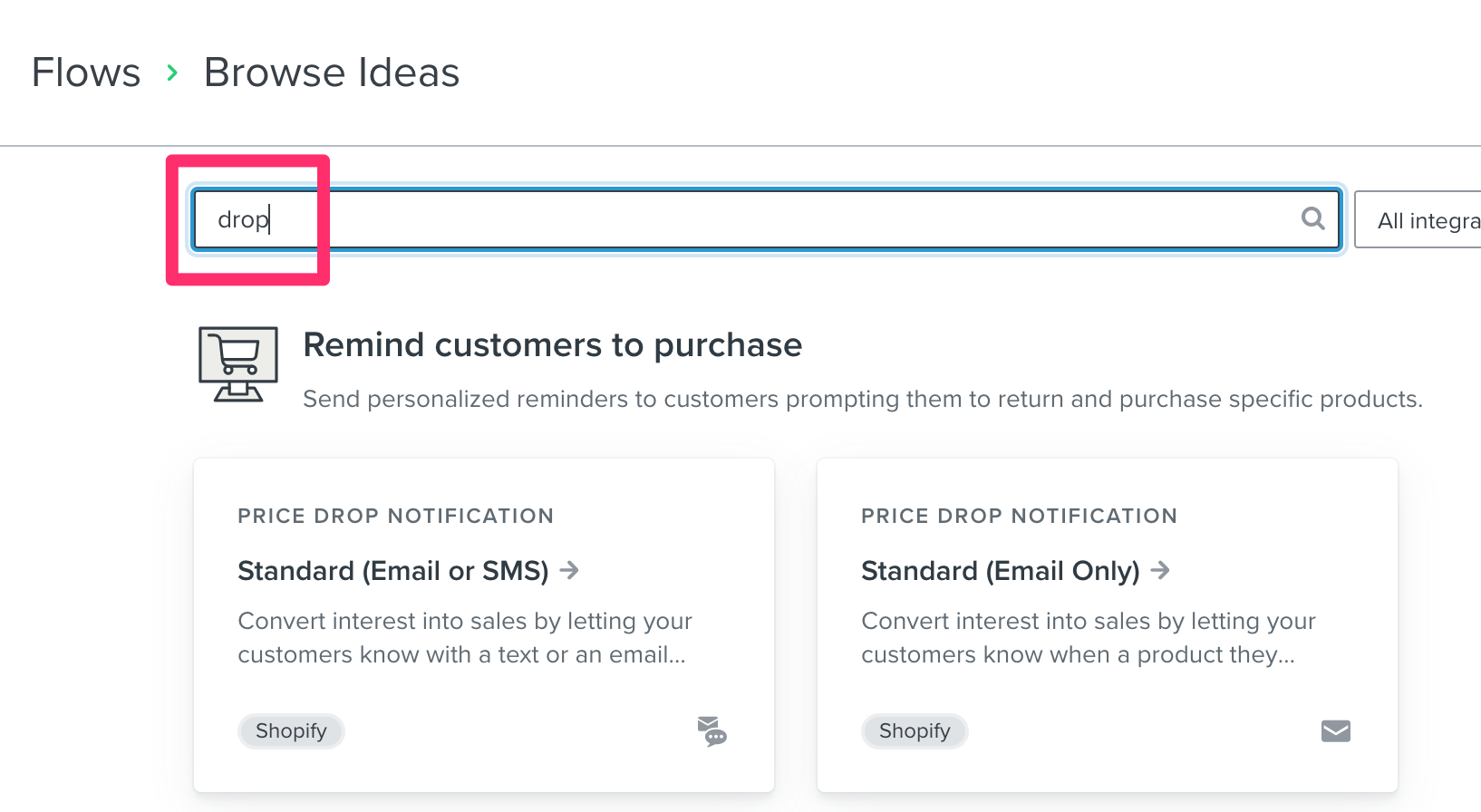
Searching “Drop” under “Browse Ideas” will bring you to the Price Drop Flow Templates


If this is the case, then you are on the right track 🙂. If not, I recommend you pull this flow template to get started because it provides all of the tags you need to dynamically populate the item prices, title, etc. in your Price Drop flow. No additional coding required!

Also keep in mind, when you are previewing a flow email, you will need at least one price drop event in order to see data associated with the event (item prices, title etc.) in the email preview. Since you’re telling me the preview is blank, that leads me to believe that you do not yet have a price drop event logged in the account. Once that occurs, you should see the data for that event populate in the flow email. And previewing will pull in the prices, title etc.

I hope that is helpful.


15 replies

Dov
Klaviyo Alum
May 5, 2022

Hi @AliceC,

Thanks for your reply!

I will file a feature request on your behalf and if we garner enough interest, the product team will evaluate the implementation of a vendor tag in the future.

Thanks for being a member of our community.


DD
Contributor I
January 24, 2024

Store Platform: Shopify

Issue: Dynamic text (values) not populating in Price Drop test emails.

Request: Direction on where to go next to troubleshoot this issue.

---

To test our Price Drop flow, I…

  1. created a customer profile,
  2. viewed a product while signed in,
  3. confirmed in the customer profile that the integration tracked the product view,
  4. in Shopify, I dropped the price within the flow’s trigger range,
  5. received the Price Drop email alert in my inbox,
  6. ...but, the email had no values for the event variables

Code:


Result of the Test Email:


I checked the “Price drop report”, but there is “No Data Available”:


I thought that maybe the problem was that I had subsequently returned the product’s price to it’s original price causing the event to be removed from the report, but…


...I looked at another account I manage that has products that were (1) dropped and then (2) returned to original price, but the “Price drop report” still has those products listed.


I can see Event Details for this account 👆 in the Send Test “Preview Mode” view:


But, in the account I’m currently troubleshooting, there are no Events in the same view:


I checked the status of the Enabled Integrations, but I don’t see anything that would explain why these events aren’t logging:


I also checked the “Viewed Product” report in Analytics > Metrics > Viewed Product > [filter for test product] and confirmed that the views for that product were registered today during the times I viewed and tested this flow email.


Not sure where to go next to troubleshoot this and would appreciate any direction or ideas.

Contributor I
October 1, 2024

It’s the same for me. This is the original flow of Klaviyo:

and price drop exists

Help please :(

Contributor I
April 10, 2025

Hi, I’ve been testing out my Price Drop Flow for the past few days however nothing is appearing in the View Price Drop Report.

Shopify Support team helped with this, however I don’t believe they did the last two points highlighted.

  • Reach out to our Support Team and request access to the “price drop trigger for custom catalogs” feature. Make sure to specify the following:
    • The account which has a custom catalog or API catalog, if you have multiple accounts.
    • Event IDs for all metrics used as triggers with product data such as Ordered Product, Started Checkout, and Viewed Product.
    • For each event, the field names for product ID and price.
    • For Started Checkout, the field name for the list that contains the products from the checkout.
  • Once the support team has completed your request, you can continue on and create the flow.

I talked to support again via chat and they said there was a catalog update issue. Still waiting to hear back from them.

Wondering if anyone else has any advice on how to troubleshoot/move forward?

Thank you!

Contributor I
April 29, 2025

Hey, just jumping on this. I am trying to set up a price drop flow and need some help. We have a custom catalogue integration (not with shopify or anything) so I can’t see the template there to go off. With custom data how do I get the “before” price to display? I can see current price which pulls through but our system has no value for “was” price. Does anyone have an example of how they set up the actual email themselves without Klav templates?


Also what event is price drop flow triggered off?