Contributor I
May 24, 2021 8:26 PM UTC
Solved

Pulling Order Data From Woo Commerce

Hello Everyone - I have Klaviyo integrated with Stripe & WooCommerce. I am trying to set up a transactional email once an order is placed to act as a receipt, similar to the auto-email Stripe sends immediately after a credit card is processed and order is placed. How can I automatically pull the information into an email template in Klaviyo, such as name, order ID, shipping address, total, etc from either WooCommerce directly or Stripe?

Thanks!
 

This topic has been closed for replies.
Spark Bridge Digital LLC
2025 Champion
May 25, 2021 11:53 AM UTC

Hey there!

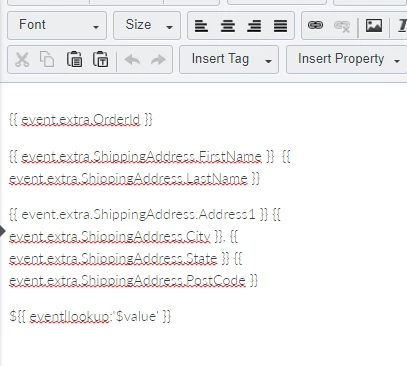
If you create a Flow with your WooCommerce ‘Placed Order’ Metric as the trigger, you should have all of that dynamic info coming in that you can feed into your emails. 

Just did a test on my end and I do see all of those fields coming in that you listed.

You’ll follow this guides to make your template:

https://help.klaviyo.com/hc/en-us/articles/115002779071-About-Using-Event-Variables-to-Personalize-Flows

But overall it’d end up looking something like this:


Just changing it up how you actually want it to be designed within the email. If you click Preview when you make the email, you’ll see all of the fields you could pull into your template for that event.

Once you have this set-up though, you need to contact Klaviyo so that they can review and mark that message as transactional, so that it is always delivered!

Hope that helps!

Klaviyo Champion | Your Email Marketing BFF

6 replies

Spark Bridge Digital LLC
Partner - Platinum
2025 Champion
May 25, 2021 11:53 AM UTC

Hey there!

If you create a Flow with your WooCommerce ‘Placed Order’ Metric as the trigger, you should have all of that dynamic info coming in that you can feed into your emails. 

Just did a test on my end and I do see all of those fields coming in that you listed.

You’ll follow this guides to make your template:

https://help.klaviyo.com/hc/en-us/articles/115002779071-About-Using-Event-Variables-to-Personalize-Flows

But overall it’d end up looking something like this:


Just changing it up how you actually want it to be designed within the email. If you click Preview when you make the email, you’ll see all of the fields you could pull into your template for that event.

Once you have this set-up though, you need to contact Klaviyo so that they can review and mark that message as transactional, so that it is always delivered!

Hope that helps!

Klaviyo Champion | Your Email Marketing BFF
Contributor I
Sep 10, 2021 9:20 PM UTC

@Spark Bridge Digital LLC are you on WooCommerce? 

Taylor Tarpley
Community Manager
Community Manager
Sep 13, 2021 11:41 PM UTC

Hi @Mike T, 


Thanks for adding to this thread! Do you have an additional question on this topic the Community can help with? 


Look forward to hearing from you!

Best,

Taylor

Contributor I
Sep 14, 2021 7:25 PM UTC

Hi @Taylor Tarpley...So far, Klaviyo’s ability to send WooCommerce transactional emails seems theoretical. I’m hoping to connect with WooCommerce folks who are actually using Klaviyo for transactional emails to see how they like it. 

DavidSandel
Partner - Silver
Partner - Silver
Oct 3, 2023 1:34 PM UTC

Can confirm, the default WooCommerce integration does NOT pull in the OrderID….which blows my mind.

Klaviyo Silver Master --> LowGravitySolutions.com
Contributor I
Jan 14, 2025 8:26 PM UTC

Anyone know if this has been fixed? It blows my mind too that OrderID seems not to be available.