Problem Solver I
January 11, 2022
Solved

Radius / rounded corners for blocks

  • January 11, 2022
  • 33 replies
  • 8047 views

I would like to understand if it is possible to created a radius or rounded corners for blocks. Like an image block or text block. Thank you.

    Best answer by David To

    Hello @wouter,

    Good question!

    At present, rounded corners or the option to apply corner radius is not supported for individual blocks outside of button blocks. One solution to this would be using a third party editing tool to create rounded corners for your graphic to be uploaded into your email template for use. The same can be done with text where you create a blank image with rounded corners while superimposing your desired text and uploading it to your email for use in an image block. 

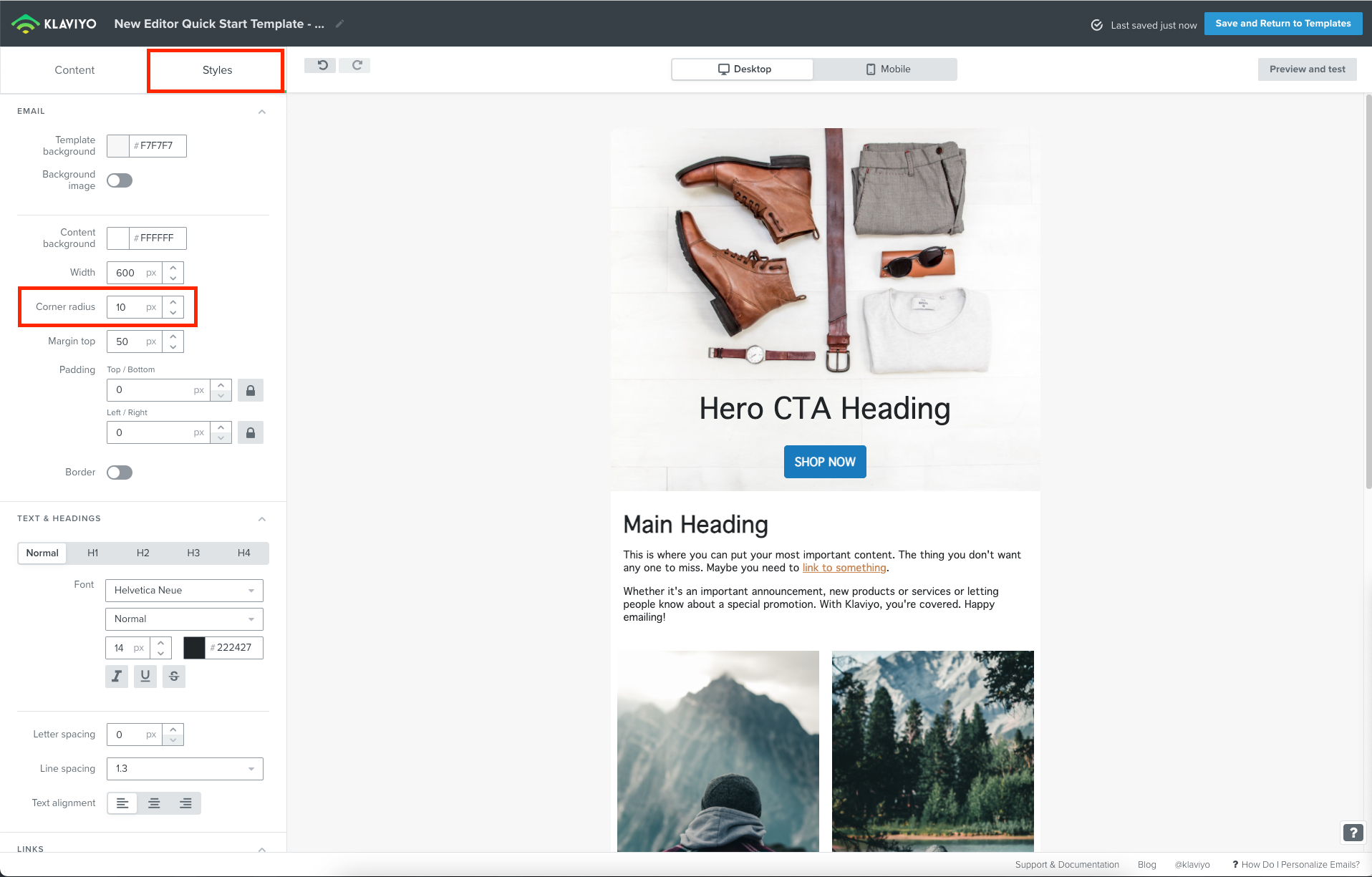
    Although corner radius is not supported for individual blocks, you can actually apply corner radius to your template as a whole if you were using our new editor. This would round out the corners of your email as a whole. You can find this setting under the Styles tab in the new editor under Corner radius.

    Since this isn’t a feature, I’ll share this feedback with our Product Team!

    Thanks for being a part of the Klaviyo Community!

    David 

    33 replies

    Contributor I
    January 22, 2025

    Same here, also quite a limitation for us. We can’t set up a template that follows our brand guidelines. Please provide an update!

    January 23, 2025

    Still cant see the future although it has been brought up and supported for 3 years. I m guessing it is not in the roadmap ?

    Such a needed and basic feature now. Please let us know if it is definitely abandoned or, if not, when it will be released.


    (Very much needed feature)

    Contributor II
    January 27, 2025

    Even coding my own html block for a table with border-radius is undone by Klaviyo editor. Why? Very frustrating as our style guide has rounded corners on all elements.

    Contributor II
    March 14, 2025

    Come on guys. Its 2025. In the RICE and Moscow or whatever you’re using to prioritize feature updates this should be up on the list. 3 years is terrible. And you just started charging more.


    FYI Braze and Omnisend are looking more appealing and in marketing group convos and webinars- starting to eat your lunch.


    If you're going to charge a premium deliver premium service. 

    Contributor I
    April 16, 2025

    Upvoting this feature request for what its worth. 

    Contributor I
    April 24, 2025

    If we can’t get a tool to round the corners, can we at least have access to the source code for the product feed so we can try to round the edges of product photos in HTML? 

    Contributor II
    June 5, 2025

    Man I’ve been mostly impressed with Klaviyo but threads like this where a community is repeatedly asking for a feature over a number of years and are told “we’re working on it” and then just nothing…kind of a bummer.


    Anyways. I too upvote this feature request.

    Contributor II
    September 13, 2025

    Another vote here for rounded corners please! The only hack I’ve found - though not a great one - is to use a button (without a link). Can’t use a lot of text though as the spacing is hard to get right, but the rounded edge is possible. It’s a hacky hack though, rounded edges seems like a basic editor inclusion to me. 

    Contributor II
    September 17, 2025

    Workaround for this is, use the HTML block with inline CSS for the border radius. Like:

    <!DOCTYPE html>
    <html lang="en">
    <head>
    <meta charset="UTF-8">
    <title>Placeholder 2000x800</title>
    <style>
    body {
    margin: 0;
    font-family: Arial, sans-serif;
    background: #f7f7f7;
    }
    .wrapper {
    padding: 0 15px; /* left & right padding */
    }
    .placeholder {
    width: 2000px;
    height: 200px;
    border-radius: 25px;
    display: block;
    background-color: #ddd;
    object-fit: cover;
    }
    </style>
    </head>
    <body>
    <div class="wrapper">
    <img
    class="placeholder"
    alt="2000x800 placeholder"
    src="data:image/svg+xml;utf8,
    <svg xmlns='http://www.w3.org/2000/svg' width='2000' height='800'>
    <rect width='2000' height='800' fill='%23dddddd'/>
    <text x='50%25' y='50%25' dominant-baseline='middle' text-anchor='middle'
    font-family='Arial, sans-serif' font-size='72' fill='%23555'>2000 × 800</text>
    </svg>"
    />
    </div>
    </body>
    </html>

    Not ideal but works. And can be used for other things aswell.

    Contributor I
    January 9, 2026

    Another vote for rounded corners please! It’s been years since people have been requesting the feature!