Contributor I
April 24, 2024
Solved

re-enabling a subscriber pop-up

  • April 24, 2024
  • 3 replies
  • 133 views

I set up a pop up to test a new form - https://www.threecitiessocial.com/404 - and i used my work email to test. the test worked and the info flowed into Klaviyo. I have the form set to ‘show everyone’. 

Now i want to test the form again (without having to se multiple email addresses) and went into klaviyo and removed my subscribed work email but when i go to https://www.threecitiessocial.com/404 i can’t get the form to show. 

Is there a way to have the form show?

    This topic has been closed for replies.
    Best answer by JessFosnough

    Hi @three cities social,

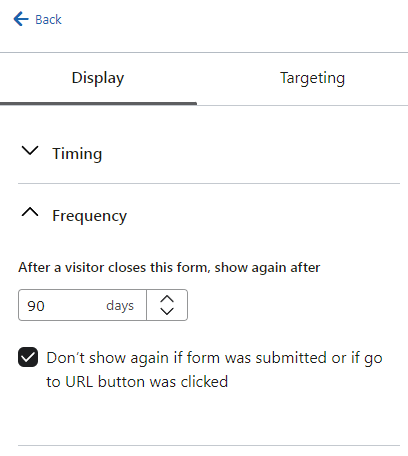
    I would check the form display settings. Under frequency, change it to 0 days, and uncheck the button that says “Don’t show again...” See screen shot below. I think the default frequency is 1 day, so it wouldn’t show up for 24 hours or so if that is how it is set.

    Also, I went to your link and the pop up showed up for me. :-)


    3 replies

    JessFosnough
    Expert Problem Solver IV
    Expert Problem Solver IV
    April 24, 2024

    Hi @three cities social,

    I would check the form display settings. Under frequency, change it to 0 days, and uncheck the button that says “Don’t show again...” See screen shot below. I think the default frequency is 1 day, so it wouldn’t show up for 24 hours or so if that is how it is set.

    Also, I went to your link and the pop up showed up for me. :-)


    Jessica
    Contributor I
    April 24, 2024

    Thanks! that did it! 

    JessFosnough
    Expert Problem Solver IV
    Expert Problem Solver IV
    April 24, 2024

    Awesome! Glad it helped! 😀

    Jessica