


Contributor I
October 11, 2024
Solved

Removing marketplace customers from Klaviyo

  • October 11, 2024
  • 2 replies
  • 153 views

We have a lot of marketplace customers that have their orders come through to our website dashboard. From what I can see, there is no way I can get klaviyo to not import those customers, and just stick with direct website customers.

Alternatively I believe the only way to work this, is if I make a segment and suppress them?? My website is with bigcommerce. 
Would this segment cover all marketplace customers?
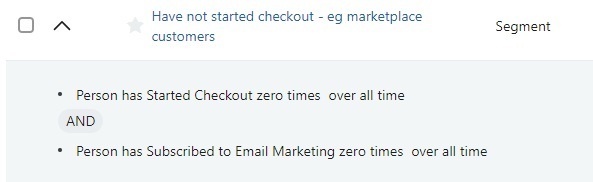


If someone can give me a better set of rules to set up a segment to remove these marketplace customers it would be much appreciated.

From what I have tried, it seems that I need to keep periodically clicking to suppress them, as they don't seem to get automatically suppressed as they join this segment. Thanks

    This topic has been closed for replies.
    Best answer by ArpitBanjara

    Hey @GemsWeddingSupplies 

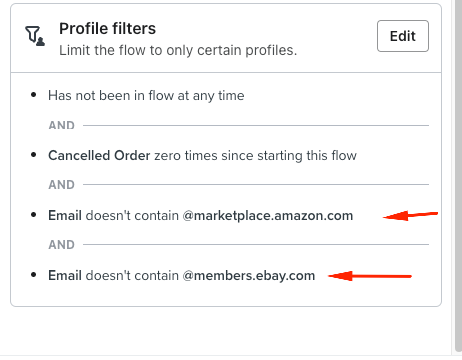
    If you sell on other marketplaces, like amazon, ebay etc, we usually exclude those profiles by adding flow filters to the flow

    if you look at those emails, you will see a pattern in those emails and you exclude those emails by using “Doesn’t contain” as shown below. (you can do that flow all flows)

    For campaigns you can create a segment for the same definitions (Use ‘contains’ in this case) and exclude this segment from all future campaigns.

    Let me know if this answers your question. thank you for sharing your question here in the community,

    Cheers

    Arpit

    2 replies

    ArpitBanjara
    Principal User II
    Principal User II
    October 13, 2024

    Hey @GemsWeddingSupplies 

    If you sell on other marketplaces, like amazon, ebay etc, we usually exclude those profiles by adding flow filters to the flow

    if you look at those emails, you will see a pattern in those emails and you exclude those emails by using “Doesn’t contain” as shown below. (you can do that flow all flows)

    For campaigns you can create a segment for the same definitions (Use ‘contains’ in this case) and exclude this segment from all future campaigns.

    Let me know if this answers your question. thank you for sharing your question here in the community,

    Cheers

    Arpit

    Arpit Banjara - Lead Email Marketing Specialist at Flowium
    Contributor I
    October 13, 2024

    Yes that is perfect Arpit, I have been able to filter based on the emails with Amazon, ebay etc.