


Active Contributor I
December 5, 2023
Solved

Removing underline on text that has a date/time

  • December 5, 2023
  • 4 replies
  • 1619 views

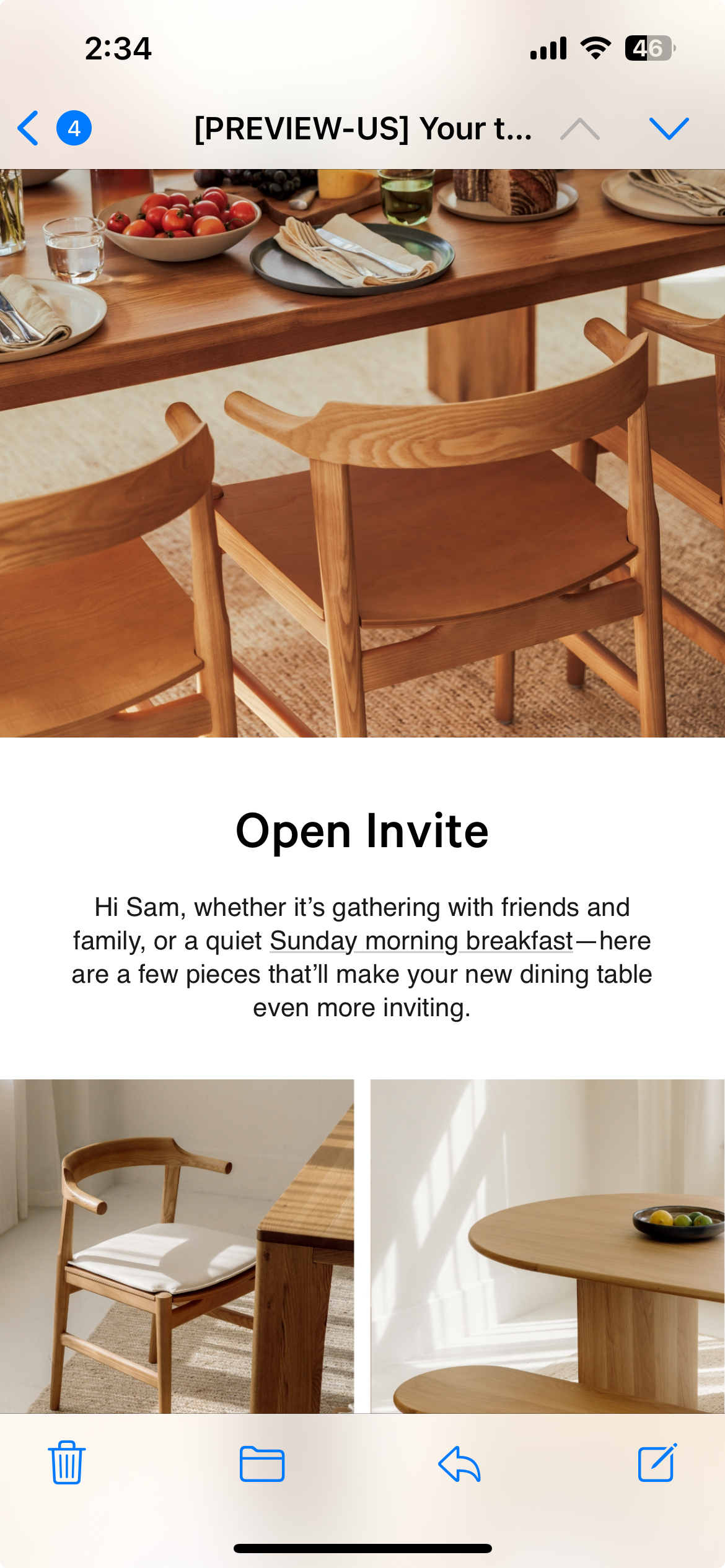
Hi! Noticed in testing my email that the date/day of the week has been underlined and giving the option to link it to my calendar in my phone and add it as an event. Anyone know if there’s a way around this to not show? PS, this is Live Text/Text within Klaviyo.

See below where it’s underlining “Sunday morning breakfast” on an iphone and suggesting to add it to my calendar.

 

    This topic has been closed for replies.
    Best answer by Kylie W

    Hi @LM0721 

    Thank you for this. Looking at the HTML and testing against this, I see what you mean.

    I have researched this more and it is a common occurrence for Apple to render some content according to their own styling sheet and Klaviyo unfortunately has no control over this and can not override it. 

    Here is another post that talks about this by another Community Member. And here is another one that give more addition insight from a Klaviyo Member.

    I understand this is frustrating, so I am tagging a few other Community Champions to see if they can share any advice @chelsgrove @In the Inbox 

    Kylie

    4 replies

    Kylie W
    Partner - Silver
    Champion & Partner
    December 6, 2023

    Hi @LM0721 

    Thank you for your question.

    Are you able to please share the HTML for this section?

    I have tested this with an account I do not get the underline, so would be interested to see what you have. Also, can you please clarify what you mean by “Live Text/Text within Klaviyo”

    Thanks,

    Kylie

    Berridge Strategy Group, Your eCommerce Partner - eCommerce results, without the Complexity | Klaviyo Partner & 2024 Klaviyo Community Champion | www.berridgestrategy.com
    LM0721Author
    Active Contributor I
    December 6, 2023

    Thanks Kylie,

    On desktop and within Klaviyo, the underline doesn’t come up, but on an iphone it does as it wants to schedule it as an event as it says “Sunday morning”.

    Below is the source code for this section:

    <p style="text-align: center;"><span style="font-family: Helvetica, Arial, sans-serif; font-weight: 400;"><span class="TextRun SCXW217573453 BCX0" lang="EN-US" xml:lang="EN-US" data-contrast="auto"><span class="NormalTextRun SCXW217573453 BCX0">Hi {{ first_name|default:"friend" }}, whether it&rsquo;s gathering with friends and family, or a quiet Sunday morning breakfast&mdash;here are a few pieces that&rsquo;ll make your new dining table even more inviting.</span></span></span></p>


    And by Text within Klaviyo I mean we used Klaviyo to add the programming in. Our team often uses baked in imagery/graphics :)

    Kylie W
    Partner - Silver
    Kylie WAnswer
    Champion & Partner
    December 6, 2023

    Hi @LM0721 

    Thank you for this. Looking at the HTML and testing against this, I see what you mean.

    I have researched this more and it is a common occurrence for Apple to render some content according to their own styling sheet and Klaviyo unfortunately has no control over this and can not override it. 

    Here is another post that talks about this by another Community Member. And here is another one that give more addition insight from a Klaviyo Member.

    I understand this is frustrating, so I am tagging a few other Community Champions to see if they can share any advice @chelsgrove @In the Inbox 

    Kylie

    Berridge Strategy Group, Your eCommerce Partner - eCommerce results, without the Complexity | Klaviyo Partner & 2024 Klaviyo Community Champion | www.berridgestrategy.com
    In the Inbox
    Partner - Platinum
    2025 Champion
    December 6, 2023

    Hi @Kylie W and @LM0721 

    Thanks for looping me in on this question. Unfortunately, in my experience and even in testing this, we cannot bypass the Apple styles that hyperlink something they ID as a potential event that the user might want to save an event for.

    I tried adding a <span style=”text-decoration:none;”></span> to see if that would at least hide the underline which I use to remove underlines from links, but that didn’t seem to do the trick. 

    This is a great question and I’ll continue doing some research to see if I can find any alternative approaches to eliminate this from rendering. 

    @In the Inbox 

    Bryan Richey // Klaviyo Champion & Email Strategist at In the Inbox // https://intheinbox.co/
