


Active Contributor I
September 23, 2023
Solved

Shipping update email

  • September 23, 2023
  • 2 replies
  • 253 views

I have a table in my shipping update email. 
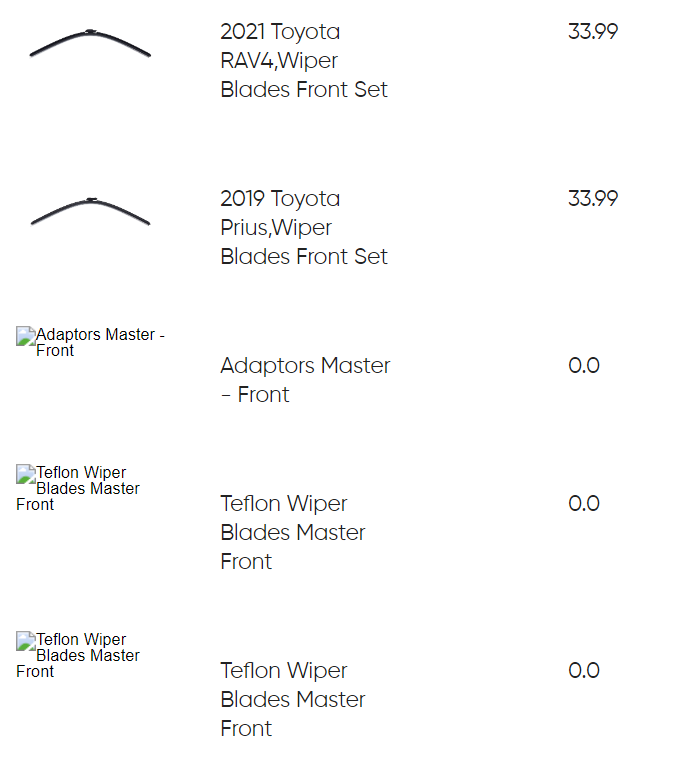
 

Why are these pictures like these? I am guessing it is a problem with the dynamic table settings. Can someone help me identify what will go in here? 

The part images are not there aren’t actually products and should not be there in the first place and I am not sure why it is beign displayed since they are not actual products but sub categories of collections. If there is a way to remove it, that would be great!


This topic has been closed for replies.
Best answer by David To

Hey @rohan12334,

Those three bottom products without images, are they a part of the order and/or are they present in the order event data? 

I’m assuming they are since it’s being pulled into the email as part of the dynamic block. This sort of behavior is typically normal - since the email/dynamic block is doing what it’s supposed to do. 

I would suggest reviewing how you’ve built the dynamic table block just to rule out it wasn’t built incorrectly. If so, and you wanted to omit those types of products from being pulled into the dynamic table block, I would recommend using some logic to hide them. 

There’s been several posts on this topic within the Community that I’ve included below that I think can help you come up with a solution:

I hope this helps!

David

2 replies

Kylie W
Partner - Silver
Champion & Partner
September 24, 2023

Hi @rohan12334 

Thank you for your question in the Klaviyo Community 😊

In my experience, I have found sometimes when this happens that I need to trigger a manual sync of products between the eCommerce platform and Klaviyo and this does the trick.

To do this; within Klaviyo select Content>Products
Then; Resync Page Items (button to the right).

After this is done, images, product availability etc should be as expected.

I hope this helps!

Kylie

Berridge Strategy Group, Your eCommerce Partner - eCommerce results, without the Complexity | Klaviyo Partner & 2024 Klaviyo Community Champion | www.berridgestrategy.com
David To
Klaviyo Employee
David ToAnswer
Klaviyo Employee
September 25, 2023

Hey @rohan12334,

Those three bottom products without images, are they a part of the order and/or are they present in the order event data? 

I’m assuming they are since it’s being pulled into the email as part of the dynamic block. This sort of behavior is typically normal - since the email/dynamic block is doing what it’s supposed to do. 

I would suggest reviewing how you’ve built the dynamic table block just to rule out it wasn’t built incorrectly. If so, and you wanted to omit those types of products from being pulled into the dynamic table block, I would recommend using some logic to hide them. 

There’s been several posts on this topic within the Community that I’ve included below that I think can help you come up with a solution:

I hope this helps!

David